
Table of Contents:
Solution Components
Following is the list of solution components of the Post Collaboration Survey (PCS).
|
Component |
Description |
Notes |
|---|---|---|
|
PCS IVR Script |
This is the Cisco script created for PCS which plays survey questions on the IVR. The main call script routes the call to this survey script once the agent hangs up the call from her side. |
While using the CCX/Finesse version prior to 11.0, the survey script will be triggered only when the agent ‘transfers’ the call by using ExpertFlow's PCS gadget. |
|
SMS Client |
This is the backend client responsible for sending SMS surveys at the end of an incoming call. The survey script, in this case, puts the survey SMS in the application database for the SMS client to send it to the customer over an SMPP or REST connection whichever is available from the client. |
|
|
PCS Web Portal |
The web portal allows non-technical contact center administrators/supervisors to create and manage call center surveys on their own. |
|
|
Survey Database |
The survey database stores the configurations (surveys, questionnaires, prompts) as well as reporting data (customer feedback, time, the agent who answered the interaction). For the database, PCS supports using MS SQL Express as well as Standard and Enterprise editions only. |
|
|
Email Notification Service |
This service sends an email notification to a supervisor or any relative personnel whenever a customer provides the rating score below a certain minimum threshold. |
|
Deployment of solution components
For IVR surveys
To execute IVR surveys, the application server and the survey database are recommended to be placed inside the corporate network (LAN).
For SMS surveys
For SMS surveys, a reverse proxy should be set up by the customer or partner in the DMZ for a secure connection to the public SMS gateway. All the application components can reside in the LAN.
Workflow Models
PCS currently supports running surveys at the end of the following two types of interactions.
-
Voice Call - A contact center call
-
Web Chat - A customer starts a chat by clicking the link on the company website
Survey After Voice Call
There are two kinds of flows for playing IVR surveys:
-
Survey after an incoming call
-
Survey after an outgoing call
Let’s get into deeper details on how the flow goes for both of the above scenarios:
IVR Survey Workflow after incoming calls - On the same call
Once an agent finishes handling an incoming call, the caller is requested to leave his/her feedback about the interaction either via IVR or SMS.
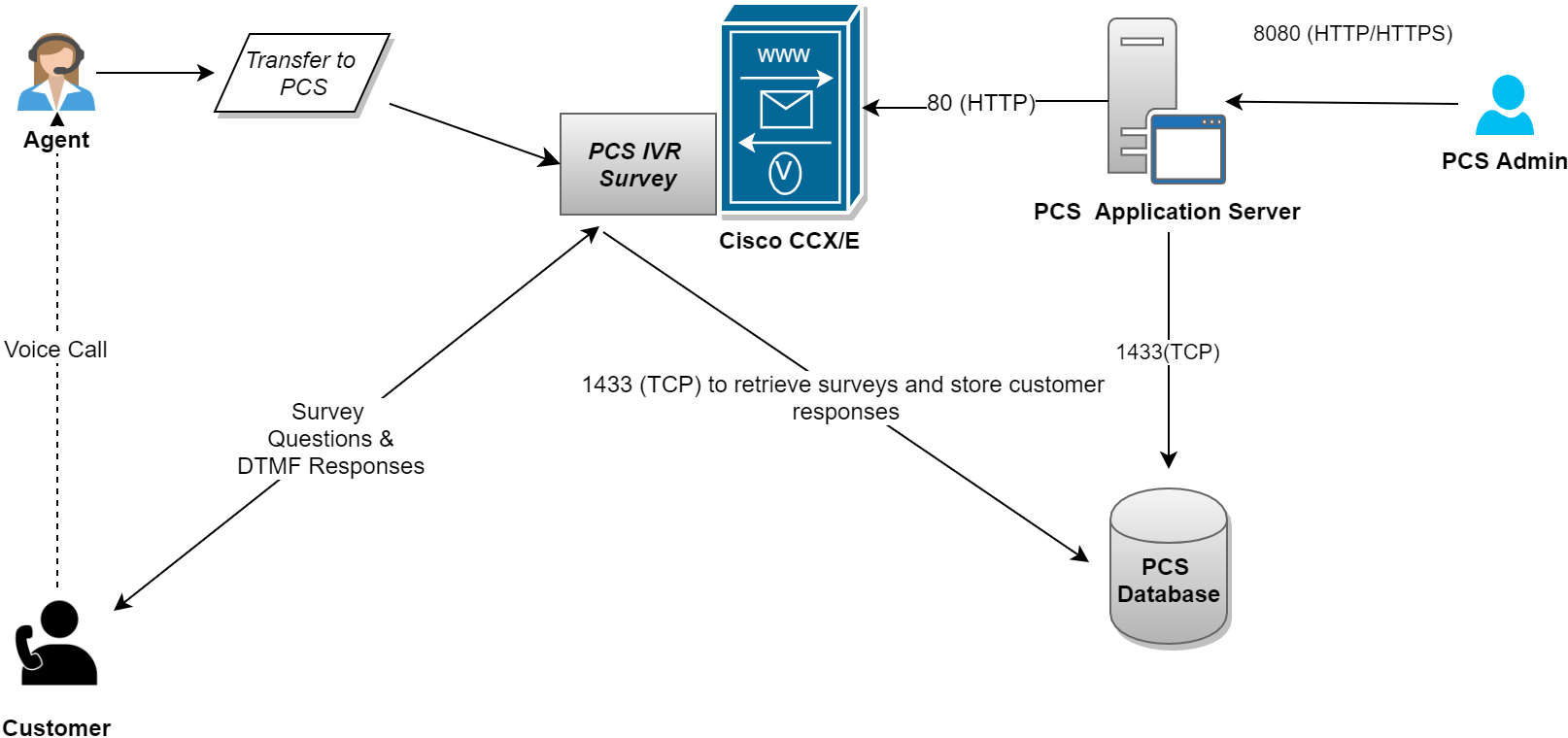
The following diagram briefly explains the signaling flow of an IVR survey for incoming calls.
-
Once the Contact center agent finishes treating the caller (customer), the agent transfers (OR hangs up from Finesse in CCX versions 11.0 and higher) the call to a PCS IVR Survey application.
-
The survey application asks survey questions from the caller (customer) as configured in the PCS system.
-
The customer responds to the questions as DTMF input.
-
All the survey responses are then analyzed by a Survey Administrator using the PCS web-based interface.
IVR Survey Workflow after incoming calls - callback after the call (for CCE customers only)
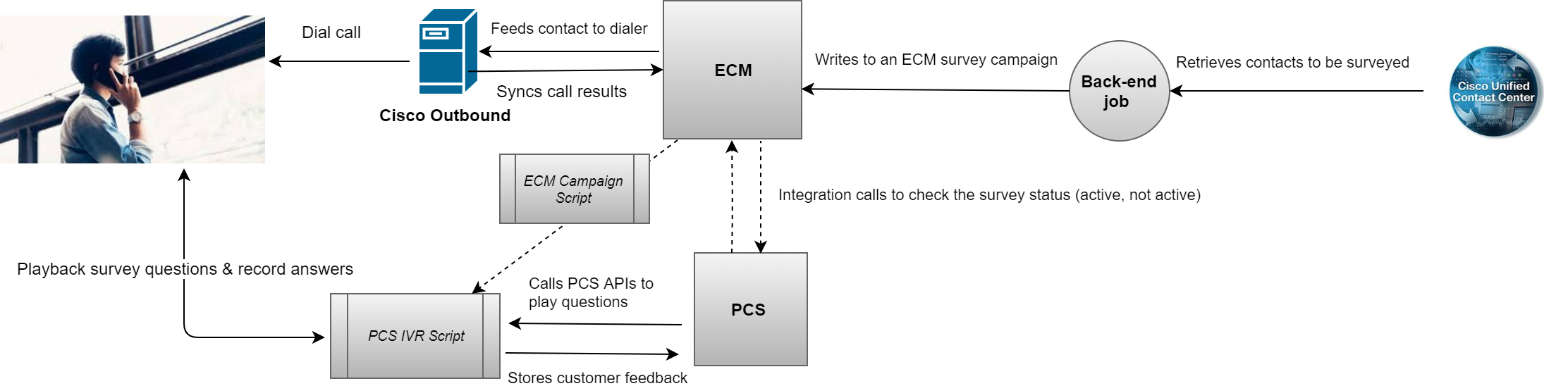
Once the call between an agent and a customer ends, the customer receives a separate outbound call for recording feedback. This type of survey is called the "Callback" survey.
In the case of callback surveys, the customer call is completely finished. A backend job runs in periodic intervals to fetch the customer record and writes it to an ECM campaign (marked as a survey campaign). The ECM campaign feeds the record to Cisco Outbound Dialer which then dials the call.
The survey is played on the IVR via the standard PCS IVR script.
IVR Survey Workflow for Outbound Calls
You can also play surveys to customers for outbound calls, once an agent ends up dealing with an outbound campaign call.
The following points briefly explain the workflow of an IVR survey after outbound campaign calls.
-
Once the Contact center agent finishes treating the caller (customer) on an outbound call, the agent transfers the call to the PCS IVR using PCS Finesse gadget.
-
The survey application asks the survey questions from the caller (customer) as configured in the PCS web application.
-
The customer responds to the questions as DTMF input.
-
All the survey responses are then analyzed by a Survey Administrator with standard PCS reports.
SMS Survey Workflow
For an SMS survey, an SMS survey question is sent to the caller after the call.
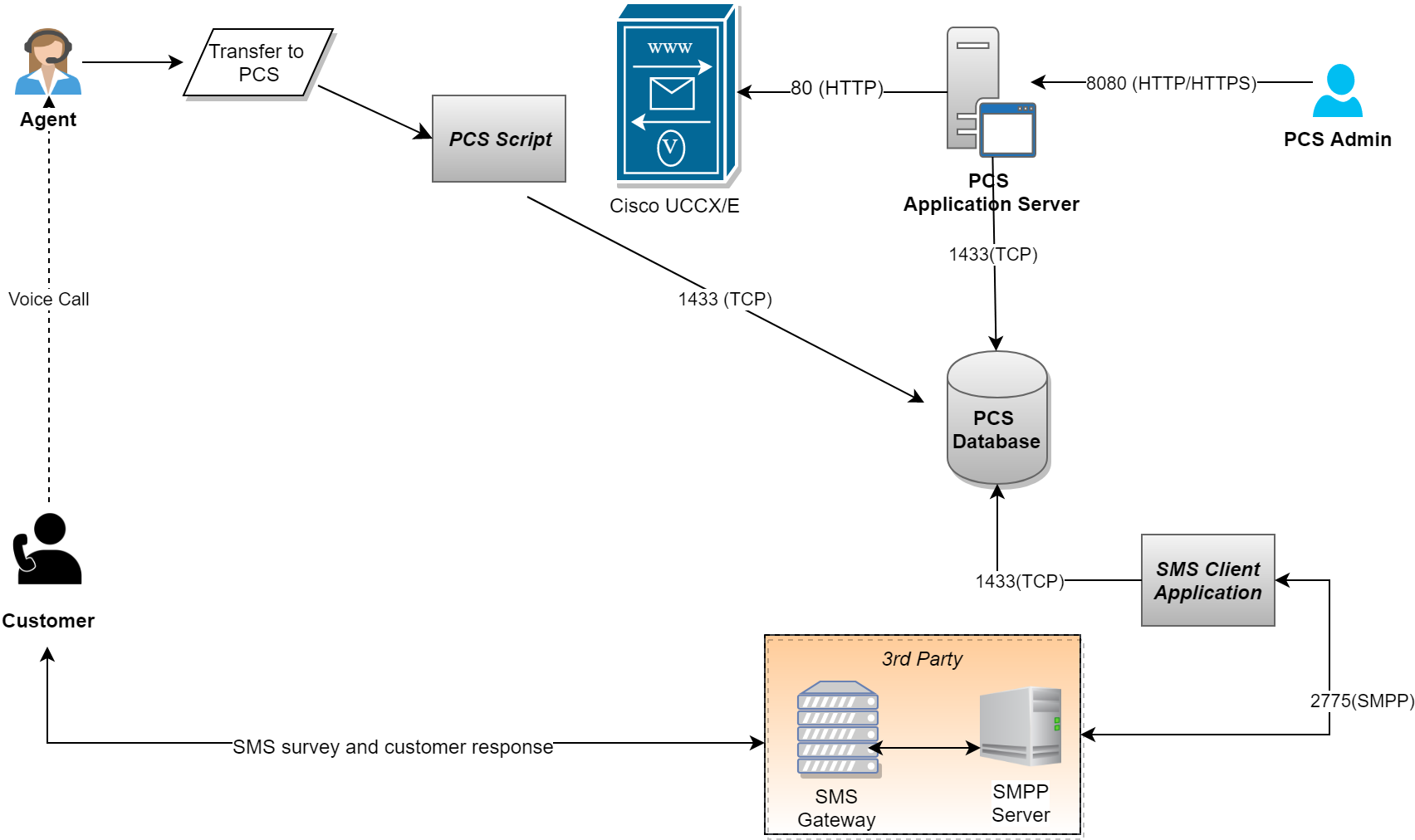
The following diagram briefly explains the signaling flow of an SMS survey.
-
Once the Contact center agent finishes treating the caller (customer), the agent transfers the call to a PCS Survey Script.
-
In the case of having the SMS survey, the customer call is finished.
-
The script calls PCS APIs to write an SMS to the PCS database.
-
The script writes the caller/agent information into the PCS database for reporting purposes.
-
The back-end SMS connector (with the client's SMS gateway) picks the message from the database and sends it to the 3rd party SMS Gateway/SMS-C.
-
Upon receiving the customer’s response to the outbound SMS, the SMS connector application hands it over to PCS for analytics and reporting.
The SMS connector application can be hosted in DMZ if the 3rd-party SMS Gateway is accessible over the public internet. If, however, the SMS Gateway is in DMZ, the SMS connector of PCS can remain in LAN to communicate with the SMS gateway.