
Solution Prerequisites
Following are the solution setup prerequisites.
Software requirements
|
|
Minimum requirement |
|---|---|
|
OS |
Red Hat 8,9, Centos 7, 8, Debian 9,10,11 |
|
MSSQLServer |
2016,17 |
|
Docker CE |
20+ |
|
Docker compose |
2.15.1 |
Hardware requirements
|
|
Minimum requirement |
|---|---|
|
CPU |
4 cores |
|
RAM |
4 GB |
|
Disk |
300 GB |
|
NICs |
1 NIC per VM |
On this page
Installation Steps
-
Install Docker and Docker Compose on the host operating system.
-
Download the deployment script deployment.sh and place it in the user home or any desired directory. This script will:
-
delete the pcs-deployment directory if it exists.
-
-
To execute the script, give it the execute permissions and execute it.
Bash$ chmod 755 pcs-deployment.sh $ ./pcs-deployment.sh -
Run this command
$ git checkout 13.1 -
pcs-deployment directory has all the files required deployment
-
Create a database in MSSQL Server for PCS application.
-
Update following environment variables in config.env file inside the pcs-deployment folder.
|
Name |
Description |
|---|---|
|
API_URL |
Backend API URL,
|
|
CISCO_TYPE |
UCCE or UCCX |
|
UCCX_FQDN |
UCCX FQDN, only required for UCCX CCX IP or FQDN |
|
UCCX_USER |
CCX Admin username |
|
UCCX_PASSWORD |
CCX Admin user password |
-
For SQL Server authentication to PCS database, use these variables
|
Name |
Description |
|---|---|
|
PCS_DB_AUTH_TYPE |
SQL |
|
DB_URL |
PCS database URL,
|
|
DB_USER |
PCS database username |
|
DB_PASSWORD |
PCS database password |
|
UCCE_DB_UR |
UCCE database URL, only required for UCCE
|
|
UCCE_DB_USER |
UCCE database user, only required for UCCE |
|
UCCE_DB_PASSWORD |
UCCE database password, only required for UCCE |
-
For Windows authentication to SQL Server,
-
Active Directory Domain: Running Windows Server with Active Directory Domain Services
-
SQL Server: Configured to accept Windows authentication
-
Network Access: Container must reach Domain Controllers on ports:
-
88 (Kerberos)
-
389 (LDAP)
-
464 (Kerberos password change)
-
-
Time Synchronization: Critical! All systems (container, AD, SQL Server) must be synchronized within 5 minutes
-
Once these are available, update following variables
|
PCS database username |
PCS database username |
|---|---|
|
PCS_DB_AUTH_TYPE |
WINDOWS |
|
PCS_DB_SERVER |
SQL Server FQDN
|
|
PCS_DB_PORT |
1433 |
|
PCS_DB_NAME |
PCS database name |
|
KERBEROS_REALM |
Kerberos realm (UCCE.IPCC) |
|
KERBEROS_KDC |
Kerberos KDC (DCUCCE.UCCE.IPCC) |
|
KERBEROS_DOMAIN |
Kerberos domain name (UCCE.IPCC) |
|
PCS_KERBEROS_PRINCIPAL |
The Kerberos principal that has access to PCS database (MSSQLSvc/win19-std.ucce.ipcc:1433@UCCE.IPCC) |
|
PCS_KERBEROS_KEYTAB |
Path to Keytab file, this should be the internal container path. The keytab file should be mounted to container via docker-compose
|
|
KERBEROS_DEBUG |
false, set it to true to enable Kerberos logging |
|
UCCE_DB_AUTH_TYPE |
WINDOWS (Set this to SQL is UCCE is going to be accessed via SQL Authentication
|
|
UCCE_DB_SERVER |
UCCE database FQDN |
|
UCCE_DB_PORT |
UCCE database port |
|
UCCE_DB_NAME |
UCCE awdb name, |
-
Execute following commands to allow specific ports exposed in docker-compose.
$ firewall-cmd --zone=public --permanent --add-port=443/tcp

 $ firewall-cmd --reload
-
Default self signed SSL certificates are provided with build. If it needs to be changed with domain signed certificate then replace server.crt(SSL certificate) and server.key (SSL key) in /root/pcs-deployment/docker/certificates folder.
-
Having environment configurations done, navigate to to the
pcs-deploymentdirectory and execute following commands:Bash$ chmod 755 install.sh $ ./install.sh
-
Update the following variables in pcs-deployment/docker/config.env
|
Name |
Description |
|---|---|
|
KEYCLOAK_REALM_NAME |
Keyclaok realm created in step 10 |
|
KEYCLOAK_CLIENT_ID |
Keyclaok client id created in step 10 |
|
KEYCLOAK_CLIENT_SECRET |
Keyclaok client secret created in step 10 |
|
KEY_CLOAK_ADMIN |
Keycloak admin user’s username |
|
KEY_CLOAK_ADMIN_PASSWORD |
Keycloak admin user’s password |
-
Run ./install.sh again,
-
Run the following command to ensure that all the components are up and running:
docker psHere is the docker pc output

-
If everything goes well, you should be able to access the application on https://FQDN
-
If deployment for UCCX access link https://FQDN/#/configuration-setting and select Cisco Survey Type = UCCX
-
Once the application is up and running, configure the PCS CUIC Reports.
-
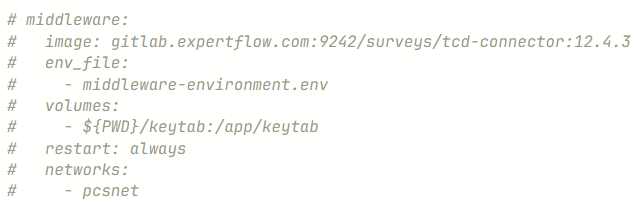
For callback surveys, uncomment following block in docker-compose file. Create a database in sql server for this server.
-
Update environment variables in middleware-environment.env file inside pcs-deployment/docker folder.
|
Name |
Description |
|---|---|
|
server.port |
8383, do not change it |
|
http.port |
7272, do not change it |
|
pcs.getSurveyDetails |
/getSurveyDetails, do not change it. |
|
pcs.getActiveSurveys |
/getActiveSurveys, do not change it. |
|
pcs.serverUrl |
PCS application URL |
|
pcs.username |
A PCS user's username |
|
pcs.password |
PCS user password |
|
ecm.serverUrl |
ECM URL, |
|
ecm.campaign.caller |
/callback/insertCallback, do not change it. |
|
ecm.campaign.uploadBulkCaller |
/callback/uploadBulkCaller, do not change it. |
|
ecm.campaign.callback |
1, ECM campaign Id supposed to be used for callback surveys |
|
ecm.campaign.sms |
2, ECM campaign Id supposed to be used for sms surveys |
|
MY_IP |
local machine IP |
|
IS_HA |
true or false, decides if HA is supported or not for this service |
|
TCD.startFetchingTime |
2019-11-12 10:11:52, initial date time from where to start fetching inbound calls and check for callback surveys. |
|
ecm.campaign.sms.phone.prefixes |
Prefixes of numbers to identify mobile numbes, e.g 77,83,92 |
|
time.zone |
+5, timzone GMT offset |
|
TCD.PARAM |
Variable3, TCD query parameter |
|
pcs.query.limit |
2000, Maximum number of records to fetch per batch |
|
pcs.query.table |
survey_feedback, Table name for survey feedback |
|
pcs.query.columns |
id,agent_name,agent_id,ani,service_dn,service_id,session_id Columns to select from the pcs survey table(comma-separated) |
|
pcs.query.where.condition |
(agent_id='NULL' OR agent_id IS NULL) AND session_id IS NOT NULL , WHERE conditions |
|
pcs.query.order.by |
feedback_time DESC , ORDER BY clause (can be 'feedback_time DESC' for newest first or 'id ASC' for sequential processing) |
|
progressive.processing.enabled |
true or false
|
-
For SQL Server authentication or Windows based authenticaion to PCS, Proxy and TCD database used in the callback surveys, use these variables:
|
Name |
Description |
|---|---|
|
PCS_DB_AUTH_TYPE |
SQL or WINDOWS |
|
PCS_DB_SERVER |
PCS SQL Server FQDN
|
|
PCS_DB_PORT=1433 |
PCS Database Port |
|
PCS_DB_NAME |
PCS database name |
|
PCS_DB_USER |
PCS database username (only required for sql server authentication skip if using window based auth) |
|
PCS_DB_PASSWORD |
PCS database password (only required for sql server authentication skip if using window based auth) |
|
PCS_DB_ADDITIONAL_PARAMS |
PCS database connection url additional params (only required for sql server authentication skip if using window based auth)
|
|
PCS_KERBEROS_PRINCIPAL |
The Kerberos principal that has access to PCS database (MSSQLSvc/win19-std.ucce.ipcc:1433@UCCE.IPCC) |
|
PCS_KERBEROS_KEYTAB |
Path to Keytab file, this should be the internal container path. The keytab file should be mounted to container via docker-compose
|
|
PROXY_DB_SERVER |
PROXY SQL Server FQDN
|
|
PROXY_DB_PORT=1433 |
PROXY Database Port |
|
PROXY_DB_NAME |
PROXY database name |
|
PROXY_DB_USER |
PROXY database username (only required for sql server authentication skip if using window based auth) |
|
PROXY_DB_PASSWORD |
PROXY database password (only required for sql server authentication skip if using window based auth) |
|
PROXY_DB_ADDITIONAL_PARAMS |
PROXY database connection url additional params (only required for sql server authentication skip if using window based auth)
|
|
PROXY_KERBEROS_PRINCIPAL |
The Kerberos principal that has access to PROXY database (MSSQLSvc/win19-std.ucce.ipcc:1433@UCCE.IPCC) |
|
PROXY_KERBEROS_KEYTAB |
Path to Keytab file, this should be the internal container path. The keytab file should be mounted to container via docker-compose
|
|
TCD_DB_AUTH_TYPE |
SQL or WINDOWS |
|
TCD_DB_SERVER |
TCD SQL Server FQDN
|
|
TCD _DB_PORT=1433 |
TCD Database Port |
|
TCD _DB_NAME |
TCD database name |
|
TCD _DB_USER |
TCD database username (only required for sql server authentication skip if using window based auth) |
|
TCD _DB_PASSWORD |
TCD database password (only required for sql server authentication skip if using window based auth) |
|
TCD _DB_ADDITIONAL_PARAMS |
TCD database connection url additional params (only required for sql server authentication skip if using window based auth)
|
|
TCD _KERBEROS_PRINCIPAL |
The Kerberos principal that has access to TCD database (MSSQLSvc/win19-std.ucce.ipcc:1433@UCCE.IPCC) |
|
TCD _KERBEROS_KEYTAB |
Path to Keytab file, this should be the internal container path. The keytab file should be mounted to container via docker-compose
|
|
KERBEROS_REALM |
Kerberos realm (UCCE.IPCC) |
|
KERBEROS_KDC |
Kerberos KDC (DCUCCE.UCCE.IPCC) |
|
KERBEROS_DOMAIN |
Kerberos domain name (UCCE.IPCC) |
|
KERBEROS_DEBUG |
false, set it to true to enable Kerberos logging |
-
If upgrading an existing deployment make sure to run the following database scripts to update the Proxy table fields to accomodate new data:
TroubleShooting
Logs for each container are available in files as well as within docker daemon. To see the logs for any container, execute docker ps and get the id of the container. Use that id to see the logs using docker logs <container_id>