Introduction
This document describes the architecture diagram and solution components of EFCX connector and how it is embedded into the Salesforce solution.
Intended Audience
The document is intended for developers with knowledge of EFCX Connector and Salesforce.
Technical Overview
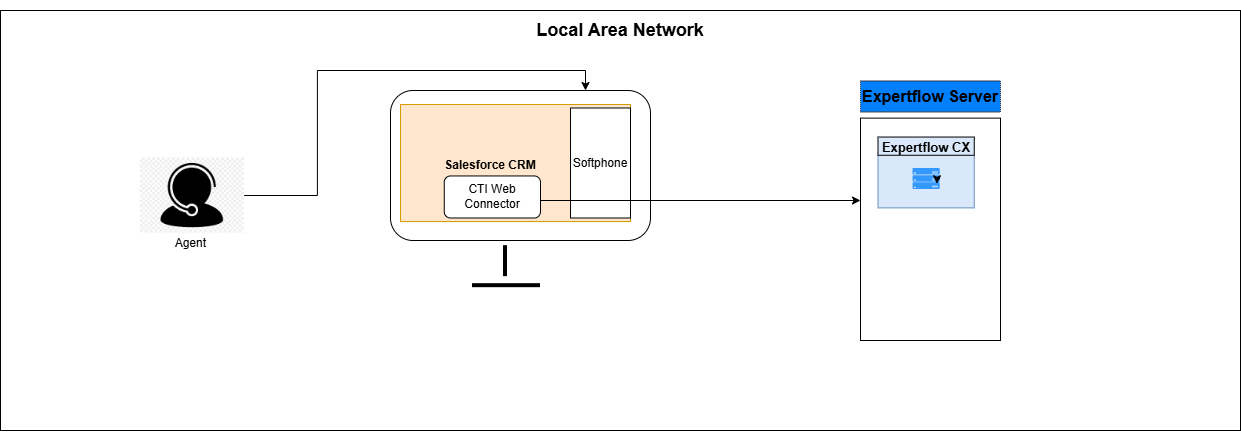
Following is the architecture diagram that illustrates how the EFCX connector is integrated into Salesforce.
Communication Flow Diagram
The communication flow between Salesforce, the components of EFCX connector is given as follows:
-
Customer Call reaches the EFCX connector through CX voice channel.
-
Customer Chat reaches the EFCX connector through web, WhatsApp and Facebook channels.
-
EFCX route the call or chat to the best available agent.
-
Salesforce Connector receives the notification from EFCX that the call or chat is coming.
-
EFCX Salesforce Connector, displays a pop-up message in Salesforce Connector and Connector will also do the screen pop in Salesforce, based on the customer number by calling Open CTI APIs.
-
Once the agent accepts the call or chat, EFCX Salesforce Connector connects the call or chat with the customer.
-
After that, the agent will perform all his operations on the Salesforce CRM, the EFCX interface will only be involved to perform operations like Consult / Transfer / Conference the call or chat to a different agent.
-
Once the Call or Chat ends, EF Salesforce Connector will create the task in Salesforce. The task field details are available in the Business Feature Guide.