
In VRS 14.10.0, Cisco wrap-up codes are fetched from Cisco after each call ends and stored with the recording. Call variables are stored with the recording so users can search by variable number and value. This capability is new in 14.10.0 and applies to new calls after 14.10.0 is running — recordings made before the upgrade are not enriched with wrap-up codes or call variables.
What it does
-
Wrap-up codes — Agents apply wrap-up on Cisco. After the call ends, VRS retrieves the wrap-up code and stores it with the recording.
-
Call variables — VRS stores call variables with the recording. Users can search recordings by Call Variable 1 through 10 and the matching value.
Where users see it
On Media Recordings:
-
Wrap-up codes appear in the Wrapup Codes column.
-
Call variables are not shown as a table column. Users find them only through search.
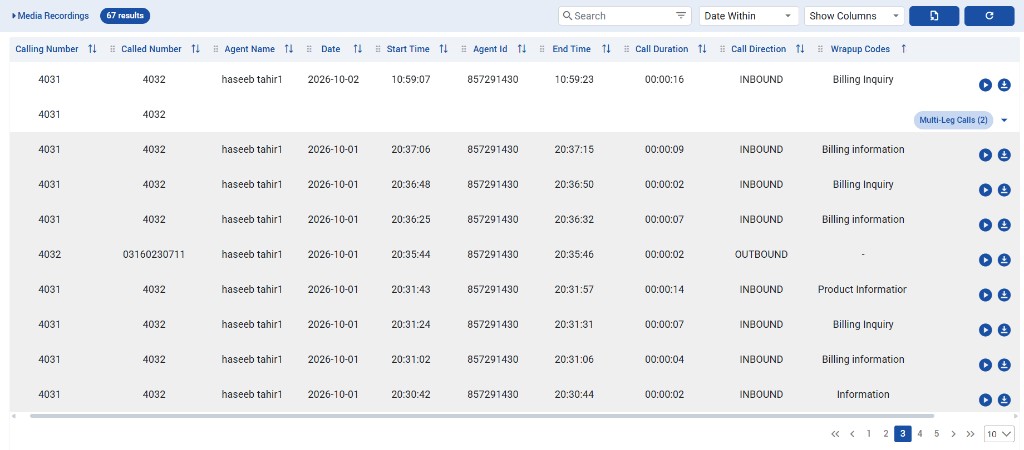
Both can be searched from advanced filters. See Searching & Filtering In VRS.
Use Wrapup codes to search by wrap-up value:
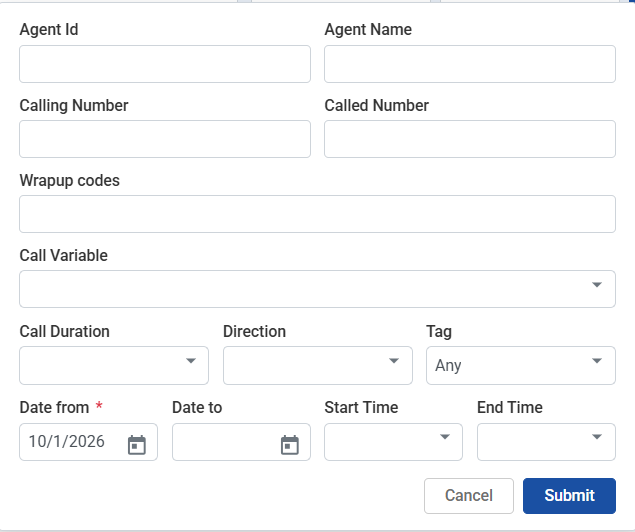
To search by call variable:
-
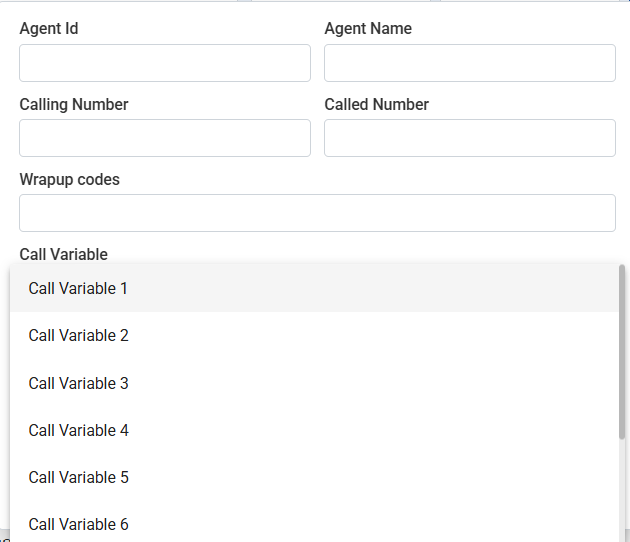
Open the Call Variable dropdown and select Call Variable 1 through Call Variable 10.
-
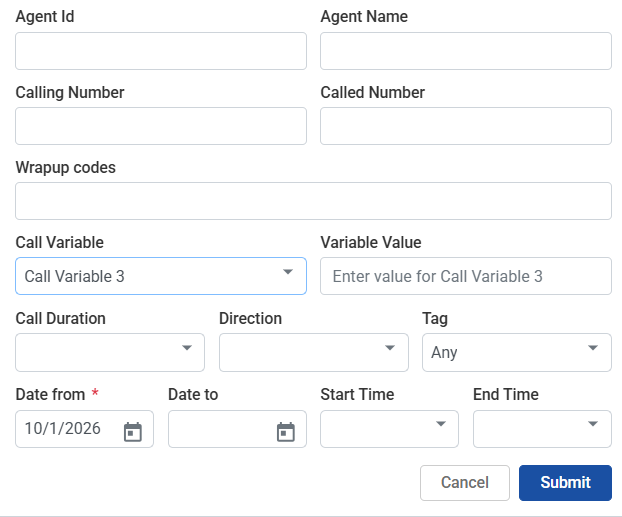
A Variable Value field appears. Enter the value to match.
-
Submit the search. Matching recordings appear in the Media Recordings table.
Step 1 — Select a call variable from the dropdown:
Step 2 — Enter the value for the selected call variable:
When the data appears
Wrap-up codes and call variables are not available in real time. VRS syncs them after a short delay once the call ends. The default delay is 2 minutes (CISCO_WRAPUP_SYNC_LAG_MIN).
Scope
-
Supported for Cisco UCCE and UCCX only.
-
Not supported for EFCX.
UCCX — Informix CRA enrichment (14.12.0)
For Cisco UCCX, VRS can enrich wrap-up, CSQ/queue name, hold time, and call variables from Informix CRA in the mixer. This support is opt-in (enable it only when your UCCX deployment uses Informix CRA).
-
Wrap-up — enriched from Informix CRA when enabled.
-
CSQ / queue — queue name enriched correctly for UCCX.
-
Hold time — hold duration enriched for UCCX sessions.
-
Call variables — searchable call variables enriched for UCCX.
UCCE continues to use the existing Cisco enrichment path. For UCCX Informix CRA, set UCCX_DB_ENGINE=informix plus UCCX_INFORMIX_SERVER and UCCX_DB_* in docker/config.env, then recreate/restart the mixer. Full table: Installation Guide (UCCX Informix CRA enrichment section).
Configuration
Administrators configure sync behavior in config.env. Full steps are in the installation and upgrade guides — this page lists the settings only.
|
Setting |
Default |
Purpose |
|---|---|---|
|
|
|
Controls wrap-up sync behavior for eligible calls after they end. Does not add wrap-up or call variables to recordings made before the upgrade. |
|
|
|
Minutes to wait after call end before syncing wrap-up / related data from Cisco. |
|
|
|
Batch size for sync processing. |
|
|
|
Safety batch size for sync processing. |
|
|
|
Time budget (seconds) per sync cycle. |
UCCX Informix CRA (14.12.0, opt-in) — set only when enabling Informix CRA enrichment:
|
Setting |
Default |
Purpose |
|---|---|---|
|
|
|
Set to |
|
|
— |
CRA connection details (required when enrichment is used). |
|
|
|
sqlserver default |
|
|
— |
Required for informix. Same INFORMIXSERVER value as cisco-connector |
See:
-
Installation Guide — UCCX Informix CRA enrichment section
-
VRS Upgrade Guide from 14.9 to 14.10.0 (original wrap-up sync settings)
Limitations
-
Wrap-up codes and call variables are available for Cisco UCCE and UCCX only — not EFCX.
-
Only new calls after upgrading to 14.10.0 get wrap-up codes and call variables. Pre-upgrade recordings are not backfilled.
-
Data appears after a short delay (default 2 minutes), not immediately when the call ends.
-
Call variables are searchable only (Call Variable 1–10 + Variable Value). They are not shown as a Media Recordings column.
-
Wrap-up must be applied on Cisco; VRS does not provide a wrap-up entry UI.