
Introduction
This document describes the architecture diagram and solution components of Webex Connector and how it is embedded into the Odoo.
Intended Audience
The document is intended for developers with knowledge of the Webex Contact Center and Odoo.
Technical Overview
The Webex Contact Center (Webex CC) integrates with Odoo using the Desktop Layout File.
This allows agents to handle voice, chat, and email interactions directly from within Odoo. Below is a detailed explanation of how this integration works:
Understanding the Desktop Layout
The Desktop Layout File defines the structure and placement of various components within the agent interface. The Expertflow Bundle is embedded in this layout to enable real-time communication between the Webex SDK and Odoo APIs.
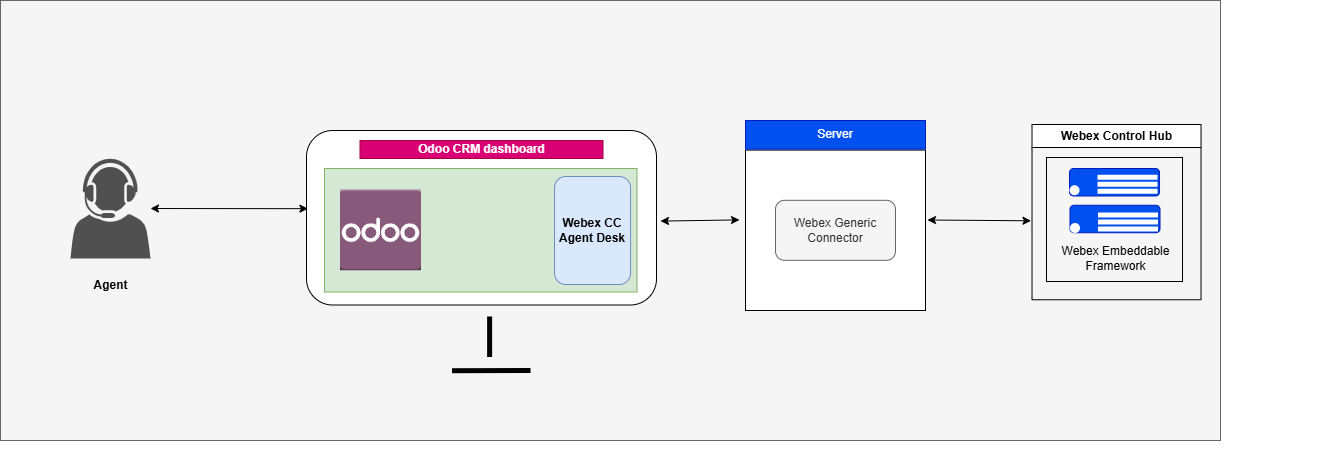
Communication Flow Diagram
-
The agent accesses Odoo CRM, which includes an iframe integration of the Webex CC Desktop.
-
The Webex CC Agent Desktop is embedded within Odoo using the Webex CC Embedded Framework, which leverages WebRTC and REST APIs.
-
The Webex CC Connector acts as a bridge between the Odoo CRM interface and Webex CC events.
-
When a call or interaction arrives in Webex CC, the Webex CC event framework receives the event. The connector captures these events and notifies the embedded Agent Desktop within Odoo.
-
A screen pop displays the corresponding customer record in Odoo CRM based on the caller’s information.
-
The agent answers the call and manages the interaction through the embedded Webex CC Agent Desktop inside Odoo.
-
All business-related operations are performed within Odoo CRM, while the Webex iframe is used to execute call control operations such as Consult, Transfer, Hold/Resume, and Conference.
-
Conversation events, call logs, and notes are synchronized between Odoo and Webex CC via the connector, ensuring consistent context across systems.
Receiving an Event
The Webex Contact Center interacts with Odoo based on real-time Webex events. When an event occurs (such as an incoming call, chat, or email), the component triggers specific CRM-side actions.