
Deployment Modes
Non-Redundant / Simplex Mode
Non-Redundant / Simplex Mode Deployment
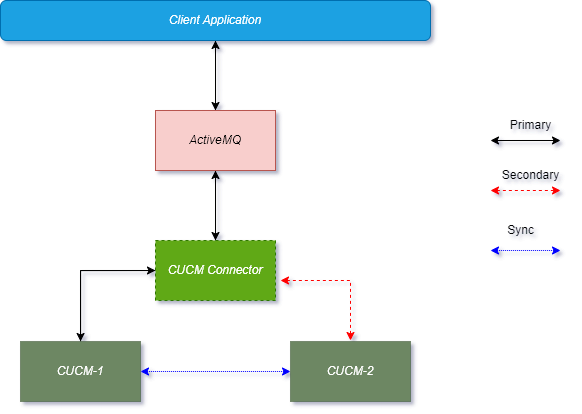
In simplex deployment, the application is installed on a single server with no failover support of EF Connector. However, the same EF Connector can still communicate with primary and secondary CUCM servers.
Simplex mode is useful for lab tests and commercial deployments at a smaller scale. The figure below explains the simplex mode of the Generic Connector.
High Availability (HA) / Duplex
Active-Passive (Primary / Secondary)
Active-Passive (Primary / Secondary) Setup
To configure the Connector in Active-Passive mode, set the value of attribute “GRC_CONSUMER_PRIORITY” in the Connector configuration. For the Primary Connector, set the value of this attribute to “127” (without quotes). For the Secondary Connector, set the value of this attribute to “100” (without quotes).
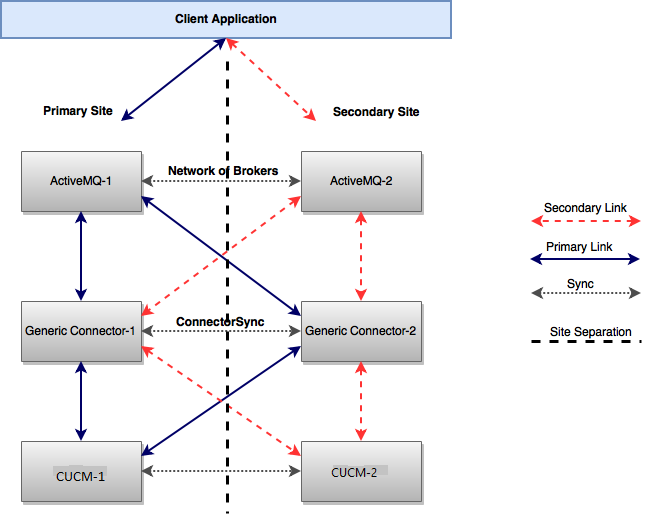
The active-Passive mode has the following configurations.
Configurations for Site-1
Primary-AMQ: broker-1, Secondary-AMQ: broker-2
Generic Connector Configuration should look like this, For a detailed description of the GC please consult properties
|
Property |
Value |
|
|---|---|---|
|
1 |
ActiveMq_Timeout |
10000 |
|
2 |
GRC_CONSUMER_PRIORITY |
127 |
|
3 |
RANDOMIZE |
false |
|
4 |
PRIORITY_BACKUP |
true |
|
5 |
ActiveMq_URL_1 |
primary-url-of-amq:port |
|
6 |
ActiveMq_URL_2 |
secondary-url-of-amq:port |
Configurations for Site-2
Primary-AMQ: broker-1, Secondary-AMQ: broker-2, For a detailed description of the GC please consult properties.
|
Property |
Value |
|
|---|---|---|
|
1 |
ActiveMq_Timeout |
10000 |
|
2 |
GRC_CONSUMER_PRIORITY |
100 |
|
3 |
RANDOMIZE |
false |
|
4 |
PRIORITY_BACKUP |
true |
|
5 |
ActiveMq_URL_1 |
primary-url-of-amq:port |
|
6 |
ActiveMq_URL_2 |
secondary-url-of-amq:port |
Failover Scenarios
The following table shows different failover scenarios and their impact on the Connector Clients.
|
Scenario |
Behavior |
|
|---|---|---|
|
1 |
AMQ-1 is down while GC-1 is active |
AMQ-2 will take over. GC-1 will automatically connect to AMQ-2 and all client requests will be processed by the same GC-1 instance because of its higher consumer priority. Request Flow: Client-App → AMQ-2 → GC-1 Response Flow: GC-1 → AMQ-2 → Client-App |
|
2 |
AMQ-2 and GC-1 are down while AMQ-1 and GC-2 are up |
AMQ-1 will take over and all client requests will be processed by GC-2 because it has the second-highest priority after GC-1. Request Flow: Client-App → AMQ-1 → GC-2 Response Flow: GC-2 → AMQ-1 → Client-App |
|
3 |
Both AMQ-1 and GC-1 are down |
AMQ-2 and GC-2 will start receiving requests. GC-2 will acquire all agents subscription rights and will start processing requests. Request Flow: Client-App → AMQ-2 → GC-2 Response Flow: GC-2 → AMQ-2 → Client-App |
|
4 |
GC-1 restores |
GC-1 will start receiving requests and will grab the agents rights because of its higher consumer priority but events will be sent from connector-2 for the existing agents. For the new agent subscriptions, connector-2 will be on standby |
|
5 |
The link between Connector-1 and Connector-2 is down |
In this case, the AMQ network of brokers will not be functional and GCs won’t be able to communicate to sync agents either. So, both GCs will be functioning independently |
|
6 |
AMQ-1 restores while GC-1 is still down |
If AMQ-2 is active and the client application is connected to AMQ-2 then all requests will be processed by GC-2 even though GC-1 is active and connected to AMQ-1. Request Flow: Client-App → AMQ-2 → GC-2 Response Flow: GC-2 → AMQ-2 → Client-App |
|
7 |
GC-1 is down while both AMQs are active |
Requests will be processed by GC-2 going through the network of brokers. Request Flow: Client-App → AMQ-1 → AMQ-2 → GC-2 Response Flow: GC-2 → AMQ-2 → AMQ-1 → Client-App |
|
8 |
GC-2 is down while both AMQs are active |
In active-passive mode, it will have no effect on request and response flow. Because AMQ-2 doesn’t get any request from Client-App until AMQ-1 goes down. |
Failover is handled in a way that if any component goes down, passive components take over in a seamless way. Also if both connectors went down at the same time, all the agents data will be lost.