
Hardware Requirements
For a simplex (single server) deployment, minimum and recommended hardware requirements are as follows:
|
|
Minimum |
Recommended |
|---|---|---|
|
vRAM |
8 GB |
16 GB |
|
vCPU |
4 Cores |
8 Cores |
|
vDisk |
40 GB |
160 GB |
For up to 250 concurrent agents: 8 vCPU, 16 GB RAM, 150 GB HDD and for a redundant deployment, two servers of the same specifications (as mentioned above) are needed.
Software Requirements
Following are the prerequisites for setting up solution under different deployment profiles.
For Ubuntu Deployment
-
Host Operating System - Ubuntu - Latest
-
Root user access to the server
For Redhat9 Deployment
-
Host Operating System - Redhat9 or above
-
Root User Access to the Server
Additional Requirements
-
Mandatory Linux Utilities:
-
wget
-
curl
-
-
Developer Tools are installed on the Linux host.
yum group install "development tools" -
For system monitoring and to assist in troubleshooting, the following utilities should be installed. (Optional)
-
strace
-
htop
-
dstat
-
atop
-
sysstat
-
iftop
-
nethogs
-
nmap or ss
-
tcpdump
-
Either these tools/libraries should be installed on the server, or provide Internet access for a limited time to download
Certificates for HTTPS
-
Certificates from a valid signing authority or Domain signed certificate are required for HTTPS protocol support
-
Administrative privileges (root) on the host machine are required to proceed with the installation.
System Access Requirements
-
Access to Expertflow Gitlab expertflow gitlab.expertflow.com:9242
Ports Opening
The following ports should remain open on the Firewall. The local security policy and any antivirus should also allow open communication on the following ports: Front
|
Type |
Source Host |
Source Port |
Destination Host |
Destination Port |
|---|---|---|---|---|
|
TCP |
<Client Application> |
any |
EF Connector |
61616/61614/61615 |
|
TCP |
<Client Application> |
any |
EF Connector |
61616/61614/61615 |
|
HTTP |
For status monitoring from any machine |
EF Connector |
8162 |
|
|
NTP |
EF Connector |
any |
NTP Server |
123 |
|
DNS |
EF Connector |
any |
DNS Server |
53 |
|
HTTP |
EF Connector |
any |
EF Connector Frontend |
8080 |
|
HTTPS RMCP |
EF Connector |
any |
EF Connector Frontend |
443/8443 |
|
HTTP/TCP |
EF Connector |
Any |
CUCM |
2748 /2789/2749 |
-
The <Client Application> is a machine running the EF Connector frontend client application, where the agent logs in to Salesforce.
-
In a redundant deployment, both EF Connector instances communicate with each other on the same TCP OpenWIre port 61616. In the table above, it’s mentioned as EF Connector (B) ⇒ EF Connector.
-
These are defaults set in EF Connector, but you can always change the default configuration.
Configuring Firewall to Allow Application Access
To make the application accessible from browsers, run the following commands on the RHEL 9 server:
sudo firewall-cmd --permanent --add-service=http
sudo firewall-cmd --permanent --add-service=https
sudo firewall-cmd --reload
CUCM JTAPI User
Jtapi RMCM users are required to login into CUCM
CUCM Application User Detail
One application/RMCM user required with the following property.
-
Permission and roles should be:
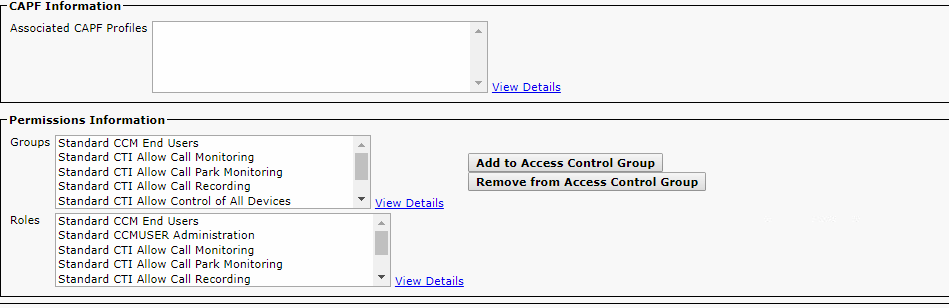
Ensure that only below Roles are added against the Application User:
-
Standard CTI Allow Call Monitoring
-
Standard CCM End Users
-
Standard CTI Allow Call Park Monitoring
-
Standard CTI Allow Control of All Devices
-
Standard CTI Call Recording
-
Standard CTI Allow Control of Phones supporting Connected Xfer and conf
-
Standard CTI Allow Control of Phones supporting Rollover Mode
-
Standard CTI Enabled
-
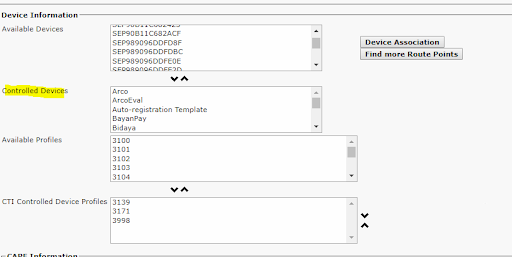
Supervisor devices part controlled Devices:
-
Credential configuration of user should be:
Salesforce Admin Access for Configuration
Salesforce Admin Access would be required to upload the Salesforce package or configuration
Time Synchronization Requirements
An important consideration is time synchronization between related components. Communication between EF Connector, client applications, and Connector Server. If the system dates and times are not synchronized the system can produce unpredictable results. Therefore, please make every effort to adhere to the following time synchronization guidelines:
-
EF Connector Server and client applications should have their Time Zone and time configured properly according to the geographic region and synchronized.
-
In the case of docker deployment, every container should have valid time zones!
Depending on your organization’s specific network architecture and security policies, additional ports may need to be opened beyond the standard requirements