Overview
Quick Links provide role-based shortcuts to frequently used internal or external applications, enabling faster navigation within AgentDesk.
Unified Admin
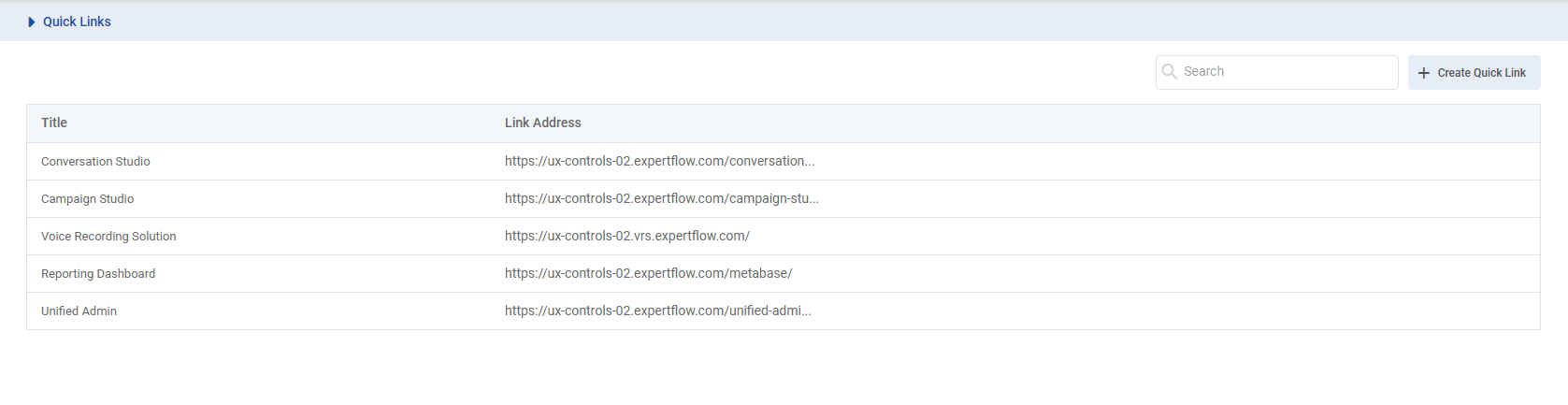
Unified Admin is responsible for managing Quick Links across the system.
Key Capabilities
-
Create, update, and manage Quick Links
-
Assign links to specific roles (Agent, Supervisor)
-
Delete links as required
-
Define link metadata (name, URL, accessibility rules)
All configurations are reflected in AgentDesk based on role-based access.
AgentDesk
This is the user-facing component where Quick Links are accessed and used.
Key Capabilities
1. Role-Based Visibility
Quick Links are visible only when:
-
Configuration:
isQuickLinksEnabled = true
If the configuration is disabled, Quick Links will not be displayed in AgentDesk for any role.
Users see Quick Links based on their assigned role.
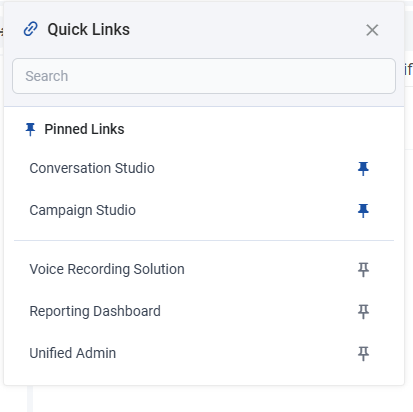
Each link is shown with its name and a pin/unpin option in a structured panel.
2. Link Access
Quick Links open in a new browser tab without interrupting the current session.
Supports both internal and external URLs with stable handling of invalid or unavailable links.
3. Search
Users can search links by name.
Search is real-time, case-insensitive, and includes both pinned and unpinned links.
If no matches are found, a “No Data Found” message is shown.
Clearing search restores the full list.
4. Pinning & Personalization
Users can pin frequently used links for quick access.
-
Pinned links appear at the top
-
Visually separated from unpinned links
-
Persist across sessions
-
User-specific (does not affect other users)
Unpinning restores the default ordering.