
Overview
Quick Links enables administrators to create and manage a centralized library of shortcut URLs within the ExpertFlow platform. Links are surfaced directly in the Agent Desk interface, giving agents and supervisors fast, role-appropriate access to frequently used tools and external resources — without navigating away from their workspace.
How It Works
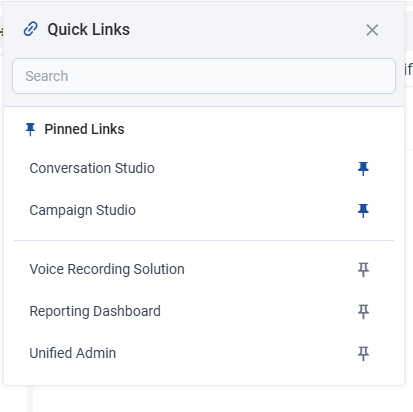
Admins configure links through the Unified Admin panel. Each link is assigned a title, URL, description, and one or more roles that determine visibility. On the agent side, Quick Links appear as a slide-out panel in the Agent Desk toolbar, where users can browse, search, pin, and launch links in a new tab.
Key Capabilities
|
Capability |
Description |
|---|---|
|
Role-based visibility |
Links can be scoped to Agents, Supervisors, or both — ensuring each role sees only relevant shortcuts. |
|
Pinned Links |
Agents can pin frequently accessed links to a dedicated section at the top of the panel for quicker access. |
|
Search |
Agents can search links by name directly from the panel. |
|
Inline management |
Admins can create, edit, and delete links without leaving the Quick Links page. |
|
Opens in new tab |
All links launch in a new browser tab, preserving the agent's current workspace context. |
Admin Configuration
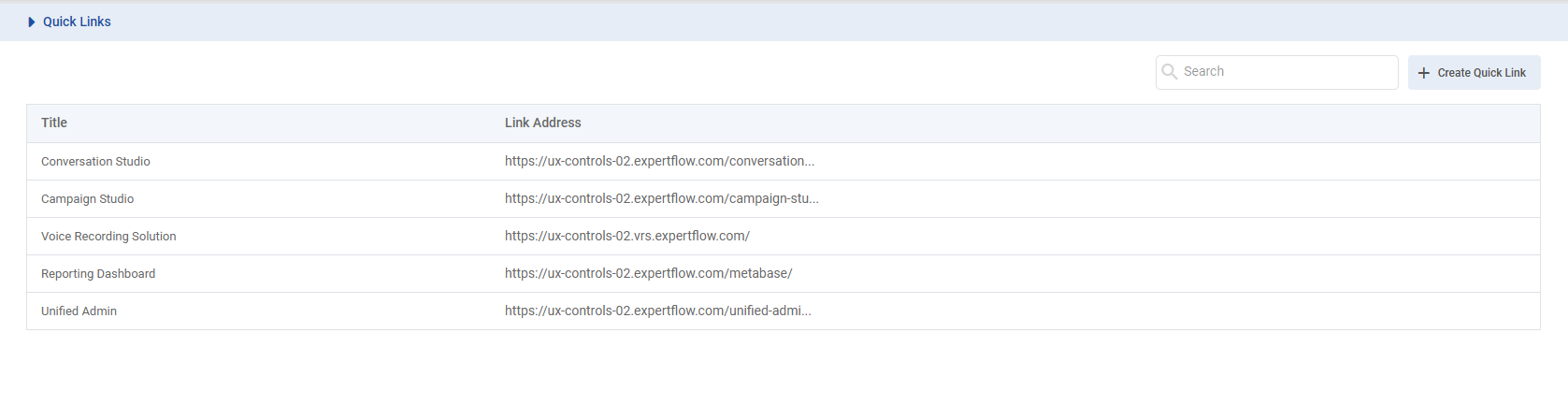
Creating a Link
-
Click + Create Quick Link (top right)
-
Fill in the required fields (see Field Reference below)
-
Click Create
Field Reference
|
Field |
Required |
Description |
|---|---|---|
|
Title |
Yes |
Display name shown to agents in the Quick Links panel. |
|
Link |
Yes |
Full destination URL — must include |
|
Description |
No |
Optional context displayed in the admin list view. |
|
Role |
No |
Determines visibility — select Supervisor, Agent, or both. |
Editing a Link
-
Click any existing link row to open the Edit modal
-
Modify the required fields
-
Click Save
Deleting a Link
Open the Edit modal for the relevant link and select the delete option.
Agent Desk Quick Links
Users see Quick Links based on their assigned role. Each link is shown with its name and a pin/unpin option in a structured panel.
Quick Links open in a new browser tab without interrupting the current session. You can also search for links by name.
Pinning & Personalization
Users can pin frequently used links for quick access.
-
Pinned links appear at the top
-
Visually separated from unpinned links
-
Persist across sessions
-
User-specific (does not affect other users)
Unpinning restores the default ordering.
Limitations
Quick Links are visible only when:
-
Configuration:
isQuickLinksEnabled = true
If the configuration is disabled, Quick Links will not be displayed in AgentDesk for any role.