
The user can log out of VRS by following the steps below:
-
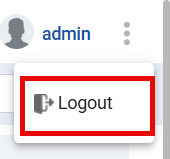
Click the three-dot menu button on the top right corner of the VRS application.

-
Upon clicking the menu button, the user will be able to view the logout option.
-
Click the Logout button.
-
Upon clicking the Log Out button, the user will be logged out and navigated to the Login screen.
Limitations:
Logging out of Finesse does not automatically log the user out of VRS.