
Overview
This document describes the architecture for Workforce Management (WFM). WFM is a microservices-based solution that helps contact centers manage workforce operations, including scheduling, user management, and integrations with external contact center platforms.
The solution is built with Python/Django and Node.js services and is deployed on Kubernetes for scalability, resilience, and operational flexibility. It integrates with Expertflow CX (EFCX).
Scope
This document covers the high-level architecture, key components, integration flows for the WFM solution. It is intended for customers, solution architects, and technical stakeholders who need to understand how WFM fits into the broader contact center ecosystem.
Note: This document focuses on architecture and integration behavior. Implementation-specific details, internal service secrets, and environment-specific configuration values are intentionally excluded.
System Overview
Architecture
The architecture diagram below shows the main WFM components, their relationships, and their integration points with EFCX and external contact center platforms.
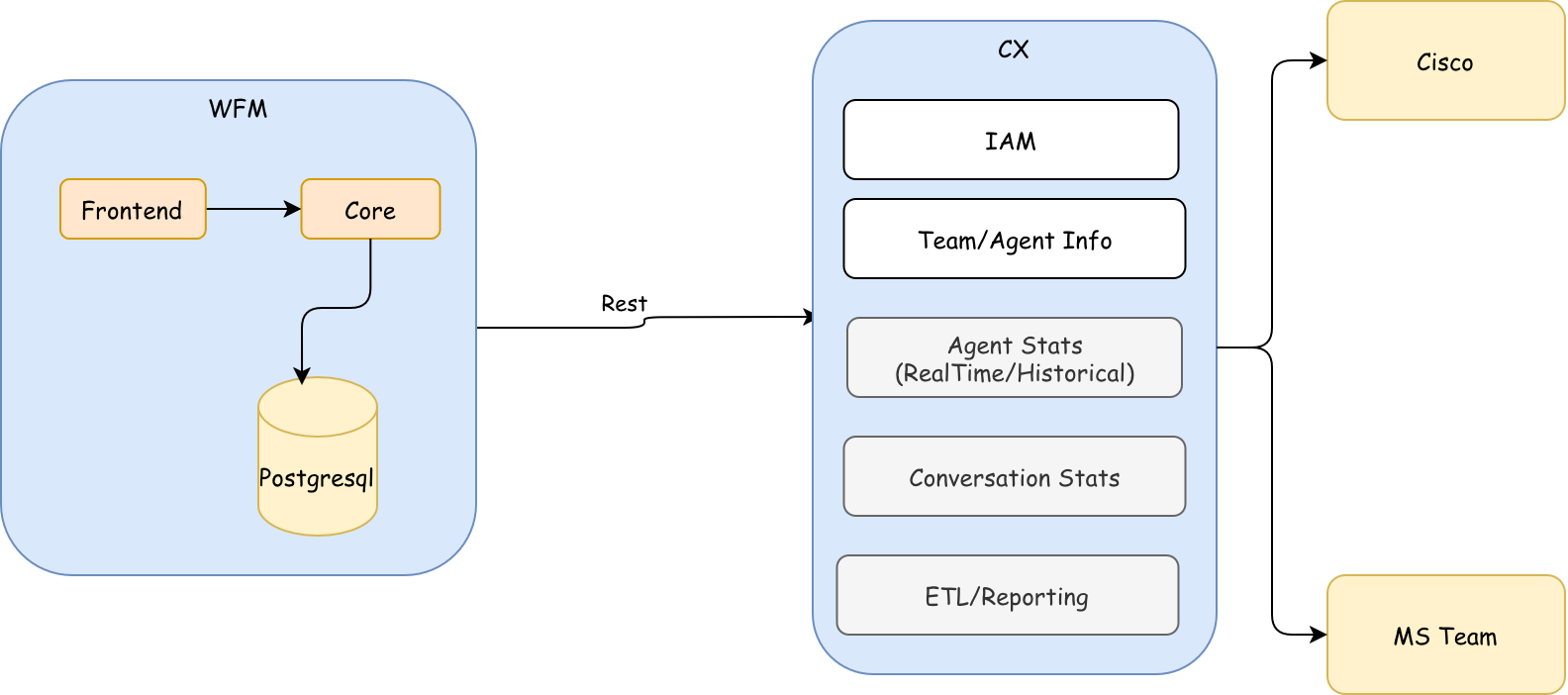
Multitenancy: WFM is a multi-tenant solution that supports tenant-specific workforce management within the same architecture.
Key Architectural Capabilities
-
Modular microservices: WFM separates user-facing functionality, core business logic, authentication and integrations into clearly defined services.
-
Kubernetes-based deployment: Services are containerized and deployed on Kubernetes to support scaling, rolling updates, service discovery, and operational resilience.
-
Contact center integrations: WFM exchanges operational data with EFCX, and other supported platforms through EFCX core.
-
Secure access: User access is authenticated through keycloak token-based authorization.
Components and Responsibilities
|
Component |
Responsibility |
Primary Interactions |
|---|---|---|
|
WFM Frontend |
Provides the web user interface for workforce operations such as leaves, skills, scheduling, and user management etc. |
Communicates with backend services through REST APIs. |
|
WFM Core Service |
Handles core business logic, including workforce data processing, scheduling workflows, skill matching, user-related operations, and coordination with platform services. |
Interacts with IAM, unified-admin, realtime-reports, connector services, and the frontend. |
Primary Workflows
User Authentication and Authorization
-
A user accesses WFM through the frontend application.
-
The login request is authenticated through the identity provider.
-
After successful authentication, the system issues a JWT access token.
-
The frontend includes the token in subsequent API requests to backend services.
-
Administrative users receive the required authorization context for administrative operations.
Core Workforce Processing
-
The frontend sends workforce-related requests to backend APIs.
-
The core service evaluates the request using internal workforce data and integrated contact center data.
-
Business rules are applied for operations such as scheduling, shift assignments, role validation, and skill matching.
-
The service returns the result to the frontend for user action or display.
Security and Communication
|
Area |
Approach |
|---|---|
|
External communication |
External traffic uses HTTPS to protect data in transit. |
|
User authentication |
Users authenticate through OAuth2, and authorized sessions use JWT-based tokens. |
|
Internal communication |
Internal service-to-service communication is controlled through platform-level network policies, service authentication, and approved request headers where applicable. |
Deployment and Scalability
-
Containerized services: WFM services are packaged as containers for consistent deployment across environments.
-
Kubernetes orchestration: Kubernetes manages scheduling, service discovery, scaling, health checks, and rolling updates.
-
Independent scaling: Services can be scaled independently based on load, such as frontend traffic or core processing.
-
Operational resilience: Health checks, restart policies, and deployment strategies help maintain service availability.
Customer Considerations
-
Integration readiness: Confirm the required credentials, network connectivity, deployment of EFCX and data availability before deployment.
-
Identity provider alignment: Validate the authentication flow, user roles, and administrative access requirements for the customer environment.