
In case of private FQDNs, you need to register the IP and FQDN in the hosts file located in drivers/etc directory of local machine/system
Pre-requisite: Fresh Deployment for EF Data Platform EF Data Platform Deployment
Once the pod is up (after 1 minute), access the Data Platform UI using the allocated FQDN and login using admin.
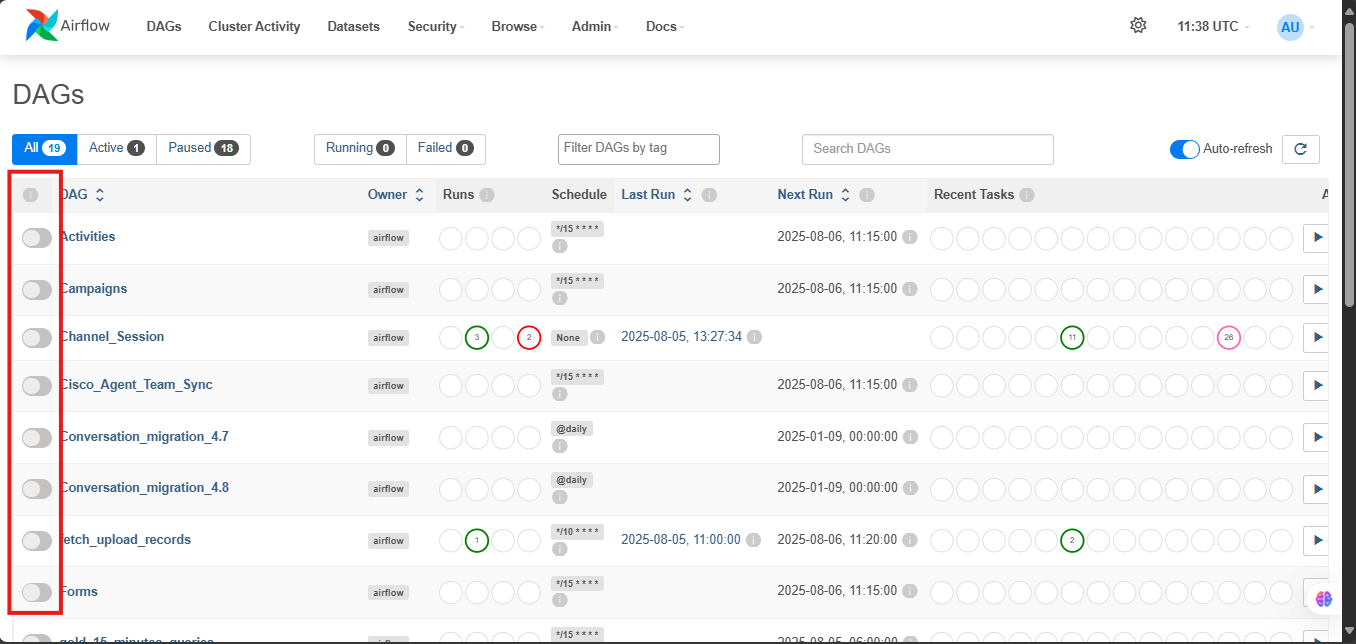
Initially, pipelines will be turned off (slider) as shown in figure 01, turn on the pipelines as per the following order
-
Forms Forms Data Pipeline
-
Teams Teams Data Pipeline
QM and Campaigns are dependent on Forms and Teams pipeline
-
For QM
-
Quality_Management QM Data Pipeline
-
Keycloak_users Keycloak Users Pipeline
-
Cisco_Agent_Team_Sync Cisco Agent & Team Sync Pipeline
-
-
For Campaigns Campaigns Data Pipeline
-
Campaigns
-
Activities
-
gold_15_minute_queries
-
-
For bulk upload Customer Bulk Upload ETL
-
fetch_upload_records
-
process_upload_records
-
-
For Graphana SLA Grafana SLA, AWHT Pipeline
-
graphana_queries
-
All pipelines are set at scheduled intervals, and will start running once the pipeline are turned on (turn slider right)