
Configuration guide
Settings that used to be Helm environment variables are now per tenant in Unified Admin. Change them in the UI; do not put them back in kubernetes/helm-values after upgrade.After you save Agent Desk, refresh the Agent Desk browser tab. After you save Widget Settings, refresh the customer widget.
|
Area |
Where to change it |
|---|---|
|
Agent Desk |
Unified Admin → Agent Desk |
|
Routing Engine |
Unified Admin → Routing → General |
|
Bot Framework |
Unified Admin → Bot Settings → General |
|
Customer Widget |
Unified Admin → Channel Manager → Web Widget → Widget Settings |
|
File Engine |
Unified Admin → General → File Engine |
1. Agent Desk
Path: Unified Admin → Agent Desk
Permission: manage Agent Desk
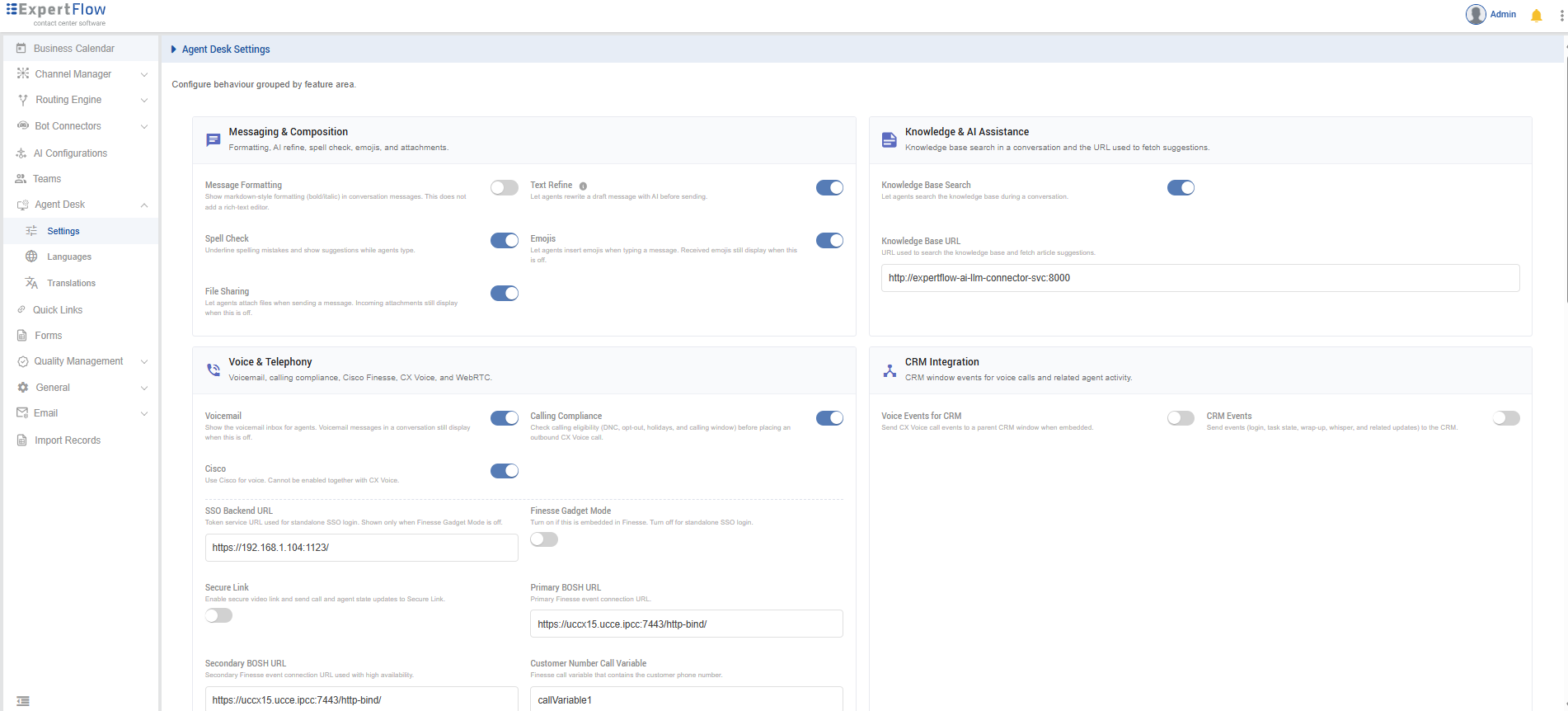
Cisco and CX Voice cannot both be on. Turning one on turns the other off.
Messaging & Composition
|
Setting |
Type |
Default |
Description |
|---|---|---|---|
|
Message Formatting |
Toggle |
Off |
Allow rich text in agent replies. |
|
Text Refine |
Toggle |
Off |
Show AI text-refine actions while the agent types. |
|
Spell Check |
Toggle |
On |
Underline spelling mistakes and show suggestions. |
|
Emojis |
Toggle |
Off |
Show the emoji picker. |
|
File Sharing |
Toggle |
Off |
Allow agents to attach files. |
Knowledge
|
Setting |
Type |
Default |
Description |
|---|---|---|---|
|
Knowledge Base Search |
Toggle |
Off |
Show knowledge-base search on Agent Desk. |
|
Knowledge Base URL |
Text |
empty |
Knowledge-base endpoint. Shown when search is on. |
Voice & Telephony
|
Setting |
Type |
Default |
Description |
|---|---|---|---|
|
Voicemail |
Toggle |
On |
Show the voicemail inbox. Conversation voicemail still displays when this is off. |
|
Calling Compliance |
Toggle |
Off |
Check DNC, opt-out, holidays, and calling window before an outbound CX Voice call. |
|
Cisco |
Toggle |
Off |
Use Cisco Finesse for voice. Cannot be on with CX Voice. |
|
CX Voice |
Toggle |
On |
Use CX Voice. Cannot be on with Cisco. |
|
WebRTC Video |
Toggle |
Off |
Shown when Cisco or CX Voice is on. When the agent goes Ready, request camera permission. Off = microphone only. |
Cisco (shown when Cisco is on)
|
Setting |
Type |
Default |
Description |
|---|---|---|---|
|
SSO Backend URL |
Text |
|
Token URL for standalone SSO. Shown only when Finesse Gadget Mode is off. |
|
Finesse Gadget Mode |
Toggle |
On |
On = embedded in Finesse. Off = standalone SSO. |
|
Secure Link |
Toggle |
Off |
Enable secure video link and send call/agent state to Secure Link. |
|
Primary BOSH URL |
Text |
Finesse http-bind URL |
Primary Finesse event connection. |
|
Secondary BOSH URL |
Text |
Finesse http-bind URL |
Secondary Finesse event connection (HA). |
|
Customer Number Call Variable |
Text |
|
Finesse call variable that holds the customer number. |
|
Primary Finesse Host |
Text |
Finesse hostname |
Primary Finesse hostname. |
|
Secondary Finesse Host |
Text |
Finesse hostname |
Secondary Finesse hostname (HA). |
|
Finesse Admin Username |
Password |
Encrypted |
Encrypted Finesse administrator username. |
|
Finesse Admin Password |
Password |
Encrypted |
Encrypted Finesse administrator password. |
|
Finesse Deployment Type |
UCCX / UCCE |
|
Call-type handling and failover. |
|
Cisco Voice MRD |
Text (read-only) |
MRD id |
Media Routing Domain for Cisco voice. |
|
Finesse Agent URL |
Text |
Finesse agent URL |
URL used to log the agent into Finesse. |
|
Finesse High Availability |
Toggle |
Off |
Retry login on the secondary host if primary fails. |
|
Secondary Finesse URL |
Text |
Secondary Finesse URL |
Secondary Finesse URL for HA. |
|
Cisco Service Identifier |
Text |
|
Default service identifier on Cisco voice calls. |
|
WebRTC Service Identifier |
Text |
|
Service identifier on Cisco WebRTC calls. |
CX Voice (shown when CX Voice is on)
|
Setting |
Type |
Default |
Description |
|---|---|---|---|
|
Campaign Auto-Answer Timer |
Number |
|
Seconds before auto-accepting Progressive/Predictive campaign calls. Preview is not auto-answered. |
|
Silent Monitor DN |
Text (read-only) |
|
DN prefix to start silent monitor. |
|
External Dial DN |
Text (read-only) |
|
DN prefix for external consult/transfer. |
|
CX Voice MRD |
Text (read-only) |
MRD id |
Media Routing Domain for CX Voice. |
|
SIP Extension Password |
Password |
Encrypted |
Encrypted static SIP password for media-server extensions. |
|
SIP Console Logs |
Toggle |
Off |
Detailed SIP logs for troubleshooting. |
|
Queue Transfer DN |
Text (read-only) |
|
DN used to transfer a CX Voice call to a queue. |
Read-only fields cannot be edited here. SIP WebSocket URL and SIP URI come from CX Tenant (tenantSettings.mediaServer.wssUrl and domain).
CRM Integration
|
Setting |
Type |
Default |
Description |
|---|---|---|---|
|
Voice Events for CRM |
Toggle |
Off |
Shown when Cisco or CX Voice is on. Send CX Voice call events to a parent CRM window. |
|
CRM Events |
Toggle |
Off |
Send login, task state, wrap-up, whisper, and related events to the CRM. |
Conversation Handling
|
Setting |
Type |
Default |
Description |
|---|---|---|---|
|
Auto Answer |
Toggle |
Off |
Auto-accept incoming chats and CX Voice alerting calls. Does not auto-answer Cisco calls. |
|
Conversation Auto-Accept Delay (ms) |
Number |
|
Wait before auto-accepting a chat or CX Voice conversation. Shown when Auto Answer is on. Not used for Cisco calls. |
|
Wrap-Up |
Toggle |
Off |
Put the agent into wrap-up when a conversation ends. |
|
Wrap-Up Time |
Number (15–1800 s) |
|
Wrap-up duration in seconds. Shown when Wrap-Up is on. |
|
Conversation Participants |
Toggle |
Off |
Show conversation participants on Agent Desk. |
|
Show Active Channels |
Toggle |
Off |
Show the agent’s active channel sessions. |
|
Hold Conversation |
List |
1 / 3 / 5 / 7 / 10 minutes |
Pause durations offered to the agent. |
|
Inactivity Timer |
Toggle |
Off |
Log the agent out after inactivity. |
|
Inactivity Timeout |
Number (seconds) |
|
Shown when Inactivity Timer is on. |
|
Outbound SMS |
Toggle |
Off |
Allow outbound SMS from Agent Desk. |
|
Send and Close (SMS) |
Toggle |
Off |
Send the SMS and close the conversation. |
|
Prefix Code |
Text |
|
Default country prefix for outbound SMS. |
Saving wrap-up also updates Agent Manager.
Workspace Preferences
|
Setting |
Type |
Default |
Description |
|---|---|---|---|
|
Dashboard Refresh Time (ms) |
Number |
|
How often supervisor dashboards refresh. |
2. Routing Engine
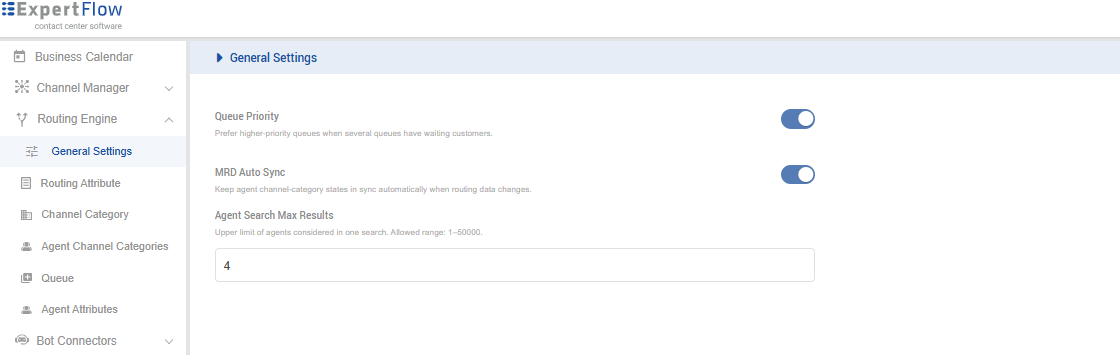
Path: Unified Admin → Routing → General
Permission: manage Routing Engine (or Queue)
Reset: restore defaults for this tenant
Until you save, routing uses built-in defaults.
|
Setting |
Type |
Default |
Description |
|---|---|---|---|
|
Queue Priority |
Toggle |
Off |
Prefer higher-priority queues when several queues have waiting customers. |
|
MRD Auto Sync |
Toggle |
Off |
Keep agent channel-category states in sync when routing data changes. |
|
Agent Search Max Results |
Number |
|
Upper limit of agents considered in one search. Minimum 1. |
3. Bot Framework
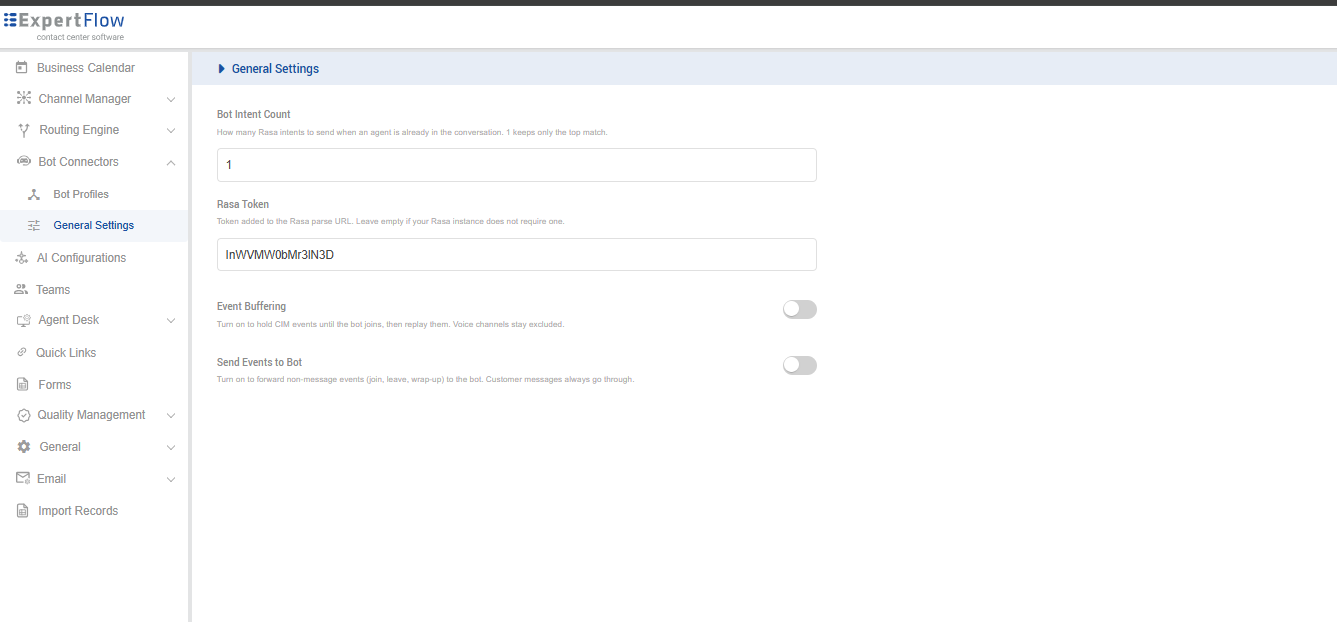
Path: Unified Admin → Bot Settings → General
Permission: manage Bot Settings
Reset: restore defaults for this tenant
Until you save, the bot framework uses built-in defaults.
|
Setting |
Type |
Default |
Description |
|---|---|---|---|
|
Bot Intent Count |
Number |
|
How many Rasa intents to send when an agent is already in the conversation. |
|
Rasa Token |
Text |
empty / site default |
Token on the Rasa parse URL. Leave empty if Rasa does not require one. |
|
Event Buffering |
Toggle |
On |
Hold CIM events until the bot joins, then replay them. Voice channels stay excluded. |
|
Send Events to Bot |
Toggle |
Off |
Forward non-message events (join, leave, wrap-up) to the bot. Customer messages always go through. |
4. Customer Widget
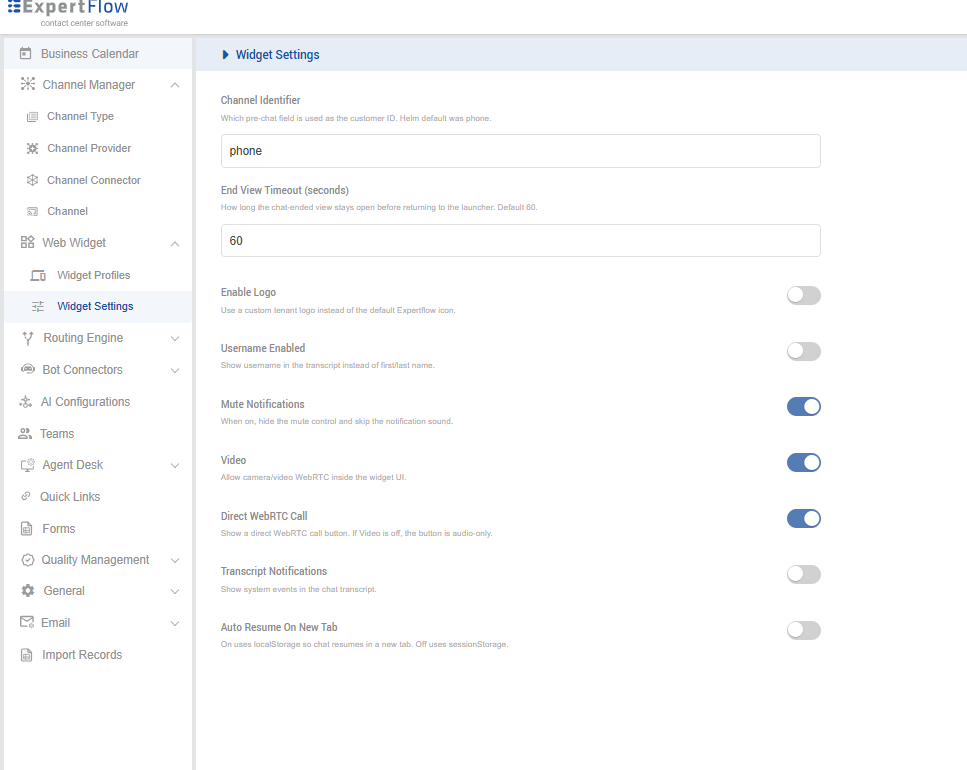
Path: Unified Admin → Channel Manager → Web Widget → Widget Settings
Permission: manage Web Widget
Reset: restore defaults for this tenant
This is tenant-wide widget behaviour. Widget Profiles (same Web Widget menu) is a different page for appearance, theme, and per-widget gadget WebRTC.
Until you save, the widget uses built-in defaults.
|
Setting |
Type |
Default |
Description |
|---|---|---|---|
|
Channel Identifier |
Text |
|
Which pre-chat field is used as the customer ID. |
|
End View Timeout (seconds) |
Number |
|
How long the chat-ended view stays open before returning to the launcher. Minimum 1. |
|
Enable Logo |
Toggle |
Off |
Use a custom tenant logo instead of the default Expertflow icon. |
|
Username Enabled |
Toggle |
On |
Show username in the transcript instead of first/last name. |
|
Mute Notifications |
Toggle |
Off |
Hide the mute control and skip the notification sound. |
|
Video |
Toggle |
Off |
Allow camera/video WebRTC inside the widget. |
|
Direct WebRTC Call |
Toggle |
On |
Show a direct WebRTC call button. If Video is off, the button is audio-only. |
|
Transcript Notifications |
Toggle |
On |
Offer download / notification for the transcript after chat ends. |
|
Auto Resume On New Tab |
Toggle |
On |
Resume the same conversation when the customer opens another tab. |
5. File Engine
Path: Unified Admin → General → File Engine
Permission: manage General Settings
Save applies immediately for that tenant. ClamAV host and port are deployment settings, not on this page.
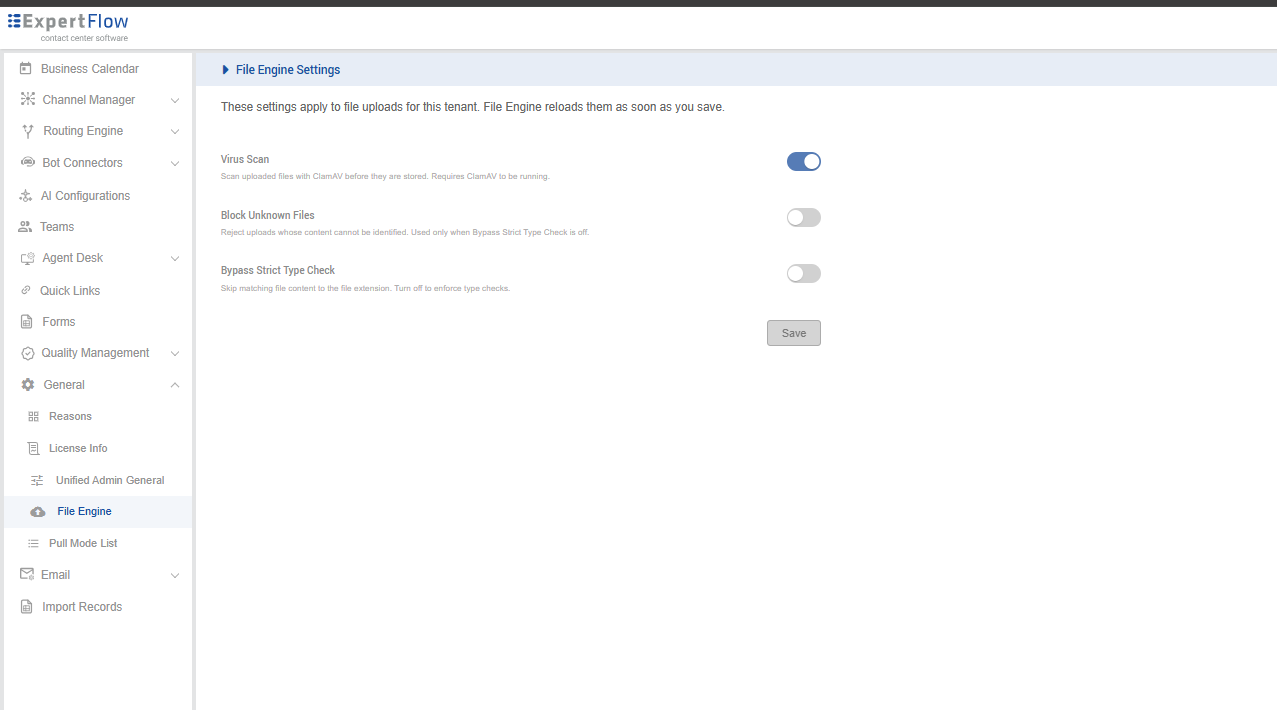
|
Setting |
Type |
Default |
Description |
|---|---|---|---|
|
Virus Scan |
Toggle |
Off |
Scan uploads with ClamAV before they are stored. |
|
Block Unknown Files |
Toggle |
Off |
Reject uploads whose content cannot be identified. Used only when Bypass Strict Type Check is off. |
|
Bypass Strict Type Check |
Toggle |
On |
Skip matching file content to the file extension. Turn off to enforce type checks. |
Helm variable mapping
These Helm environment variables were removed from the charts and are stored per tenant in Unified Admin. efCommonVars_IS_WRAP_UP_ENABLED and efCommonVars_WRAPUP_TIME are the same settings as IS_WRAP_UP_ENABLED and WRAPUP_TIME. WEBRTC_SERVICE_IDENTIFIER is written to both WebRTC fields.
Settings that were never Helm variables (message formatting, text refine, emojis, file sharing, knowledge base, auto answer, conversation participants, active channels, hold conversation, inactivity, outbound SMS) exist only on the Agent Desk page.
Agent Desk
|
Helm variable |
Admin setting |
Config path |
|---|---|---|
|
|
Spell Check |
|
|
|
Voicemail |
|
|
|
Calling Compliance |
|
|
|
Cisco |
|
|
|
CX Voice |
|
|
|
WebRTC Video |
|
|
|
SSO Backend URL |
|
|
|
Finesse Gadget Mode |
|
|
|
Secure Link |
|
|
|
Primary BOSH URL |
|
|
|
Secondary BOSH URL |
|
|
|
Customer Number Call Variable |
|
|
|
Primary Finesse Host |
|
|
|
Secondary Finesse Host |
|
|
|
Finesse Admin Username |
|
|
|
Finesse Admin Password |
|
|
|
Finesse Deployment Type |
|
|
|
Cisco Voice MRD |
|
|
|
Finesse Agent URL |
|
|
|
Finesse High Availability |
|
|
|
Secondary Finesse URL |
|
|
|
Cisco Service Identifier |
|
|
|
WebRTC Service Identifier |
|
|
|
Campaign Auto-Answer Timer |
|
|
|
Silent Monitor DN |
|
|
|
External Dial DN |
|
|
|
CX Voice MRD |
|
|
|
SIP Extension Password |
|
|
|
SIP Console Logs |
|
|
|
Queue Transfer DN |
|
|
|
Voice Events for CRM |
|
|
|
CRM Events |
|
|
|
Conversation Auto-Accept Delay (ms) |
|
|
|
Wrap-Up |
|
|
|
Wrap-Up |
|
|
|
Wrap-Up Time |
|
|
|
Wrap-Up Time |
|
|
|
Dashboard Refresh Time (ms) |
|
Routing Engine
|
Helm variable |
Admin setting |
Config path |
|---|---|---|
|
|
Queue Priority |
|
|
|
MRD Auto Sync |
|
|
|
Agent Seize TTL |
|
|
|
Agent Search Max Results |
|
Bot Framework
|
Helm variable |
Admin setting |
Config path |
|---|---|---|
|
|
Bot Intent Count |
|
|
|
Rasa Token |
|
|
|
Event Buffering |
|
|
|
Send Events to Bot |
|
Customer Widget
|
Helm variable |
Admin setting |
Config path |
|---|---|---|
|
|
Channel Identifier |
|
|
|
End View Timeout (seconds) |
|
|
|
Enable Logo |
|
|
|
Username Enabled |
|
|
|
Mute Notifications |
|
|
|
Video |
|
|
|
Direct WebRTC Call |
|
|
|
Transcript Notifications |
|
|
|
Auto Resume On New Tab |
|
File Engine
|
Helm variable |
Admin setting |
Config path |
|---|---|---|
|
|
Virus Scan |
|
|
|
Block Unknown Files |
|
|
|
Bypass Strict Type Check |
|