
A question on an evaluation form can be marked Critical. If the evaluator picks an answer that was flagged as failing, the whole review fails. The score is 0% and the reason is Critical Failure, even when the other answers score well. It is not the same as a review that scores 0% on its own.
Critical is available only on evaluation forms that use weightage, and only on MCQ and Dropdown questions, because those are the questions that contribute to the score.
1. Turn on Critical when creating the form
In Forms, create or edit an evaluation form.
-
Turn on Enable Weightage. The Critical toggle is not shown when weightage is off.
-
Add an MCQ or Dropdown question.
-
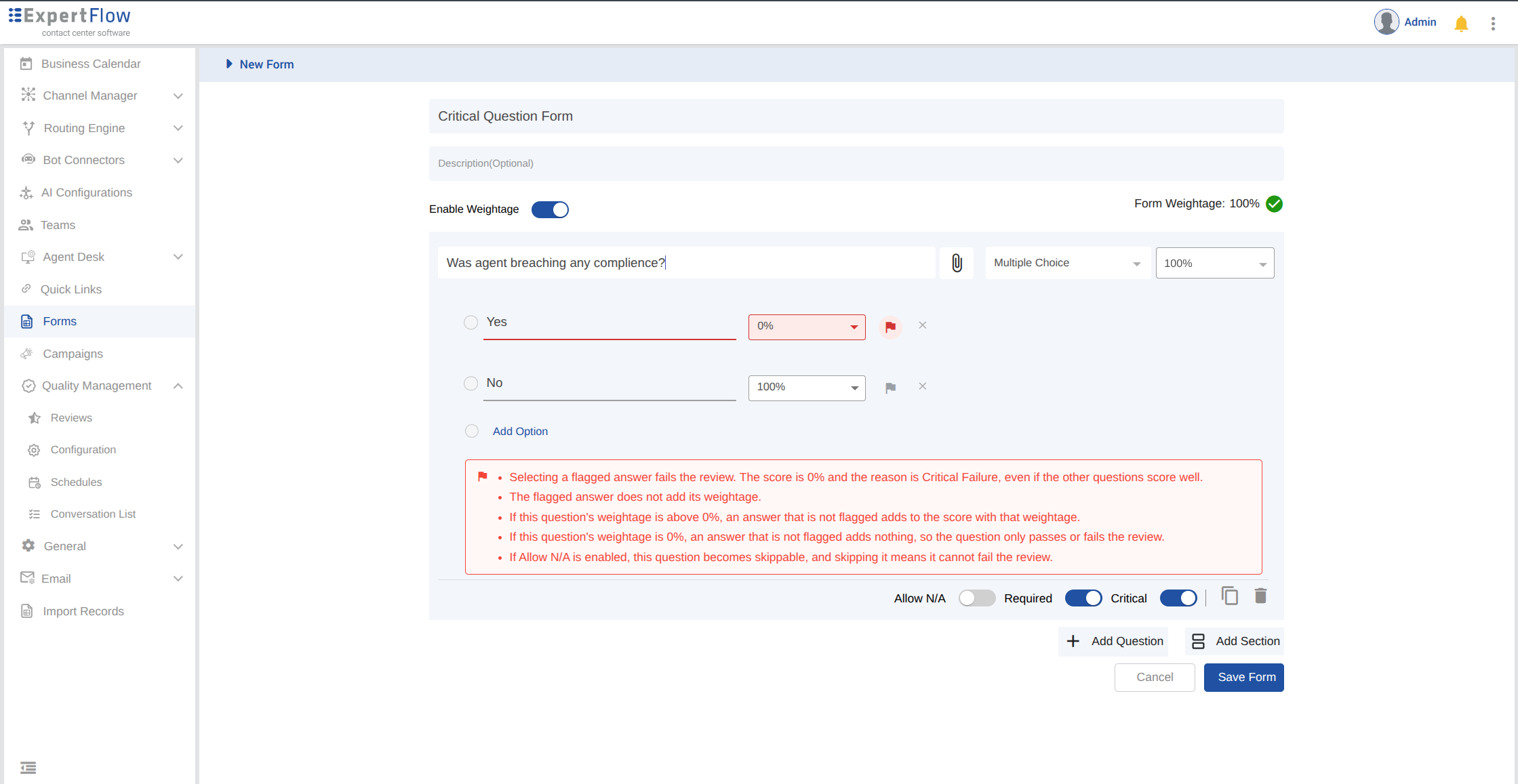
Turn on Critical for that question. It is off by default, next to Allow N/A and Required.
Other question types do not have Critical.
Required can stay on or off. A required Critical question must still be answered before submit, unless it is marked N/A. An optional Critical question that is left blank does not fail the review.
Allow N/A can be on at the same time. If the evaluator marks that question Not applicable (N/A), it is skipped and cannot fail the review.
Question weightage is unchanged when Critical is turned on. A weightage above 0% means a passing answer still adds to the score. A weightage of 0% means the question only passes or fails the review and adds nothing to the score. The same applies if the question sits in a section whose weightage is 0%.
2. Flag the answers that fail the review
Turning Critical on does not pick a failing answer for you. A flag appears on every answer option.
-
Flag each answer that should fail the review. The tooltip reads Flag this answer as critical. A flagged answer shows Flagged answer fails the review, and its score is locked at 0%. Unflagging it restores the score it had before.
-
Leave at least one answer unflagged, so the evaluator can pass the question.
The form cannot be saved until both are true:
-
At least one option must be flagged.
-
At least one option must stay unflagged.
While Critical is on, the question shows a short note: a flagged answer fails the review with score 0% and reason Critical Failure; a flagged answer does not add its weightage; a passing answer adds to the score only when the question weightage is above 0%; and Allow N/A makes the question skippable so it cannot fail the review.
3. What the evaluator sees during review
Evaluators do not mark a question as Critical. That is set on the form.
On the review screen in Conversation View:
-
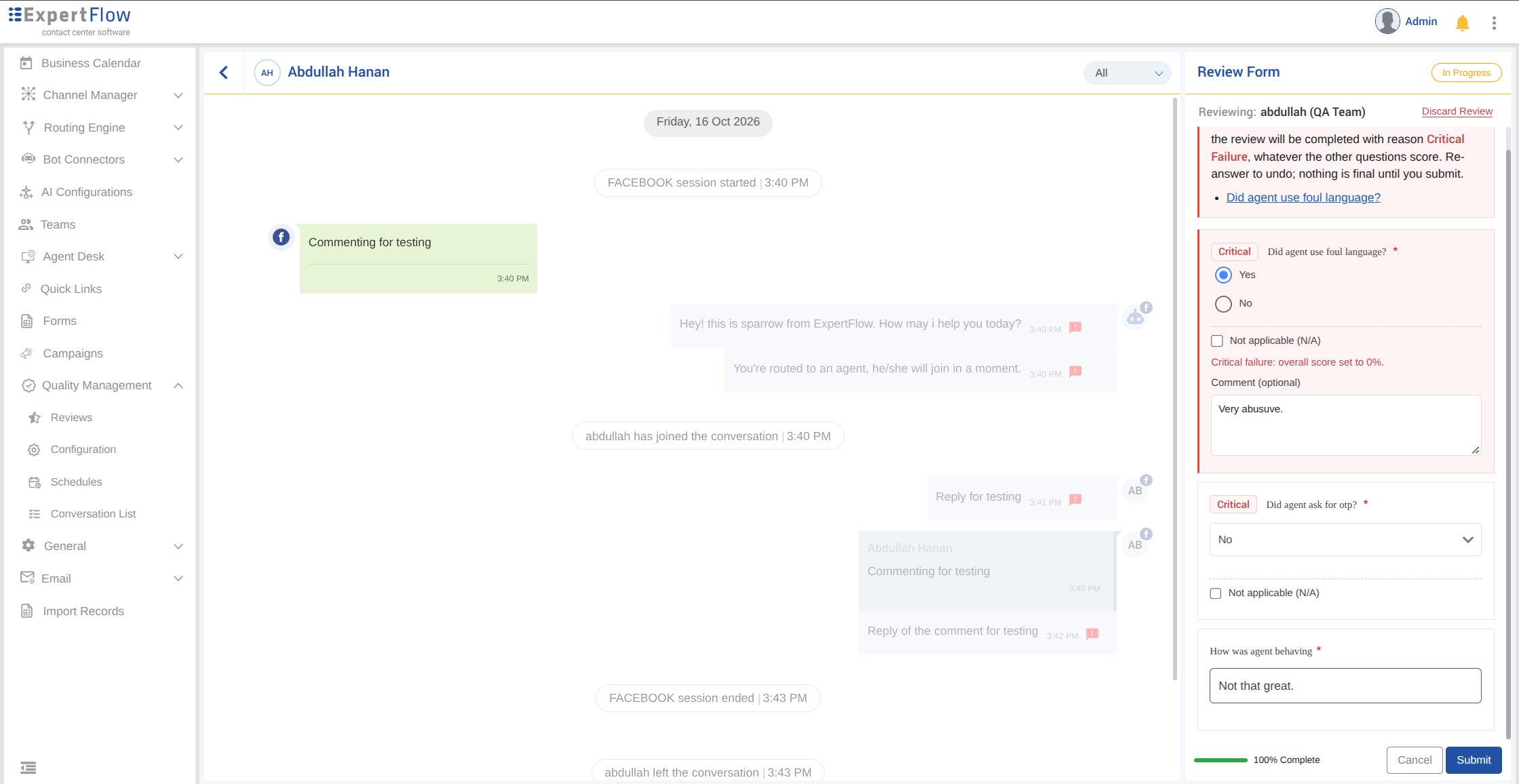
A Critical question shows a Critical label, and states which answer fails the review before it is answered.
-
Choosing a flagged answer shows Critical failure: overall score set to 0%. A comment is optional. The placeholder is What happened, e.g. the timestamp where it occurred.
-
A banner lists every failed Critical question. It says the overall score will be 0% and the review will be completed with reason Critical Failure. Changing the answer before submit removes that failure. Nothing is final until submit.
-
Submit stays disabled until every required question that still applies is answered or marked N/A.
-
There is no running score while the review is in progress. The score appears after the review is submitted.
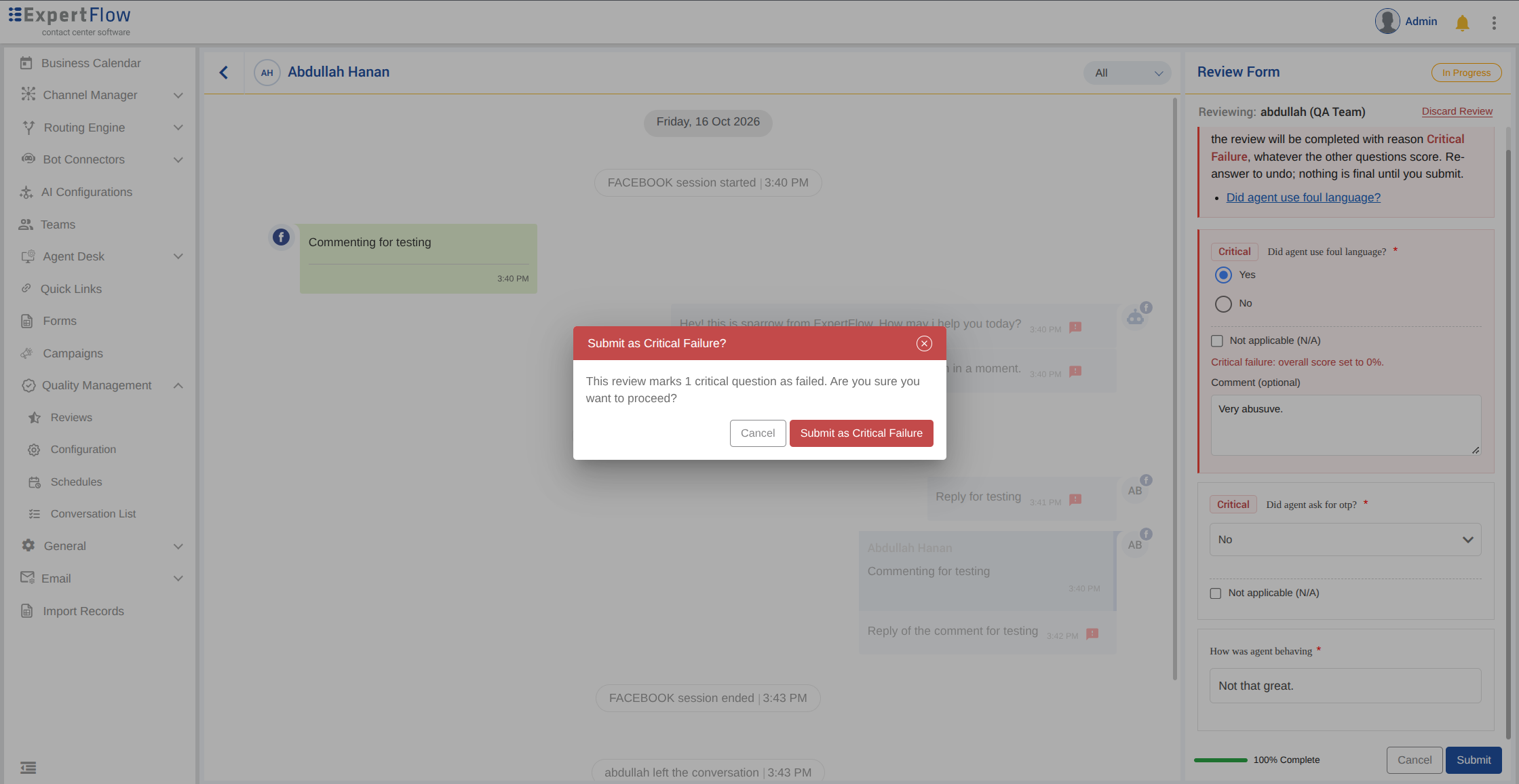
Clicking Submit while a Critical question is failed asks Submit as Critical Failure? The dialog states how many critical questions are failed. Cancel returns to the review. Submit as Critical Failure completes it.
4. How the score is calculated
-
A flagged answer sets the overall score to 0% and the reason to Critical Failure. The review status is Completed. This happens even when the question or its section has a weightage of 0%.
-
Answers on the other questions are kept. They do not change the 0%.
-
Several failed Critical questions still produce one score of 0%. The banner lists each one.
-
A passing answer on a Critical question is scored like any other answer. It adds to the score only when that question’s weightage is above 0% and its section weightage is above 0%.
-
A review that scores 0% with no failed Critical question is not a Critical Failure. It has no Critical Failure reason.
-
Marking the question Not applicable (N/A), or leaving an optional Critical question blank, skips it. A skipped question cannot fail the review.
5. After the review is submitted
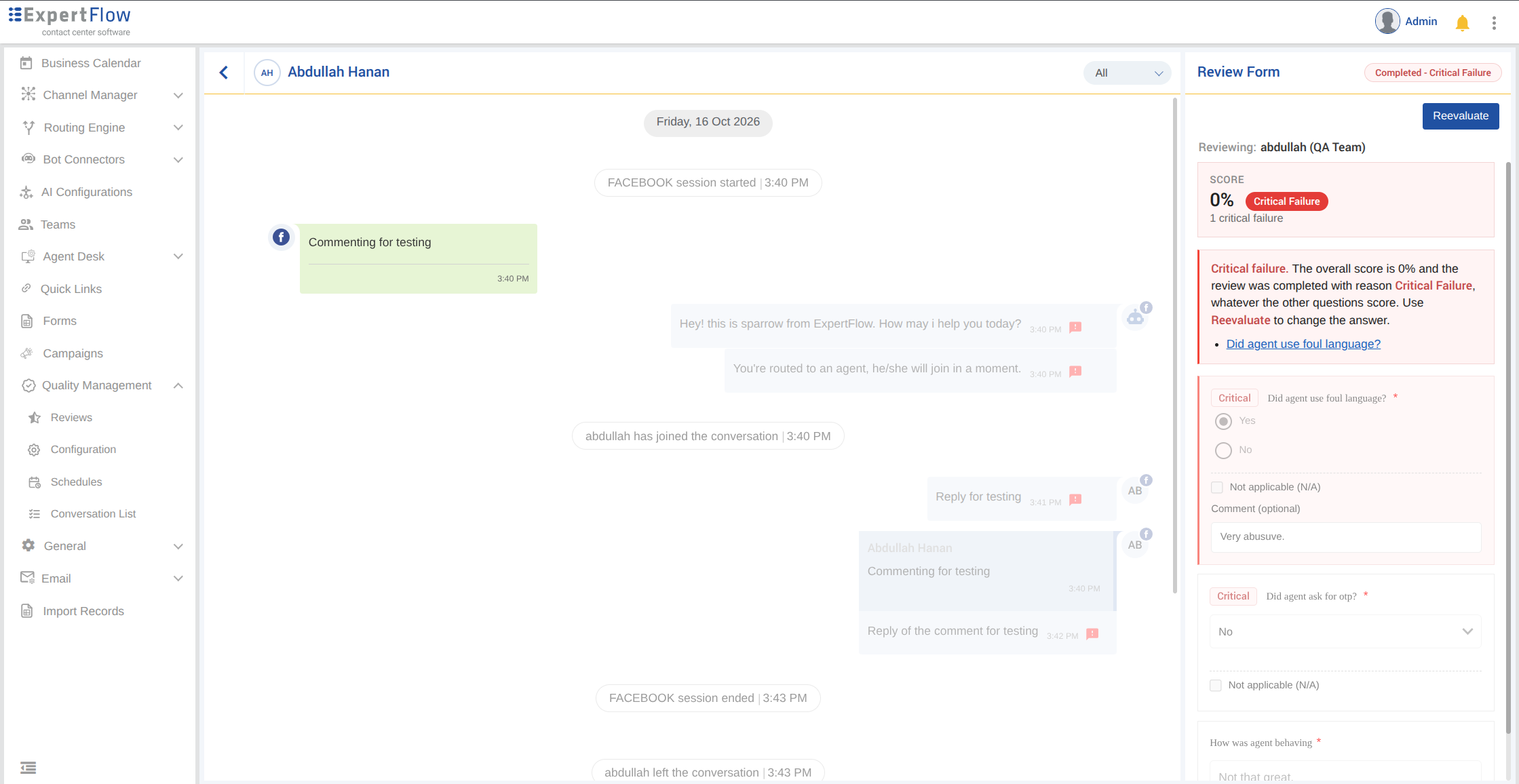
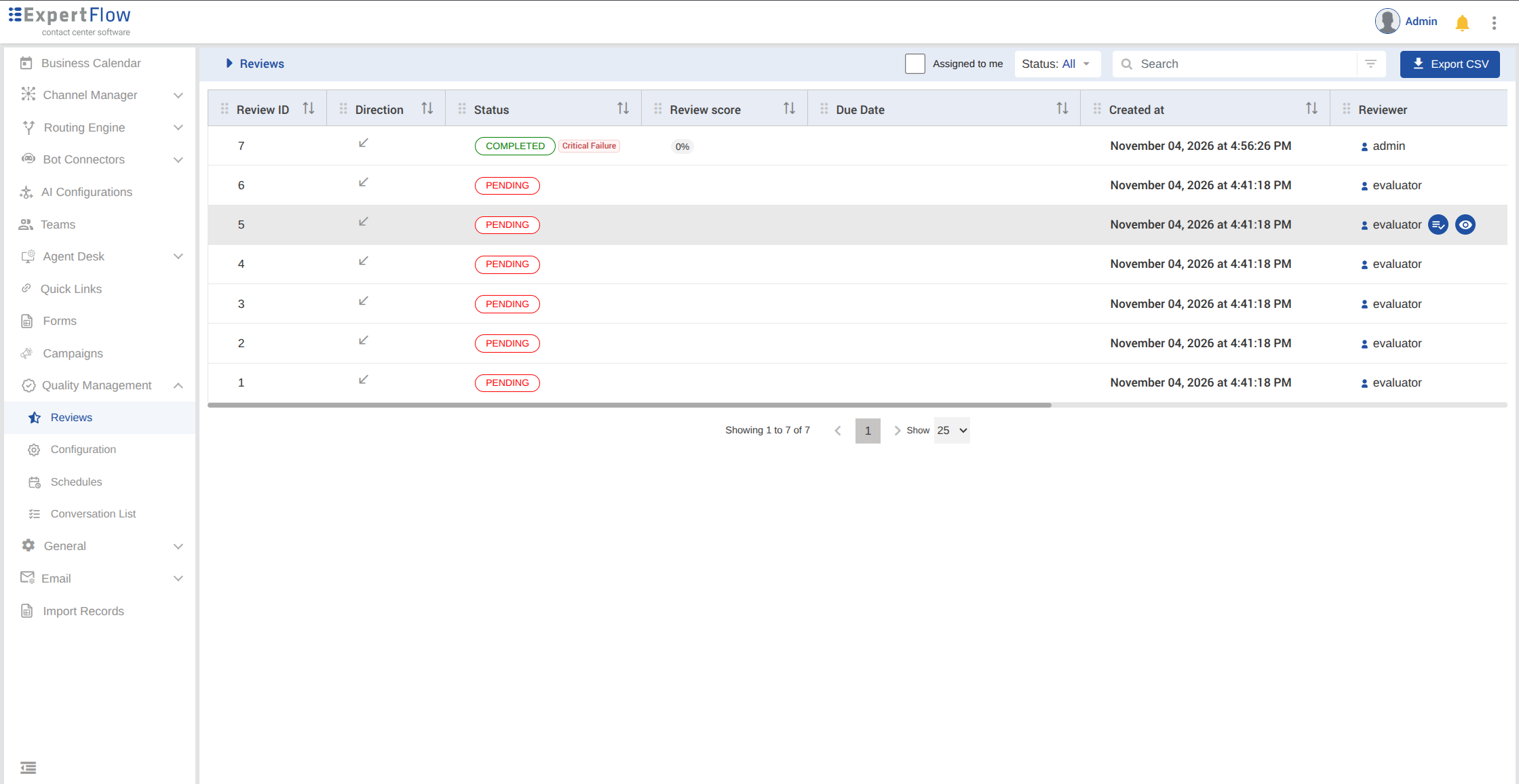
The completed review is read-only. The status shows Completed with reason Critical Failure, and the score shows 0%.
On the Reviews list, the status shows Completed with reason Critical Failure, and the review score shows 0%.
The agent and the quality manager receive a Critical Failure Alert. If the evaluator left a comment, the agent sees that comment in the notification and next to the failed question in View score.
Only a role with the Reevaluate permission can start a reevaluation. There is no separate undo. During reevaluation the same Critical rules apply. Changing the failed answer to one that is not flagged, then submitting, recalculates the score and removes the Critical Failure reason when no Critical question is still failed. If a reevaluation fails a Critical question again, the reason is Critical Failure once more.
6. Critical error rate target
This is a separate setting. It does not decide whether one review fails.
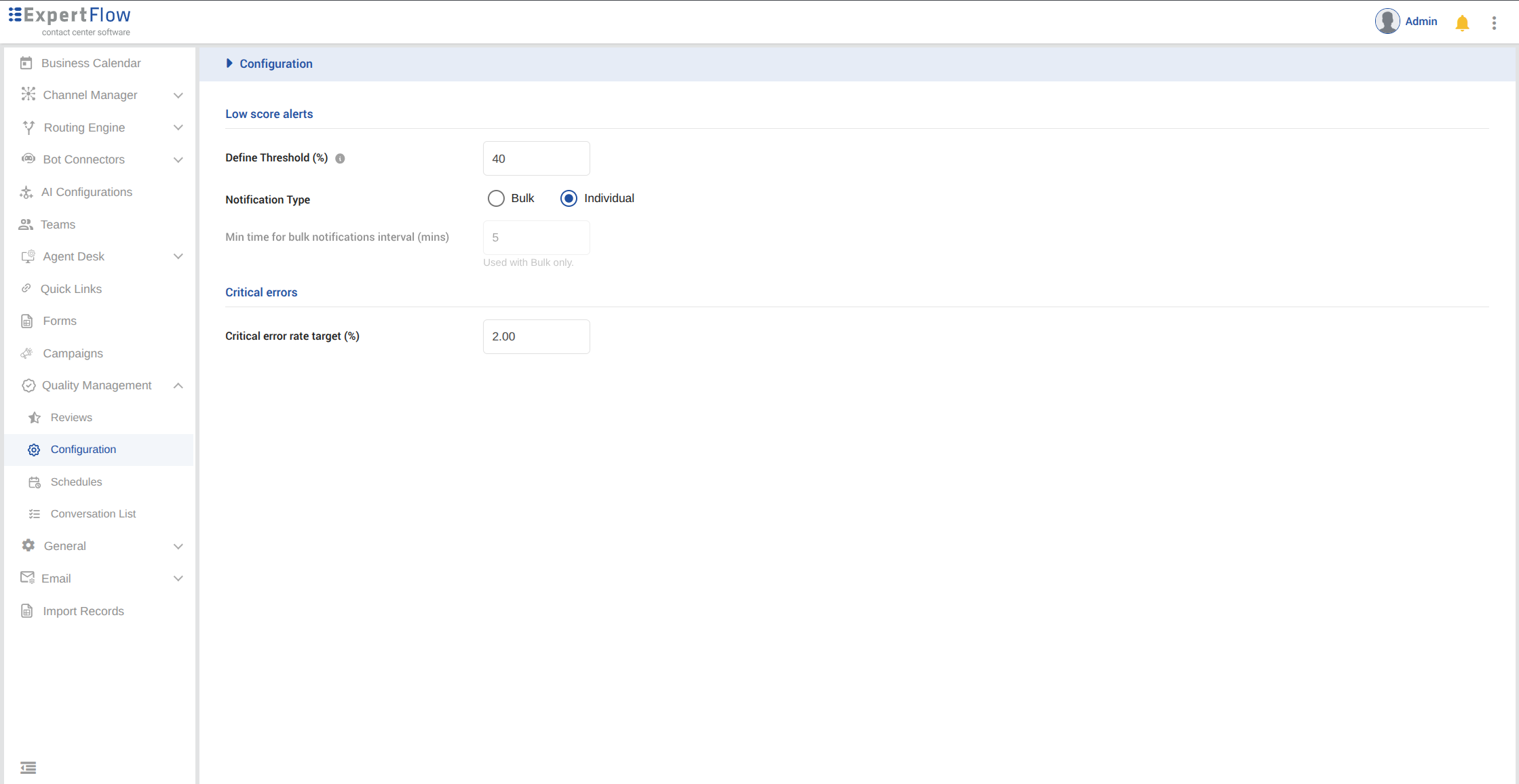
In Quality Management Configurations, under Critical errors, set Critical error rate target (%). The default is 2.00. It accepts 0.00 to 100.00, with up to two decimal places. There is one target for the tenant. The Critical Error Rate report uses it to flag when the rate goes above the target. Save stays disabled until the value is valid.
Notes
-
Critical is off until it is turned on for that MCQ or Dropdown.
-
Critical is shown only when Enable Weightage is on.
-
Critical is not an answer option. The admin flags which answers fail the review.
-
A flagged answer takes precedence over the points on the rest of the form.
-
If Allow N/A is on and the evaluator marks the question N/A, that question cannot cause a Critical Failure. See Not Applicable (N/A) Questions in Quality Management.
-
Changes to Critical on a form already in use apply to reviews started after the form is saved. A review already open picks up the new Critical settings when it is refreshed. Reviews already submitted keep their score and reason.