
Expertflow Quality Management is designed to help Contact Centres monitor, evaluate, and enhance human agent performance across all interaction channels (voice, chat, email, etc.). The solution provides a comprehensive suite of tools to establish clear performance criteria, empowering management to determine if an agent has successfully met specific organizational standards.
As a Quality Manager, you can search across conversations based on several different search criteria, e.g., specific agents/teams, wrap-ups, etc., create evaluation jobs based on custom-designed questionnaires, and assign (set deadlines with reminder notifications) them to Evaluators.
As an Evaluator, you can evaluate agent interactions in the assigned conversations and score them accordingly.
To ensure oversight, a Quality Admin can configure Quality Management notification delivery and thresholds. They can manage how low-scoring evaluation alerts are sent to Quality Managers, Evaluators, and Agents: either in real-time for individual reviews or as bulk summaries at set intervals, accessible via a dedicated configuration tab.
The solution offers data-driven insights through reports such as Evaluation Volume, Team Comparison, Agent & Team Leaderboard, Evaluator Comparison, and Skills Assessment.
-
AI-Automated Evaluation: Automatically evaluates 100% of interactions, eliminating bias. The AI fills out evaluation forms, scores parameters such as sentiment, language, and KPIs, generates evaluator comments, and submits completed reviews, no manual step required. Results are immediately available to Quality Managers.
-
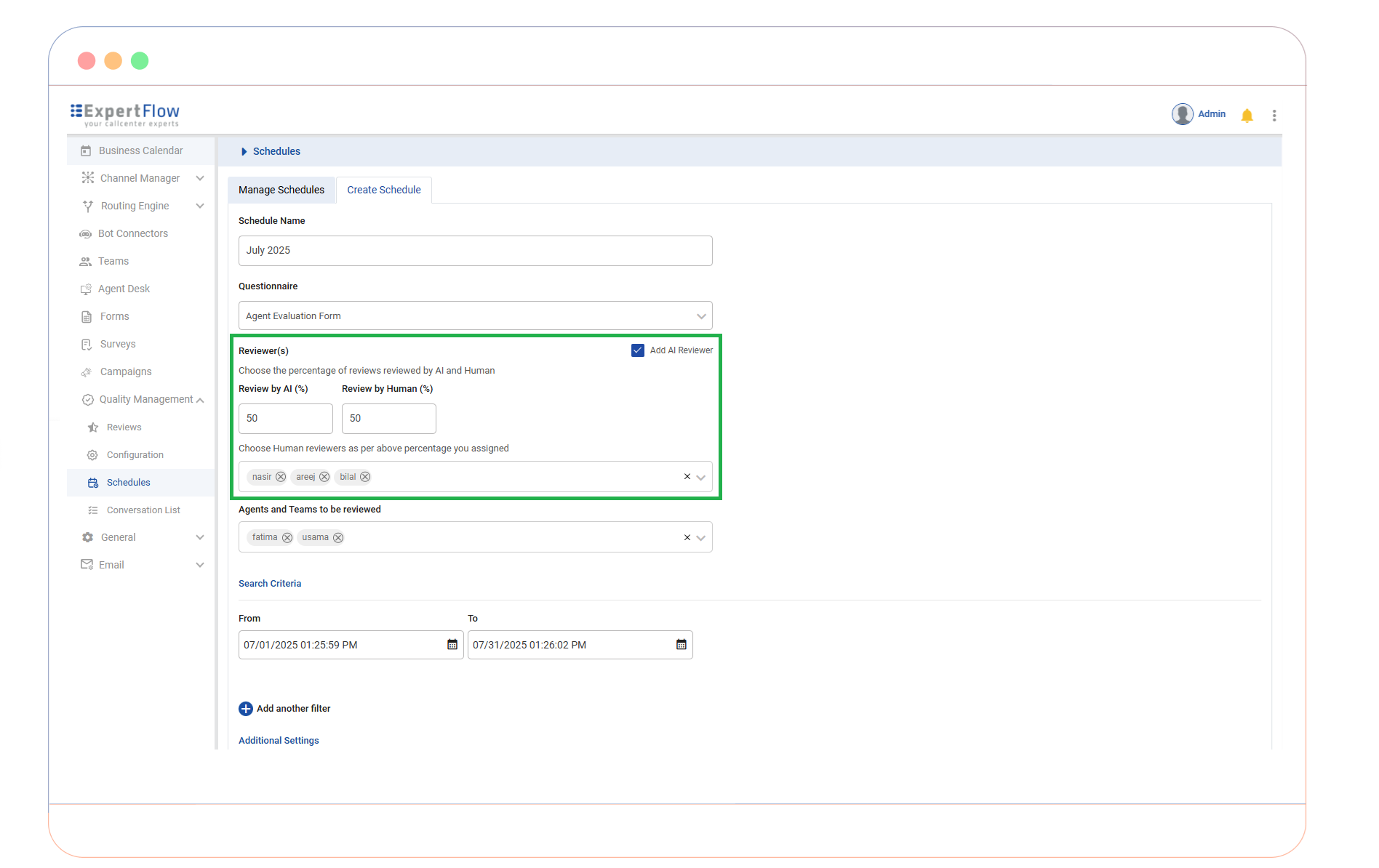
Hybrid Evaluation Model: Quality Managers can set a ratio for evaluations conducted by AI vs. human evaluators, optimizing resource use.
-
Targeted Interaction Selection: Conversations can be filtered for evaluation based on criteria like call direction, wrap-up codes, sentiment, and survey results.
-
Agent Performance & Development: Agents can view their quality scores and feedback from evaluators. AI can also suggest training or counseling, and mark conversations for use as training material.
-
Integration: The QM solution can be integrated with third-party Contact Centers, such as Cisco Contact Center.
AI-Driven Quality Management
Traditional Quality Assurance (QA) is often hampered by manual processes that are resource-intensive and limited to small interaction samples. This sampling gap can lead to inconsistent scoring, delayed feedback, and an incomplete view of agent performance.
The Expertflow AI-Driven Quality Management eliminates these bottlenecks by providing automated, objective evaluations for 100% of customer interactions.
Expertflow QM by AI is designed to work alongside your quality team, not replace it. While the AI handles repetitive evaluation work at scale, Quality Managers and evaluators retain full control — they can review AI-generated scores and comments, fine-tune scorecards and evaluation criteria, and step in to handle exceptions or edge cases at any time. This ensures your quality standards stay grounded in human judgment as automation expands.
How it Works
-
A conversation closes, the AI picks it up automatically.
-
It analyses the transcript and interaction data against your pre-configured evaluation form.
-
Each question is scored against the same objective criteria, every time.
-
The AI generates evaluator comments alongside the numeric scores.
-
The completed review is submitted automatically, no manual step required.
-
Results are immediately available for Quality Managers to view, filter, and act upon.
Supports English and Arabic (Egyptian dialect). Works with multiple AI model providers, cloud-based or on-premises. Model provider credentials can be set at the tenant level.
AI & Hybrid Evaluation Modes
The system offers two flexible modes to balance automation with human oversight:
-
Full Automation: The AI engine automatically evaluates and scores every closed interaction, providing a total view of compliance and performance.
-
Hybrid Mode: Allows for a collaborative approach by distributing evaluations between AI and human reviewers based on a defined percentage.
Evaluation Forms
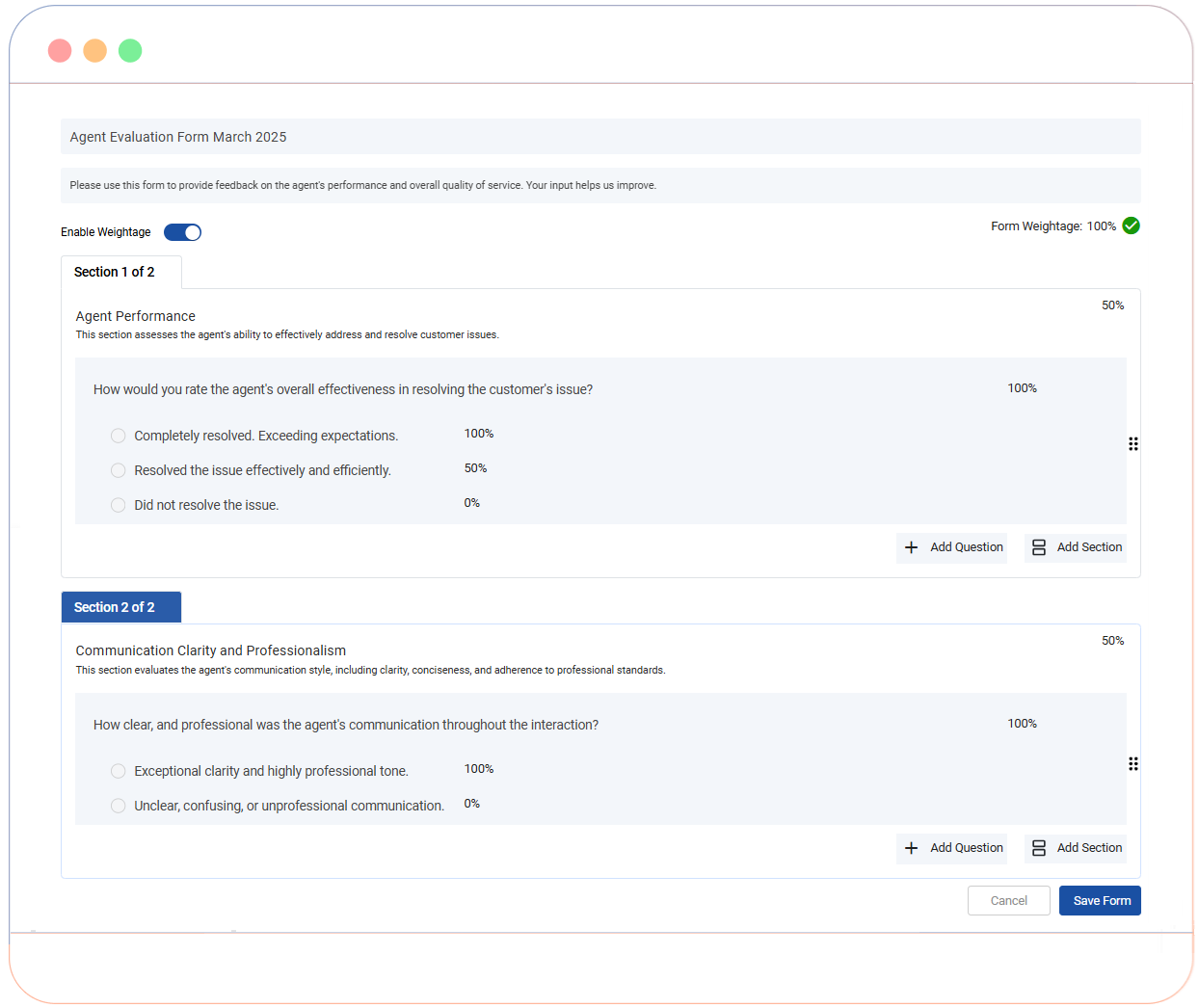
At the heart of the Expertflow QM solution is a flexible and intuitive Form Builder, which allows organizations to translate their unique quality standards into measurable data. Evaluation forms are fully customizable, ensuring that whether you are measuring technical compliance, soft skills, or sales effectiveness, the criteria remain aligned with your business goals. The Form Builder supports a wide range of question types—including dropdowns, multiple choice, rating scales, and text inputs—along with configurable weight assignments at form, section, and question level. Built-in checks ensure that total weights are correctly distributed and sum to 100% where required.
Dynamic Form Structure
By supporting hierarchical questionnaire design, the module allows you to break down evaluations into specific categories for deeper insights into agent performance.
-
Multi-Section Layouts: Group related questions into logical sections (e.g., "Greeting," "Problem Solving," "Compliance") to provide structured feedback.
-
Variable Question Types: Choose from a variety of input formats, including Multiple Choice Questions (MCQs), Rating Scales (1–5 or 1–10), and Open-Ended Text fields for qualitative comments.
-
Weighting & Scoring Logic: Assign relative importance to different sections or individual questions. This ensures that critical compliance items carry more weight in the final score than secondary soft skills.
Submitted Evaluation & Performance Visibility
Once a Quality Management (QM) questionnaire is submitted, it serves as a permanent record of performance. The Expertflow platform provides a rich, interactive view of these submitted evaluations with rich UI components tailored to the specific question type, ensuring that feedback is visually clear for Quality Managers.
The Total Form Score is prominently displayed at the top of the view. To maintain a clean interface while providing deep context, an Info Icon (i) is situated next to the score, which provides a Metadata Summary containing Agent Evaluated and Evaluator.
Conversation Explorer
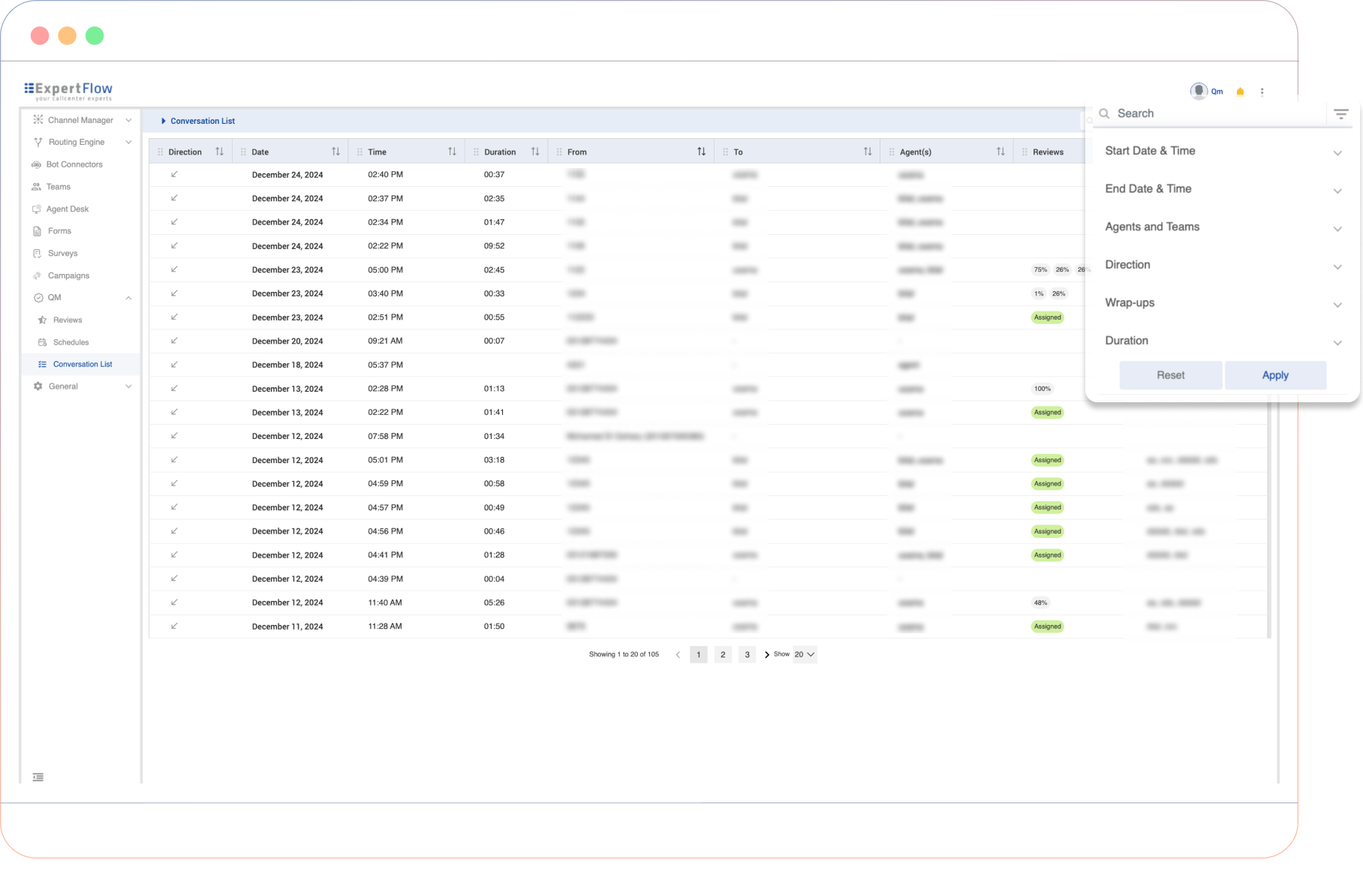
The Conversation Explorer is the central hub for interaction oversight within Expertflow QM. It allows Quality Managers to navigate through vast amounts of interaction data across all channels (Voice, Chat, Email) to identify high-value conversations for review.
Advanced Search & Filtering
By applying granular filters, quality teams can move away from random sampling to focus on "moments of truth" by prioritizing interactions based on Date & Time, Agent(s) & Team(s), Direction, Wrap-up codes, Duration, Channels, and Customer.
The Channel and Customer Identifier filters enable you to identify performance gaps across Voice, Chat, and Email, while making it possible to track a single customer’s journey across multiple touchpoints.
Detailed Interaction Metadata
The Conversation List table provides a comprehensive snapshot of every interaction, allowing for quick "at-a-glance" triage before diving into a full review. Key data points include:
|
Column |
Description |
|---|---|
|
Direction |
Visual indicator of the interaction type (Inbound/Outbound). |
|
Date & Time |
The exact date and time the interaction was initiated. |
|
Duration |
The total handling time of the conversation. |
|
From and To |
Identifies participants based on the direction of the interaction. |
|
Agent(s) |
Lists the agents involved in the conversation. |
|
Team(s) |
The name(s) of the teams of agent(s) involved. |
|
Reviews |
Displays review scores if evaluations have been conducted. |
|
Wrap-ups/ Dispositions |
Shows the Wrap-up codes assigned by the agent at the end of the session. |
Conversation View
The Conversation View provides a unified, structured interface for accessing complete interaction histories. By consolidating conversation activities and metadata into a single pane, it enables Quality Managers and Evaluators to perform deep-dive reviews and complete assessments with full contextual awareness.
The Conversation View is channel-agnostic. While it supports all Expertflow CX channels, the current version is fully optimized and QA-certified for WebChat, Voice (CX - Cisco UCCE & UCCX) , Email, SMS, Facebook and Whatsapp. Social Media channels are currently tested with chat only mode.
Review Scheduler
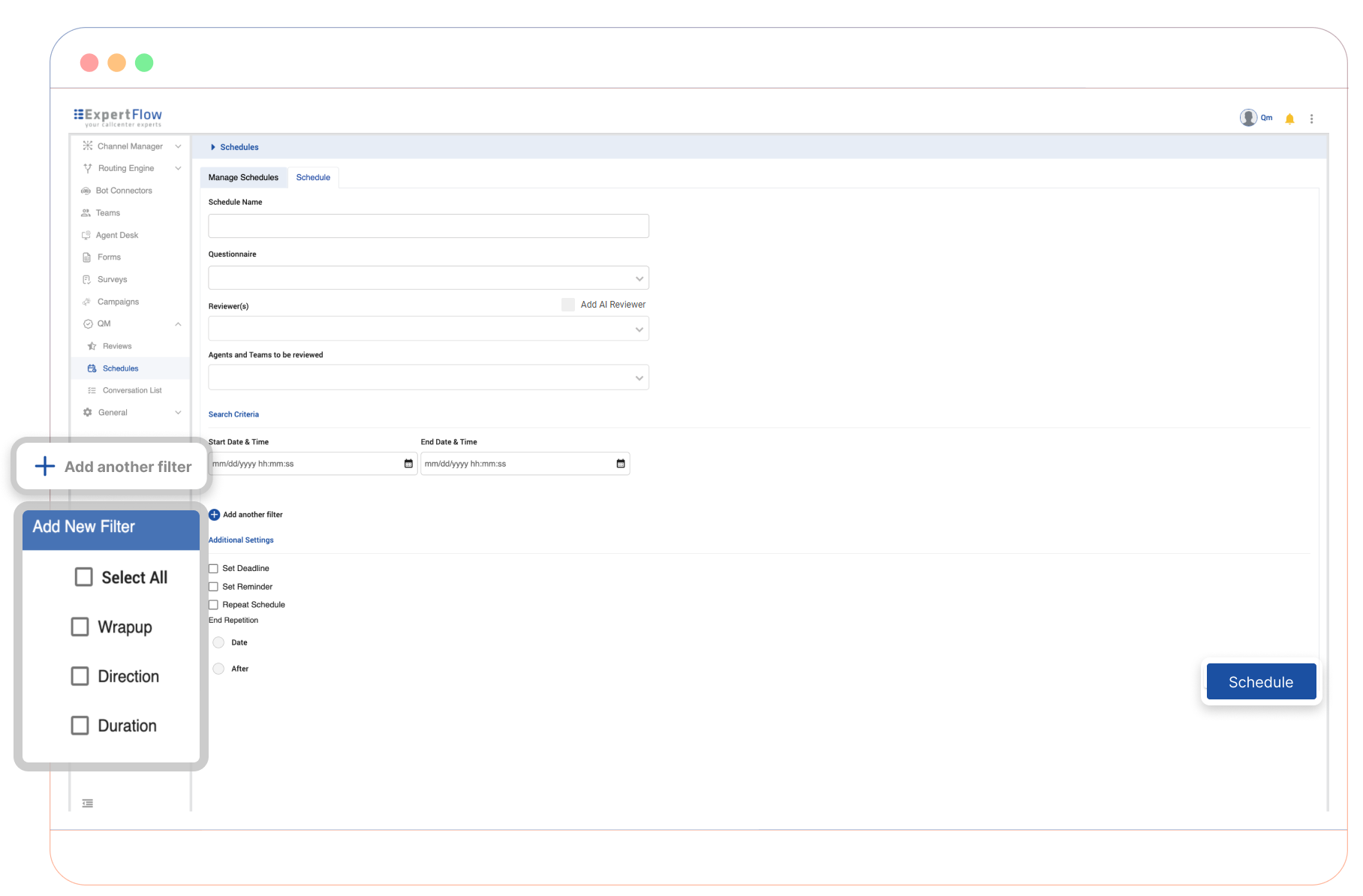
The Review Scheduler empowers Quality Managers to automate the evaluation process through highly configurable rules. Schedules can be created based on agent groups, interaction metadata (such as call duration, wrap-up codes, or direction), and linked evaluation forms. Managers can assign reviewers, define deadlines, and configure automated reminders to ensure timely completion. Recurring schedules automatically assign new conversations that meet selected criteria, streamlining the QA process and reducing manual workload.
-
Automated Selection: Create one-time or recurring schedules that automatically pull conversations based on specific metadata.
-
Targeted Assignments: Link specific evaluation forms and assign designated reviewers to ensure the right people are grading the right interactions.
-
Accountability Tools: Set hard deadlines and automated reminders to maintain a high completion rate across your QA team.
Review Tracker
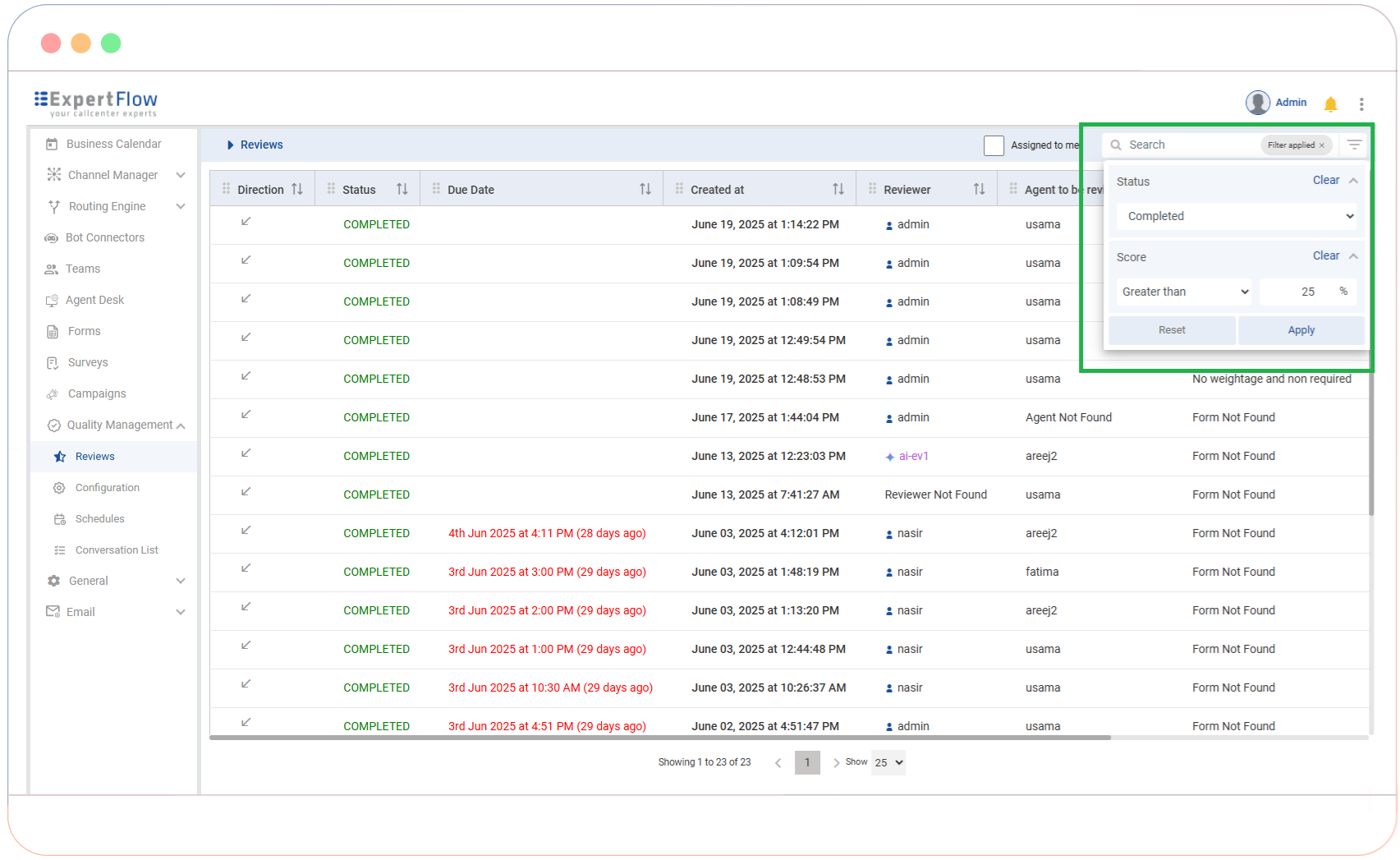
The Review Tracker serves as a centralized command center for managing the end-to-end evaluation lifecycle. By providing a role-based workspace, it ensures that Quality Managers maintain high-level oversight while Evaluators remain focused on their specific assignments.
It allows for filtering, tracking, and initiating reviews directly from one place. By utilizing Advanced Filtering, Quality Managers can instantly isolate reviews based on Status or Evaluation Score to identify coaching opportunities. The Integrated "Start Review" Workflow provides a side-by-side workspace for simultaneous interaction analysis and scoring, while Personalized Views (such as the “Assigned to Me” toggle) allow Evaluators to filter out noise and focus strictly on their immediate responsibilities.
Role-Based Workspaces
To streamline the user experience, the interface dynamically adjusts based on the user's permissions:
-
Quality Managers: Gain a comprehensive "birds-eye view" of all team evaluations. Managers can track progress across the entire organization, monitor evaluator workloads, and audit final scores to ensure calibration and consistency.
-
Evaluators: A focused, "distraction-free" view containing only assigned tasks. This view prioritizes upcoming deadlines and pending evaluations to ensure timely completion.
Monitoring & Metadata
The tracker displays key data points to help users prioritize their workflow at a glance:
|
Field |
Description |
|---|---|
|
Status |
Real-time tracking: Pending, In Progress, or Completed. |
|
Due Date |
Clear visibility of deadlines to prevent backlogs. |
|
Evaluation Form |
Identifies the specific scorecard applied to the interaction. |
|
Agent / Reviewer |
Identifies who is being evaluated and who is conducting the review. |
|
Score |
The final outcome, visible immediately upon submission for quick analysis. |
🖥️ Unified Evaluation Workspace
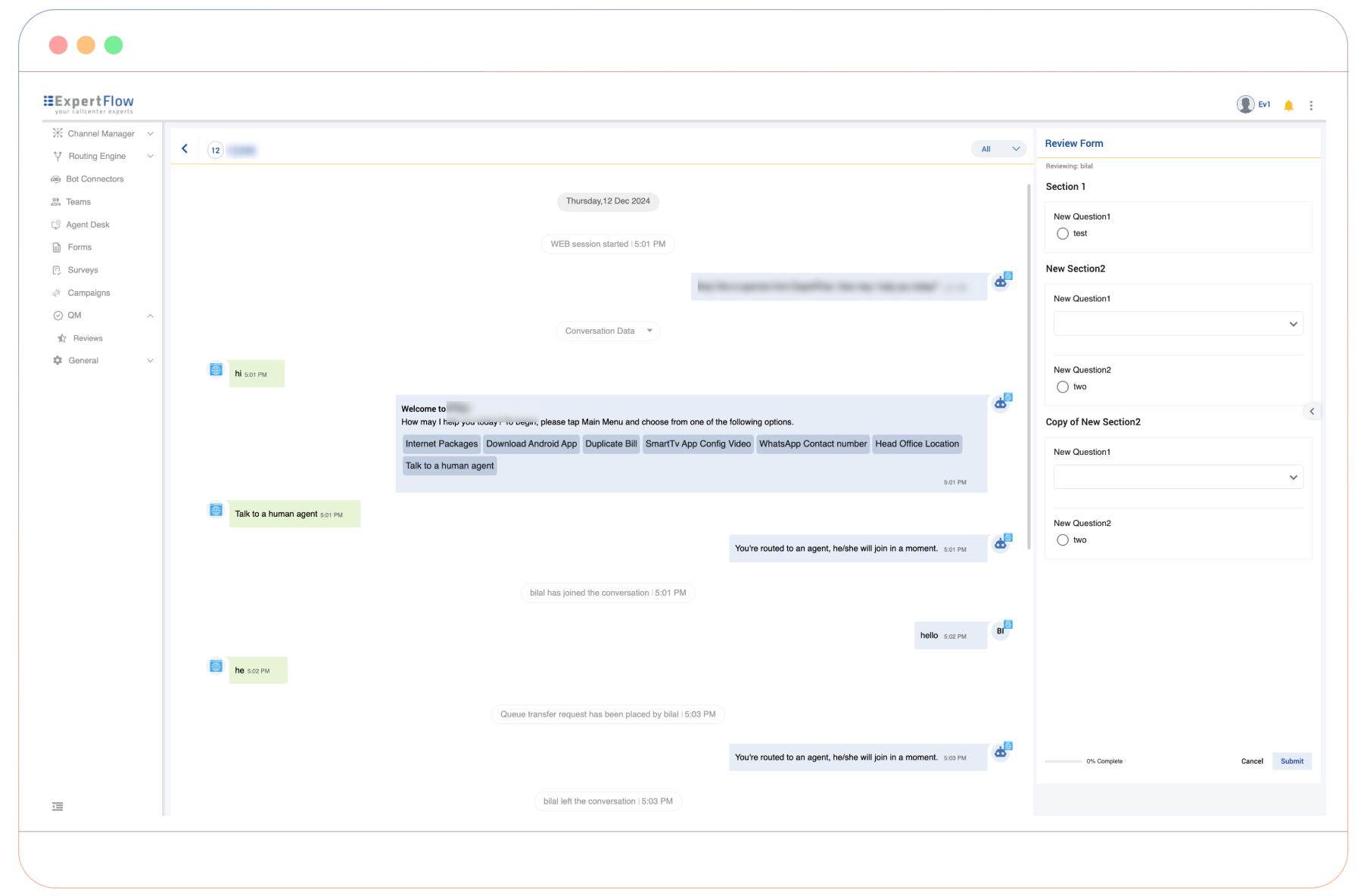
To maximize productivity, the workspace uses a split-screen layout. The interaction history including chat transcripts, email threads, and voice recordings occupies the main workspace while the Evaluation Form remains anchored on the right. Evaluators scroll through transcripts or listen to audio while simultaneously filling out the form. This eliminates the need to toggle between different tabs or windows.
Real-Time Performance Alerts
Define the performance threshold that triggers alerts for low-scoring evaluations. This ensures that Quality Managers are promptly notified of conversations requiring immediate attention. The business can manage low-scoring evaluation alerts, sent to Quality Managers, either in real-time for individual reviews or as bulk summaries at set intervals. All alert settings can be managed through a dedicated configuration tab, offering flexibility and control over notification preferences.
Instant Performance Feedback for Agents
This feature provides agents with immediate visibility into their performance directly within the Agent Desk. When a conversation evaluation falls below a configurable score threshold, the system triggers an instant notification to ensure the agent is informed of low-scoring interactions in real-time. Instead of waiting for a manual coaching session, agents can simply click the notification for instant access to the specific conversation.
Currently, the notification directs the agent to the conversation view to review the interaction. Direct visibility into the detailed evaluation questionnaire and specific question-level scores is part of our upcoming Roadmap, which will further integrate detailed evaluator feedback into the agent's workflow.
Audit Logging & Compliance
Expertflow Quality Management maintains a comprehensive audit trail to ensure operational transparency and data integrity. Every significant interaction, whether it is a configuration change by an administrator or a review submission by an evaluator, is captured in real-time to support internal security policies and external compliance audits.
Quality Management audit logs are integrated into the Centralized Audit Logging Capability across the Expertflow CX platform. This ensures that QM events are unified with broader system activities, providing a single source of truth for security teams and a standardized format for cross-platform auditing.
Traceable Actions
The system automatically generates an audit entry for the following activities:
-
Review Management: Full tracking of the lifecycle of a Review, including creation, updates, state changes (e.g., from Draft to Submitted), and deletions.
-
Schedule Management: Monitoring of all changes made to evaluation schedules.
-
System Configuration: Recording all administrative changes within the QM Admin panel to maintain a record of system-wide setting adjustments.
Data Points Captured
Each log entry provides a granular view of the "Who, What, When, and Where" of an action.
|
Field |
Business Purpose |
|---|---|
|
User Identity |
Records both the |
|
Action Type |
Categorizes the event (CREATE, UPDATE, DELETE) to identify the nature of the change. |
|
Resource Details |
Pinpoints exactly which item was affected (e.g., a specific Team or Schedule ID). |
|
Origin IP |
Logs the source IP address to verify the location and security of the request. |
|
Contextual Data |
Captures the specific data changes (e.g., updated names or settings) for historical comparison. |
Audit Log Dashboard
To provide stakeholders with an intuitive and powerful way to monitor system activity, the Audit Log Dashboard leverages the OpenSearch framework. This enables real-time search, complex filtering, and visual analytics for all Quality Management activities.
Reports
Expertflow Quality Management provides comprehensive reporting tools to help supervisors and stakeholders transform raw evaluation data into actionable business intelligence. Through a combination of visual trends and detailed tabular data, management can monitor operational health, identify coaching opportunities, and ensure that quality standards are consistently met.
-
Evaluation Volume: Tracks the lifecycle of reviews (Planned, In Progress, Completed) over time to monitor workflow productivity and target attainment.
-
Skills Assessment: Measures agent and team performance against specific evaluation forms to identify core strengths and targeted skill gaps.
-
Evaluator Comparison: Compares how different evaluators score the same interaction, ensuring scoring alignment and calibration across the QM team.
-
Team Comparison: Analyzes performance trends across multiple teams, with the ability to drill down into specific question groups or individual metrics.
-
Agent & Team Leaderboard: Ranks performance based on average scores and review volume, providing a clear view of top performers and coaching needs.
Cisco Integration
QM integrates with Cisco (UCCE and UCCX) to create conversations (with their relevant activities/ recordings) for calls handled on Cisco Finesse and exposes APIs for other third-party Contact Centres.
Limitations
Channel-Specific Accuracy: AI evaluation accuracy may vary across channels. Further validation is ongoing for SMS, Voice, and WhatsApp interactions.
Long Messages: Longer emails may exceed the current input-length limit and may not be evaluated successfully. Similar limitations may apply to lengthy chat conversations.
Multi-Channel Conversations: Conversation s combining multiple channels, such as Voice and Chat, require further validation to ensure consistent evaluation accuracy.
Message Delivery Status: AI evaluation currently processes available conversation content without considering message delivery or receipt status.
Long Conversations: Evaluation accuracy may vary for lengthy conversations, particularly when relevant content occurs later in the interaction.
Non-Text Content: Files, attachments, images, and other non-text message types have not yet been fully validated for AI-based evaluation.