
Requirement
Call Progress Analysis is required for outbound campaign calls to determine whether the answering party is:
-
Human
-
Voicemail
-
Answering machine
-
Other machine-based responses
This helps the dialer decide whether to connect the call to an agent, drop it, retry later, or route it to voicemail automation.
Prerequisites
|
Item |
Recommended |
Installation guide |
|---|---|---|
|
Media Server |
Latest version |
|
|
CX Dialer |
5.1 |
3. Implementation & Installation Workflow
Step 1: Clone the AMD Module
Clone the mod_amd source repository:
git clone https://github.com/seanbright/mod_amd
Step 2: Move Source Code to Build Directory
Move the cloned module into the FreeSWITCH source location:
mv mod_amd /usr/src/
Step 3: Set Build Environment
Export the pkg-config path before compilation:
export PKG_CONFIG_PATH=/usr/lib/pkgconfig/
Step 4: Update Makefile
Open the module Makefile:
vi /usr/src/mod_amd/Makefile
Locate the following line:
MODCFLAGS = -Wall -Werror
Comment it out:
# MODCFLAGS = -Wall -Werror
This prevents compilation failure caused by warning-level issues.
Step 5: Build the Module
Navigate to the module directory and compile:
cd /usr/src/mod_amd
make
Step 6: Deploy the Compiled Module
Move the generated shared object file to the FreeSWITCH modules directory:
mv mod_amd.so /usr/lib/freeswitch/mod/
4. AMD Configuration
Create the AMD configuration file:
vi /etc/freeswitch/autoload_configs/amd.conf.xml
Add the following configuration:
<configuration name="amd.conf" description="mod_amd Configuration">
  <settings>
    <param name="silence_threshold" value="256"/>
    <param name="maximum_word_length" value="5000"/>
    <param name="maximum_number_of_words" value="3"/>
    <param name="between_words_silence" value="50"/>
    <param name="min_word_length" value="100"/>
    <param name="total_analysis_time" value="5000"/>
    <param name="after_greeting_silence" value="800"/>
    <param name="greeting" value="1500"/>
    <param name="initial_silence" value="2500"/>
  </settings>
</configuration>
5. Parameter Tuning Recommendations
The AMD parameters should be tuned based on the expected answering behavior in your telephony environment.
Common tuning areas
-
Initial silence → Time to wait before speech starts
-
Greeting length → Helps detect long voicemail greetings
-
Maximum words → Useful for distinguishing human “hello” vs voicemail prompt
-
Post-greeting silence → Helps confirm voicemail beep or pause
It is recommended to validate these values against:
-
Local telecom carriers
-
PSTN routing behavior
-
Regional voicemail systems
-
Customer answering patterns
6. Load the Module in FreeSWITCH
Open the FreeSWITCH CLI:
fs_cli
Load the AMD module:
load mod_amd
To verify successful loading:
show modules
7. Dialplan Integration
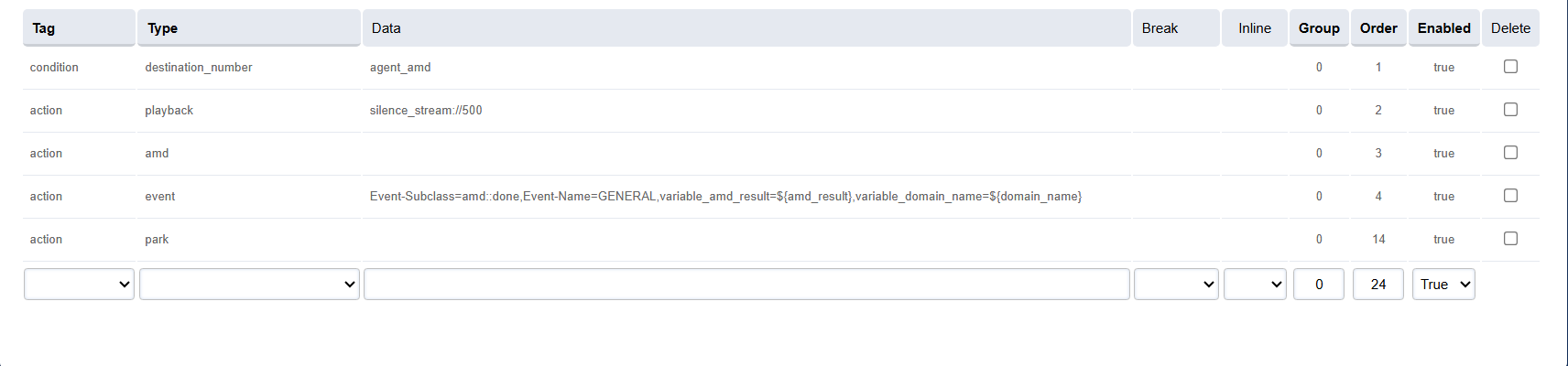
Run the AMD application during outbound calls by adding it into the dialplan of the respective domain.
8. Enable Automatic Module Loading on Restart
To ensure the AMD module loads automatically whenever:
-
FreeSWITCH service restarts
-
The VM/server reboots
-
The service recovers after downtime
-
Systemd restarts FreeSWITCH after failure
the module must be added to the FreeSWITCH module load configuration.
Step 1: Edit modules.conf.xml
Open the module configuration file:
vi /etc/freeswitch/autoload_configs/modules.conf.xml
Add the following line inside the <modules> section:
<load module="mod_amd"/>
Example:
<configuration name="modules.conf" description="Modules">
  <modules>
    <load module="mod_commands"/>
    <load module="mod_sofia"/>
    <load module="mod_amd"/>
  </modules>
</configuration>
Step 2: Reload Module Configuration
Apply the configuration without restarting the server:
fs_cli -x "reloadxml"
Step 3: Validate Auto-Load
Restart FreeSWITCH:
systemctl restart freeswitch
Then verify:
fs_cli -x "show modules" | grep mod_amd
Expected output:
mod_amd
This confirms the module is now part of the automatic startup sequence.