Skip table of contents

Survey Message

Node

Survey Message Node

Description

The Survey Message deb-frontend.expertflow.com_conversation-studio_.png node can be used to send survey messages to the customer

This node can be placed at any stage of the controller flow, e.g., when an agent leaves, when chat ends. For further details, check the control flow. Survey displays and then removes all channel sessions.

Inputs

Input Details

Form

The form to be sent to the customer

Message

A custom message to be sent to the customer along with the link to the form.

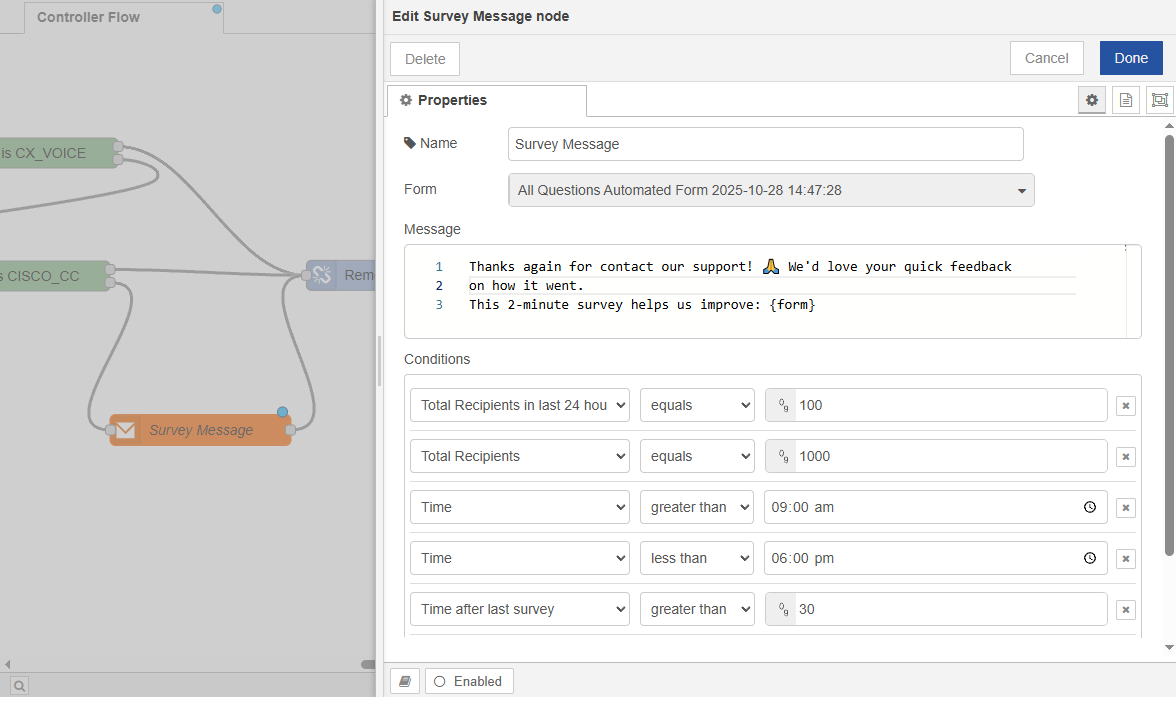
Conditions

The list of conditions that must be satisfied for the survey to be sent to the customer.

  • Total number of surveys you want to receive in 24 hours.

  • Number of recipients (Total number of surveys you want to receive).

  • Set time limit: The Survey can be designed to be sent in a set time frame. For example, send the survey only from 9:00 AM to 6:00 PM.

  • Waiting time (in seconds) before sending the next survey to the same customer.

image-20251029-113913.png

Survey Message Node Example 1.0

JavaScript errors detected

Please note, these errors can depend on your browser setup.

If this problem persists, please contact our support.