
This document covers all the flows that the Conversation Studio has by default on the fresh deployment. A flow is triggered whenever the conversation studio receives the corresponding CIM event from Conversation Manager. For example, whenever Conversation Studio receives AGENT_MRD_INTERRUPTED the flow Agent MRD Interrupted will be triggered.
Default Conversation Flows
1. Agent MRD Interrupted
Whenever the MRD is interrupted, AGENT_MRD_INTERRUPTED event is published. Conversation Manager calls the Conversation Studio Controller API with this intent, and as a result, the flow is triggered.
From release 4.10.6 onwards, the All Agents node has been replaced with a new node, “On MRD Interrupted,” as visible in the figure below. This node supports the action to put a conversation on hold.
Please add this node in place of “Remove All Agents” and then open the UI of this node and select one of the actions (“Remove All Agents”, “Put On Hold”) that you want for Interrupted Conversations.

|
Node |
Description |
|---|---|
|
Agent MRD Interrupted |
This is the INIT node, which is invoked by the controller when its endpoint is called by the Conversation Manager. Input: For its payload, please refer to this. Output: It passes the control to the next node, which is "Check Interrupted MRD Type". |
|
Check Interrupted MRD Type |
This node checks if the MRD, which is interrupted, is of the same type or not as provided in the input. Input: "CX_VOICE" Output: In case if the MRD is not of "CX_VOICE" type, the control flows to the next node. |
|
Check Interrupted MRD Type |
This node checks if the MRD which is interrupted is of the same type or not as provided in Input. Input: "CISCO_CC" Output: In case if the MRD is not of "CISCO_CC" type, the control flows to the next node on false switch, otherwise the flow passes to the true switch. |
|
Remove All Agents |
This node passes the action to REMOVE_ALL_AGENTS with the reason code specified as input. The controller then calls the Conversation Manager API to execute the action. Input: "MRD_INTERRUPTED" Output: Passes the action to the controller to REMOVE_ALL_AGENTS with the reason "MRD_INTERRUPTED". |
2. Agent SLA Expired
Whenever the Agent SLA is expired, AGENT_SLA_EXPIRED event is published. Conversation Manager calls the Conversation Studio Controller API with this intent, and as a result this flow is triggered.
|
Node |
Description |
|---|---|
|
Agent SLA Expired |
This is the INIT node, which is invoked by the controller when its endpoint is called by Conversation Manager with the intent "AGENT_SLA_EXPIRED". Input: The payload received in request. Output: It passes the control to the next node "Check If Room Is Private". |
|
Check If Room Is Private |
This is a condition node which passes program to the TRUE path if room mode is "PRIVATE", otherwise to the FALSE path. Input: N/A Output: Passes the program flow to the FALSE path, which invokes the next flow which is "Remove All Agents" |
|
Remove All Agents |
This node sets the action to REMOVE_ALL_AGENTS with the reason code specified in the input. Controller then calls the Conversation Manager API to execute the action. Input: "SLA_EXPIRED" Output: Passes the action to the controller to REMOVE_ALL_AGENTS with the reason "SLA_EXPIRED". |
3. Agent Subscribed
Whenever the Agent Subscribes a conversation, AGENT_SUBSCRIBED event is published. Conversation Manager calls the Conversation Studio Controller API with this intent, and as a result this flow is triggered.
|
Node |
Description |
|---|---|
|
Agent Subscribed |
This is the INIT node, which is invoked by the controller when its endpoint is called by Conversation Manager with the intent "AGENT_SUBSCRIBED". Input: The payload received in request. Output: It passes the control to the next node "Check If Room Is Private". |
|
Check If Room Is Private |
This is a condition node which passes program to the TRUE path if room mode is "PRIVATE", otherwise to the FALSE path. Input: N/A Output: If room is not private, continues to check customer presence and external gadget actions. |
|
Check If Customer Is Present |
Checks if a customer is present in the conversation. Input: N/A Output: If customer is present, changes bot role to ASSISTANT. |
|
Change Bot Role |
Changes the Bot Role to Assistant. Input: Role "ASSISTANT" Output: Calls the Conversation Manager API to change the bot role to ASSISTANT. |
|
Open External Gadget |
Open up the External Widget. Input: Agent "CIM_EVENT", Title "codeacademy", URL "https://www.codecademy.com/learn/learn-how-to-code" Output: Calls the Conversation Manager API to open external gadget. |
4. Agent Unsubscribed
Whenever the agent is unsubscribed, AGENT_UNSUBSCRIBED event is published. Conversation Manager calls the Conversation Studio Controller API with this intent, and as a result this flow is triggered.
|
Node |
Description |
|---|---|
|
Agent Unsubscribed |
This is the INIT node, which is invoked by the controller when its endpoint is called by Conversation Manager with the intent "AGENT_UNSUBSCRIBED". Input: The payload received in request. Output: It passes the control to the next node "Check If Room Is Private". |
|
Check If Room Is Private |
This is a condition node which passes program to the TRUE path if room mode is "PRIVATE", otherwise to the FALSE path. Input: N/A Output: If room is not private, continues to check unsubscribed agent role. |
|
Check Unsubscribed Agent Role |
Checks if the unsubscribed agent has PRIMARY role. Input: Role "PRIMARY" Output: If agent has PRIMARY role, checks unsubscription reason. |
|
Check Agent Unsubscription Reason |
Checks if the unsubscription reason is "AGENT_DISCONNECTED". Input: Reason "AGENT_DISCONNECTED" Output: If reason matches, removes channel session. Otherwise, continues to other checks. |
|
Remove Channel Session |
Removes the CX_VOICE Channel Session. Input: Channel "CX_VOICE", Reason "FORCE_CLOSED" Output: Calls the Conversation Manager API to execute the action to remove the CX_VOICE channel session with FORCE_CLOSED reason. |
|
Check If Customer Is Present |
Checks if a customer is present in the conversation. Input: N/A Output: If customer is present, changes bot role to PRIMARY. |
|
Change Bot Role |
Changes the bot role to PRIMARY. Input: Role "PRIMARY" Output: Calls the Conversation Manager API to execute the action to change the bot role to PRIMARY. |
|
Check Routing Mode |
Checks if routing mode is set to "PUSH". Input: Routing Mode "PUSH" Output: If routing mode is PUSH, checks various unsubscription reasons including AGENT_DISCONNECTED, MRD_INTERRUPTED, SLA_EXPIRED, and FORCED_LOGOUT_BY_SUPERVISOR. In any of the above case, call the FIND_AGENT subflow. |
5. Channel Session Expired
Whenever the channel session is expired, CHANNEL_SESSION_EXPIRED event is published. Conversation Manager calls the Conversation Studio Controller API with this intent, and as a result this flow is triggered.
|
Node |
Description |
|---|---|
|
Channel Session Expired |
This is the INIT node, which is invoked by the controller when its endpoint is called by Conversation Manager with the intent "CHANNEL_SESSION_EXPIRED". Input: The payload received in request. Output: It passes the control to the next node "Remove Channel Session". |
|
Remove Channel Session |
Removes the channel session passed in the CIM Event. Input: Channel passed in "CIM_EVENT", Reason "FORCE_CLOSED" Output: Calls the Conversation Manager API to remove the channel session passed by Conversation Manager due to expiration. |
6. Channel Session Started
Whenever the channel session starts, CHANNEL_SESSION_STARTED0 event is published. Conversation Manager calls the Conversation Studio Controller API with this intent, and as a result this flow is triggered.
|
Node |
Description |
|---|---|
|
Channel Session Started |
This is the INIT node, which is invoked by the controller when its endpoint is called by Conversation Manager with the intent "CHANNEL_SESSION_STARTED". Input: The payload received in request. Output: It passes the control to the next node "Check If Room Is Private". |
|
Check If Room Is Private |
This is a condition node which passes program to the TRUE path if room mode is "PRIVATE", otherwise to the FALSE path. Input: N/A Output: If room is not private, continues to check channel type. |
|
Check Channel Type |
Checks if channel type is "CX_VOICE" for LAST_USED session. Input: Channel Type "CX_VOICE", Session "LAST_USED" Output: If not CX_VOICE, continues to check CISCO_CC. |
|
Check Channel Type |
Checks if channel type is "CISCO_CC" for LAST_USED session. Input: Channel Type "CISCO_CC", Session "LAST_USED" Output: If not CISCO_CC, continues to check latest intent. |
|
Check Latest Intent |
Checks if the latest intent is set to "EMPTY". Input: Intent "EMPTY" Output: If intent is empty, sends welcome message. |
|
Plain Message |
Sends a welcome message to the customer. Input: "Hey! this is sparrow from ExpertFlow. How may i help you today?" Output: Calls the Conversation Manager API to execute the action to send the welcome message. |
7. Conversation Paused
Whenever the Conversation is paused, CONVERSATION_PAUSED event is published. Conversation Manager calls the Conversation Studio Controller API with this intent, and as a result this flow is triggered.
|
Node |
Description |
|---|---|
|
Conversation Paused |
This is the INIT node, which is invoked by the controller when its endpoint is called by Conversation Manager with the intent "CONVERSATION_PAUSED". Input: The payload received in request. Output: It passes the control to the next node "Plain Message". |
|
Plain Message |
Sends a message informing the customer about conversation pause. Input: "The conversation is currently paused by the agent. We appreciate your patience." Output: Pause notification message sent. |
8. Conversation Started
Whenever the conversation is started, CONVERSATION_STARTED event is published. Conversation Manager calls the Conversation Studio Controller API with this intent, and as a result this flow is triggered.
|
Node |
Description |
|---|---|
|
Conversation Started |
This is the INIT node, which is invoked by the controller when its endpoint is called by Conversation Manager with the intent "CONVERSATION_STARTED". Input: The payload received in request. Output: It passes the control to the next node "Check Latest Intent". |
|
Check Latest Intent |
Checks the latest intent with two possible values: "START_CONVERSATION" or "OTHERWISE". Input: Intent values ["START_CONVERSATION", "OTHERWISE"] Output: If intent is "OTHERWISE", continues to check channel type. |
|
Check Channel Type |
Checks if channel type is "CX_VOICE" for INITIATING session. Input: Channel Type "CX_VOICE", Session "INITIATING" Output: If not CX_VOICE, continues to check CISCO_CC. |
|
Check Channel Type |
Checks if channel type is "CISCO_CC" for INITIATING session. Input: Channel Type "CISCO_CC", Session "INITIATING" Output: If CISCO_CC, assigns bot with PRIMARY role. |
|
Assign Bot |
Assigns a bot with PRIMARY role to the conversation. Input: Role "PRIMARY" Output: Bot assigned successfully. |
9. Conversation Resumed
Whenever the conversation is resumed, CONVERSATION_RESUMED event is published. Conversation Manager calls the Conversation Studio Controller API with this intent, and as a result this flow is triggered.
|
Node |
Description |
|---|---|
|
Conversation Resumed |
This is the INIT node, which is invoked by the controller when its endpoint is called by Conversation Manager with the intent "CONVERSATION_RESUMED". Input: The payload received in request. Output: It passes the control to the next node "Plain Message". |
|
Plain Message |
Sends a message informing the customer about conversation resumption. Input: "The conversation is resumed now." Output: Resume notification message sent. |
10. Customer SLA Expired
Whenever the customer SLA is expired, CUSTOMER_SLA_EXPIRED event is published. Conversation Manager calls the Conversation Studio Controller API with this intent, and as a result this flow is triggered.
|
Node |
Description |
|---|---|
|
Customer SLA Expired |
This is the INIT node, which is invoked by the controller when its endpoint is called by Conversation Manager with the intent "CUSTOMER_SLA_EXPIRED". Input: The payload received in request. Output: It passes the control to the next node "Remove Channel Session". |
|
Remove Channel Session |
Removes the CIM_EVENT channel session due to customer inactivity. Input: Channel "CIM_EVENT", Reason "INACTIVITY" Output: Channel session removed. |
11. End Chat
Whenever the end_chat intent is received, conversation manager calls the Conversation Studio Controller API with this intent, and as a result this flow is triggered.
Note: This intent is not yet functional
|
Node |
Description |
|---|---|
|
End Chat |
This is the INIT node, which is invoked by the controller when its endpoint is called by Conversation Manager with the intent "end_chat". Input: The payload received in request. Output: It passes the control to the next node "Check If Room Is Private". |
|
Check If Room Is Private |
This is a condition node which passes program to the TRUE path if room mode is "PRIVATE", otherwise to the FALSE path. Input: N/A Output: If room is not private, removes channel session. |
|
Remove Channel Session |
Removes the LAST_USED channel session with FORCE_CLOSED reason. Input: Channel "LAST_USED", Reason "FORCE_CLOSED" Output: Channel session removed. |
12. No Response Entity
|
Node |
Description |
|---|---|
|
No Response Entity |
This is the INIT node, which is invoked by the controller when its endpoint is called by Conversation Manager with the intent "NO_RESPONSE_ENTITY". Input: The payload received in request. Output: It calls the Find Agent Subflow to find an available agent. |
|
Find Agent Subflow |
A reusable subflow that handles the agent finding process including data extraction, priority setting, queue determination, and agent dispatch. Input: Conversation context Output: Agent finding process completed. |
13. Participant Role Changed
Whenever the participant role is changed, PARTICIPANT_ROLE_CHANGED event is published. Conversation Manager calls the Conversation Studio Controller API with this intent, and as a result this flow is triggered.
|
Node |
Description |
|---|---|
|
Participant Role Changed |
This is the INIT node, which is invoked by the controller when its endpoint is called by Conversation Manager with the intent "PARTICIPANT_ROLE_CHANGED". Input: The payload received in request. Output: It passes the control to the next node "Check If Room Is Private". |
|
Check If Room Is Private |
This is a condition node which passes program to the TRUE path if room mode is "PRIVATE", otherwise to the FALSE path. Input: N/A Output: If room is not private, checks if all primary agents are in wrapup. |
|
Check If All Primary Agents Are In Wrapup |
Checks if all primary agents are currently in wrapup state. Input: N/A Output: If all primary agents are in wrapup, checks role changed reason. |
|
Check Role Changed Reason |
Checks if the role change reason is "DIRECT_TRANSFER". Input: Reason "DIRECT_TRANSFER" Output: If not direct transfer, checks for consult transfer. |
|
Check Role Changed Reason |
Checks if the role change reason is "CONSULT_TRANSFER". Input: Reason "CONSULT_TRANSFER" Output: If consult transfer, checks customer presence. |
|
Check If Customer Is Present |
Checks if a customer is present in the conversation. Input: N/A Output: If customer is present, checks channel type and potentially shows survey or removes sessions. |
|
Survey Message |
Displays a survey form to the customer. Input: Survey form JSON Output: Survey displayed and then removes all channel sessions. |
|
Remove Channel Session |
Removes ALL channel sessions with AGENT reason. Input: Channel "ALL", Reason "AGENT" Output: All channel sessions removed. |
14. Task Enqueued
Whenever the Task is enqueued, TASK_ENQUEUED event is published. Conversation Manager calls the Conversation Studio Controller API with this intent, and as a result this flow is triggered.
|
Node |
Description |
|---|---|
|
Task Enqueued |
This is the INIT node, which is invoked by the controller when its endpoint is called by Conversation Manager with the intent "TASK_ENQUEUED". Input: The payload received in request. Output: It passes the control to the next node "Check Active Media Direction". |
|
Check Active Media Direction |
Checks if the active media direction is "CONSULT". Input: Direction "CONSULT" Output: If not consult, checks active media MRD. |
|
Check Active Media MRD |
Checks if the active media MRD matches specific ID "62f9e360ea5311eda05b0242". Input: MRD "62f9e360ea5311eda05b0242" (CX-VOICE) Output: If not matching, sends routing message. |
|
Plain Message |
Sends a message informing the customer about agent routing. Input: "You're routed to an agent, he/she will join in a moment." Output: Routing notification message sent. |
15. Task State Changed
Whenever the task state changes, a TASK_STATE_CHANGED event is published. The Conversation Manager then calls the Conversation Studio Controller API with this intent, which triggers this flow. This flow contains two parallel sub-flows (3.1.x and 3.2.x) that are executed when the third node—Check Task Name Whose State Changed—evaluates to true. For more details, please refer to Figure 1 and the description provided afterward.

|
Node |
Description |
|---|---|
|
This is the INIT node, which is invoked by the controller when its endpoint is called by Conversation Manager with the intent "TASK_STATE_CHANGED". Input: The payload received in request. Output: It passes the control to the next node "Check If Room Is Private". |
|
This is a condition node which passes program to the TRUE path if room mode is "PRIVATE", otherwise to the FALSE path. Input: N/A Output: If room is not private, checks task name whose state changed. |
|
Checks if the task name whose state changed is "CLOSED". Input: Task Name "CLOSED" Output: If task is closed, checks reason for state change. |
|
3.1.1. Check Reason for Task State Change |
Checks if the reason for task state change is "FORCE_CLOSED". Input: Reason "FORCE_CLOSED" Output: If force closed, checks active media direction. |
|
3.1.2. Check Active Media Direction |
Checks if the active media direction is "DIRECT_CONFERENCE". Input: Direction "DIRECT_CONFERENCE" Output: If not direct conference, checks state changed task mode. |
|
3.1.3. Check State Changed Task Mode |
Checks if the state changed task mode is "QUEUE". Input: Mode "QUEUE" Output: If queue mode, sends technical issues message. |
|
3.1.4. Plain Message |
Sends a message informing the customer about technical issues. Input: "Your chat has ended due to technical issues. Please come back later at a convenient time." Output: Technical issues notification sent. |
|
3.2.1. Check Channel Type |
Checks if channel type is "CX_VOICE" for INITIATING session. Input: Channel Type "CX_VOICE", Session "INITIATING" Output: If not CX_VOICE, continues to the next node. |
|
3.2.2. Check Channel Type |
Checks if channel type is "CISCO_CC" for INITIATING session. Input: Channel Type "CISCO_CC", Session "INITIATING" Output: If not CISCO_CC, continues to the next node. |
|
3.2.3. Check Reason for Task State Change |
Checks if the reason for task state change is "NO_AGENT_AVAILABLE". Input: Reason "No Agent Available" Output: If true, continues to the next node. |
|
3.2.4. Check Active Media Direction |
Checks if the active media direction is "DIRECT_TRANSFER". Input: Direction "Direct Transfer" Output: If true, continues to the next node. |
|
3.2.5. Check State Changed Task Mode |
Checks if the state changed task mode is "AGENT". Input: Mode "Agent" Output: If true, continues to find agent subflow. |
|
3.2.6. Find Agent Subflow |
The find agent subflow that will route the conversation to find an agent. |
16. Find Agent
Whenever the a request is made to find an agent, FIND_AGENT event is published. Conversation Manager calls the Conversation Studio Controller API with this intent, and as a result this flow is triggered.
|
Node |
Description |
|---|---|
|
Find Agent |
This is the INIT node, which is invoked by the controller when its endpoint is called by Conversation Manager with the intent "FIND_AGENT". Input: The payload received in request. Output: It calls the Find Agent Subflow to find an available agent. |
|
Find Agent Subflow |
A reusable subflow that handles the agent finding process including data extraction, priority setting, queue determination, recent conversation checks, and agent dispatch. Input: Conversation context Output: Agent finding process completed. |
Find Agent Subflow Components
The Find Agent Subflow is a reusable component used by multiple flows that contains the following sequence:
|
Node |
Description |
|---|---|
|
Extract Data |
Extracts relevant data from the conversation context for agent finding. Input: Conversation payload Output: Extracted data passed to next node. |
|
Set Priority |
Sets the priority level for the agent finding request. Input: Extracted data Output: Priority set and passed to next node. |
|
Determine Queue |
Determines the appropriate queue for agent assignment based on conversation context. Input: Priority data Output: Queue determined and passed to next node. |
|
Check Recent Conversations |
Checks for recent conversations to potentially assign the same agent. Input: Queue data Output: Two paths - if recent agent found, sets last agent ID; otherwise continues to dispatch. |
|
Set Last Agent ID |
Sets the last agent ID if a recent conversation agent is found. Input: Recent agent data Output: Last agent ID set and continues to dispatch. |
|
Dispatch Find Agent |
Dispatches the agent finding request to the system. Input: All processed data Output: Agent finding request dispatched. |
17. Agent State Changed (Callback)

Whenever the Agent State Changed, an AGENT_STATE_CHANGED event is published. The conversation Manager then calls the Conversation Studio API with this intent, which triggers this flow.
|
Node |
Description |
|---|---|
|
This is the INIT node, which is invoked by the controller when its endpoint is called by Conversation Manager with the intent "AGENT_STATE_CHANGED". Input: The payload received in request. Output: It passes the control to the next node "Check If Agent State is NOT_READY with Reason Callback". |
|
This is a condition node which passes program to the TRUE path if Agent State is changed to “NOT_READY“ and the state change reason is “CALLBACK“, otherwise to the FALSE path. Input: State = “Not Ready“, Reason = “Callback“ Output: Routes the flow to “True“ or the “False“ path as per the condition checks mentioned above. |
|
This node takes the input “Callback“ and then does all the processing on the backend. If the state change reason is JavaScript
Conversation Manager then removes the specified agent from all the Input: Reason = “Callback“ Output: If task is closed, checks reason for state change. |
Modify the Agent Unsubscribed flow to Re-Route the Conversation:
Once the above flow is configured, please also make sure that the Callback Unsubscription reason node is added in the Agent Unsubscribed flow as shown in the Figure 17.2 below

Note: In case if you are using custom flows of Conversation Studio, please make sure that the Find Agent Subflow is configured to re-route the chat to the required appropriate queue(the original queue in this case).
Priority Configuration for Callback Rerouting
By default, conversations rerouted due to Callback are assigned the highest priority (10) to ensure they are handled promptly. This priority can be customized based on customer requirements.
Configuration Changes in Find Agent Subflow

Two new nodes have been added to the Find Agent Subflow to handle priority assignment:
1. Check if Reroute On Callback (Switch Node)
This node determines if the conversation is being rerouted due to an agent callback state change.
Configuration:
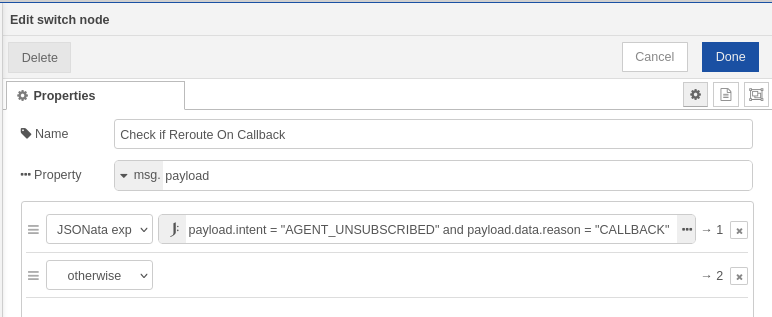
-
Add a new Switch node
-
Property Field:
payload -
Output Path 1:
-
Type: JSONata expression
-
Expression:
payload.intent = "AGENT_UNSUBSCRIBED" and payload.data.reason = "CALLBACK"
-
-
Output Path 2:
-
Type: otherwise
-
Purpose: Routes the flow to custom priority assignment node (Set Priority To 10 - Function Node) when the intent is AGENT_UNSUBSCRIBED with reason CALLBACK. Otherwise, it routes the flow to the default “Set Priority“ node, which sets the default priority (either 1, or sets the priority based on customer label)
2. Set Priority To 10 (Function Node)
This node assigns priority 10 to conversations matching the callback condition.
Configuration:
-
Add a new Function node
-
Function Body:
  node.log('Setting priority to 10 for AGENT_UNSUBSCRIBED with CALLBACK reason');
  msg.payload.priority = 10;
  return msg;
Purpose: Sets the conversation priority to 10 (highest priority) for callback-triggered rerouting.
Customizing Priority
To customize the priority value:
-
Modify the
Set Priority To 10function node -
Change the value
10to your desired priority level in the line:
-
Save and deploy the flow
Note: Priority values range from 1 (lowest) to 10 (highest).