
Use this guide to update the default Participant Role Changed flow in Conversation Studio so that when the primary agent leaves the chat, conversations on Email, Facebook, and Instagram are closed by removing the active channel sessions.
This change belongs in the default PARTICIPANT_ROLE_CHANGED flow. The goal is to extend the existing branch that already handles post-agent-exit behavior, so these digital channels do not remain open after the primary agent leaves.
When to use this change
-
Use it when the conversation should end after the primary agent exits.
-
Apply it for Email, Facebook, and Instagram channel types.
-
Place it in the branch of the flow that runs after the logic confirms the customer is present and the flow is ready to close the interaction.
Current flow context
According to the default flow, Participant Role Changed already includes logic such as:
-
Check If Room Is Private
-
Check If All Primary Agents Are In Wrapup
-
Check Role Changed Reason
-
Check If Customer Is Present
-
Survey Message
-
Remove Channel Session for closing sessions
This update adds channel-specific checks before the final close action.
Instructions
-
Open Conversation Studio and open the default flow named Participant Role Changed.
-
Find the branch that handles the case where the conversation should be closed after the participant role changes and the primary agent has left.
-
Locate the part of the flow after Check If Customer Is Present. This is the best place to add channel-specific checks before the final remove-session action.
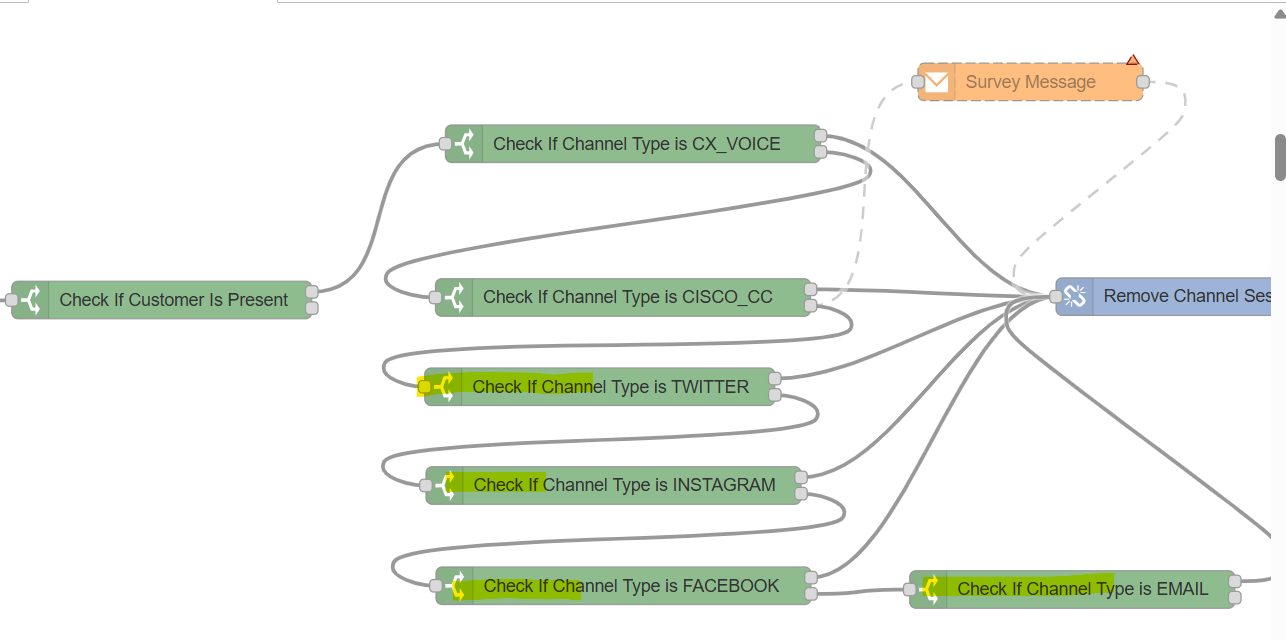
⚙️ Add the Email channel node
-
Add a new Check Channel Type node.
-
Configure it to evaluate the relevant conversation channel as EMAIL.
-
Connect the true path to a Remove Channel Session node.
-
Configure the Remove Channel Session node to remove the Email session for the conversation so the interaction closes cleanly.
⚙️ Add the Facebook channel node
-
Add another Check Channel Type node on the false path from the Email check.
-
Configure it to evaluate the channel as FACEBOOK.
-
Connect the true path to a Remove Channel Session node.
-
Configure that remove node to close the Facebook session for the active conversation.
⚙️ Add the Instagram channel node
-
Add a third Check Channel Type node on the false path from the Facebook check.
-
Configure it to evaluate the channel as INSTAGRAM.
-
Connect the true path to a Remove Channel Session node.
-
Configure that remove node to close the Instagram session for the active conversation.
🔀 Connect the fallback path
-
Review the false path from the Instagram check.
-
Connect it to the existing downstream behavior you want to preserve for all other channels.
-
If the intended behavior is to close all remaining supported channels too, connect it to the existing general Remove Channel Session node that removes all channel sessions with the configured reason.
Do not replace the existing role-change checks. Add the new channel checks inside the existing branch so the flow still honors the current conditions such as room privacy, transfer reason, and customer presence.
Recommended node sequence
The added branch can be structured like this:
Check If Customer Is Present → Check Channel Type = EMAIL → Remove Channel Session
False → Check Channel Type = FACEBOOK → Remove Channel Session
False → Check Channel Type = INSTAGRAM → Remove Channel Session
False → existing fallback behavior
Configuration notes
-
Use the same session selection pattern already used elsewhere in the default flows, typically based on the event or active conversation context.
-
Use the same closure reason style already used in your environment for agent-led closure.
-
If your existing branch already shows a survey before removal, keep the survey step before the channel removal nodes where required.
-
After saving, deploy the flow and validate each channel with a test conversation where the primary agent leaves.