
This guide explains how to configure an IVR-based outbound campaign in Expertflow CX. IVR campaigns dial contacts automatically and connect answered calls to an IVR script instead of a live agent.
Configuration overview:
-
CX Environment File — create
cx_env-{Domain}-{DN}.luaon the Media Server for your destination number. -
Outbound IVR Dialplan — create the dialplan that routes answered calls to
outboundIvr.lua.
Configuration
1. CX Environment Configuration File
Each outbound IVR destination number needs a matching environment file on the Media Server. The file name must follow this pattern:
cx_env-{Domain-Name}-{DN}.lua
|
Placeholder |
Description |
Example |
|---|---|---|
|
|
Media Server / tenant domain |
|
|
|
Destination number used in the outbound IVR dialplan |
|
Example path:
/usr/share/freeswitch/scripts/cx_env-chatsolution-6543.lua
Create the file
-
SSH into the Media Server and switch to root.
-
Create the file for your domain and destination number:
vi /usr/share/freeswitch/scripts/cx_env-chatsolution-6543.luaReplace
chatsolutionand6543with your domain and DN. -
Paste the following configuration:
local config = {}

local domain = session:getVariable("domain_name")
local cxFqdn = ""
if domain == "expertflow" then
    cxFqdn = "https://efcx4-voice.expertflow.com"  -- set Default Domain here
else
    cxFqdn = "https://" .. domain .. ".expertflow.com"  -- set Tenant based Domain here
end

config = {
    -- Set to NAME or ID depending on whether queue field contains name or ID of queue
    queueType = '',
    -- Name or ID of queue to reserve agents from
    queue = '',
    -- NOTE: Keeping queue and queueType as '' will cause CX to use the default queue set in the CX Voice channel

    -- FQDN of EF CX
    cxFqdn = cxFqdn,
    -- API of voice connector for reserving an agent
    -- Path of folder containing sound files that play during the IVR menu, DO NOT CHANGE
    ivr_prompts_folder = "/usr/share/freeswitch/sounds/ivr_prompts/",

    auth_enabled = false,
    auth_realm = "expertflow",
    client_secret = "ef61df80-061c-4c29-b9ac-387e6bf67052",
    client_id = "cim",
    username = "voice_auth",
    password = "1234"
}

return config
-
Save and exit (
Esc, then:wq). -
Verify the file:
cat /usr/share/freeswitch/scripts/cx_env-chatsolution-6543.lua
When to change variables
Create the file first. Only update values if your environment requires it.
|
Deployment |
What to change |
|---|---|
|
Multi-tenant (MTT) |
No configuration changes required. |
|
Single tenant |
Update only what differs in your environment — typically |
Do not change ivr_prompts_folder unless your Media Server uses a non-standard prompts path.
2. Outbound IVR Dialplan
Create a dialplan on the Media Server that routes answered outbound IVR calls to outboundIvr.lua.
The destination number in this dialplan (e.g. 6543) must match the {DN} used in the cx_env file created in Section 1.
-
Log in to the Media Server web interface.
-
Open Dialplan → Dialplan Manager.
-
Click Add to create a new dialplan.
-
Fill in the form:
-
Name =
outbound-ivr -
Condition 1 = destination_number with value
^(6543)$(replace6543with your DN if different) -
Action 1 = select the first item from the list (temporary; replace after saving)
-
-
Click Save, then re-open the dialplan.
-
Delete the temporary Action row (select the checkbox and click Save).
-
Add the following rows and save:
|
Tag |
Type |
Data |
Inline |
Group |
Order |
Enabled |
|---|---|---|---|---|---|---|
|
action |
set |
sip_h_X-Destination-Number=$1 |
true |
0 |
10 |
true |
|
action |
lua |
outboundIvr.lua |
|
0 |
20 |
true |
-
Set Context to global.
-
Set Domain to global.
-
Set Continue to False.
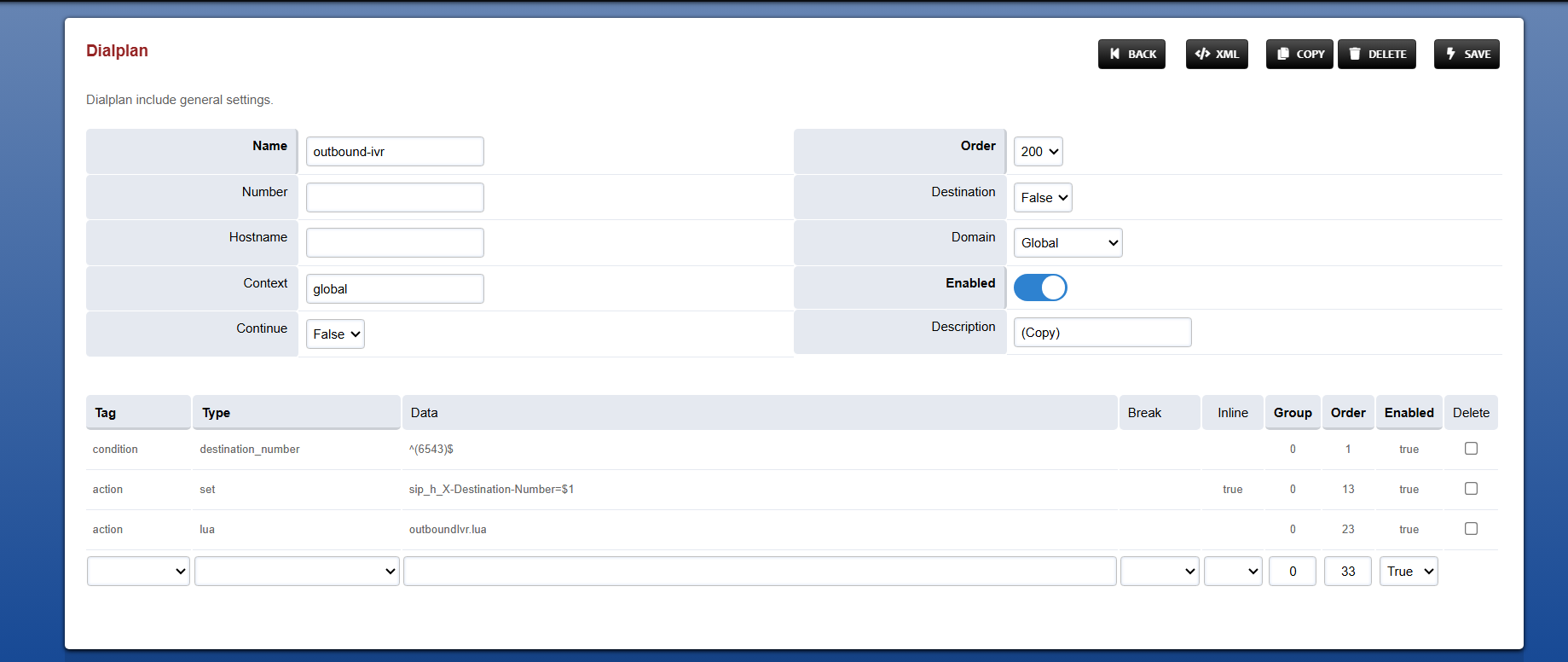
The configured dialplan should look like this:
Important
-
Ensure
outboundIvr.luais present under/usr/share/freeswitch/scripts. -
The destination number must be unique and must match the DN in the
cx_envfile and the number used by the dialer for IVR campaign calls. -
Related setup: Media Server Configurations for CX Voice