
|
Node |
Dial |
|---|---|
|
Description |
This node |
Overview
-
Takes a single contact (sent in by an upstream node) and schedules a voice call for them through the configured CX Voice channel.
-
Does not wait for the call to complete — it hands the request to the scheduling service and continues.
-
Later, the same node reports back what happened: live progress on one output, and the final delivery result on the other.
-
If the contact is missing, or does not have a usable phone number on file, the contact is skipped quietly — no call is scheduled and nothing is treated as an error.
-
The Dial node is only available on CX Voice campaigns. Opening it on another campaign type shows an unavailable message and runtime dials are skipped.
|
Category |
Inputs |
Outputs |
Default Label |
|---|---|---|---|
|
Channel Action |
1 |
2 |
Node name, or "Dial" if left blank |
Outputs
|
Output |
Label |
Carries |
|---|---|---|
|
1 |
Live Call Event |
Real-time updates about a call's progress as it happens (e.g. ANSWERING_MACHINE or HUMAN). |
|
2 |
Delivery Notification |
The final result of a previously placed call (e.g. delivered, failed), once the scheduling service reports it. |
Configuration Options
|
Setting |
Default |
What it does |
|---|---|---|
|
Name |
(blank) |
Optional label for the node. |
|
Channel |
First available CX Voice channel |
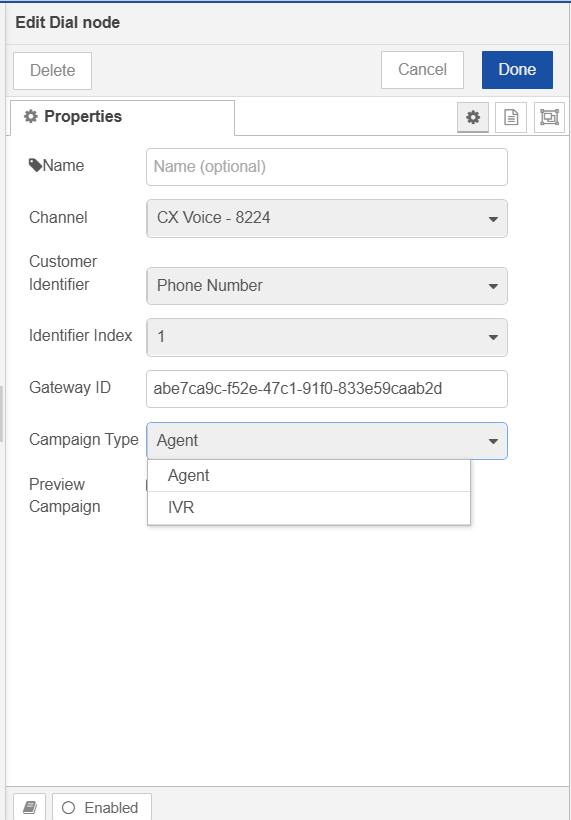
Which configured Voice channel/service to place the call from. Loaded automatically — only CX Voice channels are shown. |
|
Customer Identifier |
(from contact schema) |
Which field on the contact record holds the number to dial. Loaded from cx Customer contact schema fields marked as channel identifiers (e.g. mobile number, phone number). |
|
Identifier Index |
1st |
If that field can hold more than one value (e.g. several phone numbers), which one to use — 1st through 10th. |
|
Gateway ID |
System default |
Which telephony gateway (SIP) to route the call through. Defaults to a system-wide setting unless overridden here. |
|
Campaign Type |
Agent |
How the answered call is handled. Agent connects to a live agent path; IVR routes the call into an IVR menu. Selecting a type shows or hides the related fields below. |
|
IVR DN |
(blank / system default) |
Shown only when Campaign Type is IVR. The IVR dialed number / extension the call should be connected to (for example |
|
Preview Campaign |
Unchecked |
Shown only when Campaign Type is Agent. When checked, the Dial node sets |
Campaign Type Behavior
|
Campaign Type |
Fields used |
Scheduler impact |
|---|---|---|
|
Agent |
Gateway ID, Preview Campaign |
|
|
IVR |
Gateway ID, IVR DN |
|
What Happens When This Node Runs
-
For a normal incoming contact, the node checks that:
-
The flow's Dial config was saved for a CX Voice campaign (
outboundCampaignType = CX_VOICE) -
A contact is attached on
msg.outboundMetadata.contact.cxCustomerwith a valid_id -
That contact has a usable value in the configured Customer Identifier field at the selected Identifier Index
-
-
If any check fails, the contact is skipped — no call is scheduled. Missing contact/number cases are counted in metrics; a non–CX Voice Dial config is warned and skipped.
-
Otherwise, it builds a single voice schedule request for that contact (including Campaign Type, Gateway ID, IVR DN when IVR, and Preview Campaign on outbound metadata when Agent) and posts it to the scheduling service (
POST /scheduled-activities), then continues without waiting for the call itself. -
If the contact had previously been flagged for a retry (
scheduleAfter), that retry gauge is decremented once the contact is handed off again. -
Sometime later, the scheduling service reports the final call result — this is forwarded on the Delivery Notification output.
-
Separately, live progress updates for a call this node placed are forwarded on the Live Call Event output as they happen.
Pass-through Messages
|
Incoming |
Behavior |
|---|---|
|
|
Forwarded to output 2 (Delivery Notification). The temporary |
|
|
Forwarded to output 1 (Live Call Event). The temporary |
Prerequisites
-
The campaign linked to the flow must be type CX_VOICE.
-
At least one CX Voice channel must be configured in CCM.
-
For IVR campaigns, set a valid IVR DN before deploying.
-
For Agent preview dialing, enable Preview Campaign on the Dial node for PREVIEW campaign and disable for other type of campaign such as PREDICTIVE or PROGRESSIVE.