
This page applies from CX5.13.0. For CX5.12.0 and earlier, expand For CX5.12.0 and earlier below.
|
Node |
Init |
|---|---|
|
Description |
This node |

Overview
The Init node has a single responsibility:
Contact Delivery – When the node receives an input message, it pulls eligible synchronized contacts and sends them into the flow one at a time.
|
Category |
Inputs |
Outputs |
Default Label |
|---|---|---|---|
|
Contact Operations |
1 |
1 |
Node name, or "Init" if left blank |
Configuration Options
|
Setting |
Default |
What it does |
|---|---|---|
|
Name |
(blank) |
Optional label for the node |
|
Order |
Oldest First (FIFO) |
Controls contact selection order (FIFO / LIFO) |
|
Query |
(required) |
PromQL expression that defines how many contacts are pulled per execution |
Query (Contact Pull Logic)
The Query field controls how many contacts are pulled from the synchronized pool per execution of the node.
It can be configured in two ways:
-
Static value (e.g.,
1,5,10)-
Acts as a fixed batch size per execution
-
Commonly used for progressive or power-style pacing
-
-
Dynamic PromQL expression
-
Used for adaptive or predictive dialing behavior
-
Batch size changes based on real-time system metrics
-
Example Query
scalar(
  sum(
    1 +
    (
      clamp_min(
        1 /
        clamp_max(
          (
            # recentWeight * recentHitRate
            clamp_max(
              (
                (sum(increase(ob_contacts_sent_for_dialing_total{flowId="aa3cba4927c90d79"}[15m])) OR on() vector(0))
                / 10 # MIN_SAMPLE_SIZE_RECENT
              ),
              1
            )
            *
            (
              (sum(increase(ob_call_human_detected_total{flowId="aa3cba4927c90d79"}[15m])) OR on() vector(0))
              /
              clamp_min(
                (sum(increase(ob_contacts_sent_for_dialing_total{flowId="aa3cba4927c90d79"}[15m])) OR on() vector(0)),
                1
              )
            )

            +

            # (1 - recentWeight) * baseRate
            (
              1 -
              clamp_max(
                (
                  (sum(increase(ob_contacts_sent_for_dialing_total{flowId="aa3cba4927c90d79"}[15m])) OR on() vector(0))
                  / 10 # MIN_SAMPLE_SIZE_RECENT
                ),
                1
              )
            )
            *
            (
              # lifetimeWeight * lifetimeHitRate
              clamp_max(
                (
                  (sum(increase(ob_contacts_sent_for_dialing_total{flowId="aa3cba4927c90d79"}[30d])) OR on() vector(0))
                  / 20 # MIN_SAMPLE_SIZE_LIFETIME
                ),
                1
              )
              *
              (
                (sum(increase(ob_call_human_detected_total{flowId="aa3cba4927c90d79"}[30d])) OR on() vector(0))
                /
                clamp_min(
                  (sum(increase(ob_contacts_sent_for_dialing_total{flowId="aa3cba4927c90d79"}[30d])) OR on() vector(0)),
                  1
                )
              )

              +

              # (1 - lifetimeWeight) * DEFAULT_HIT_RATE
              (
                1 -
                clamp_max(
                  (
                    (sum(increase(ob_contacts_sent_for_dialing_total{flowId="aa3cba4927c90d79"}[30d])) OR on() vector(0))
                    / 20 # MIN_SAMPLE_SIZE_LIFETIME
                  ),
                  1
                )
              )
              * 0.5 # DEFAULT_HIT_RATE
            )
          ),
          1
        ),
        0
      )
      - 1
    )
    *
    # abandonSafetyFactor = 1 - (lifetimeAbandonRate / MAX_ALLOWED_ABANDON_RATE)
    clamp_max(
      clamp_min(
        1 -
        (
          (
            (sum(increase(ob_abandoned_calls_total{flowId="aa3cba4927c90d79"}[30d])) OR on() vector(0))
            /
            clamp_min(
              (sum(increase(ob_call_human_detected_total{flowId="aa3cba4927c90d79"}[30d])) OR on() vector(0)),
              1
            )
          )
          / 0.03 # MAX_ALLOWED_ABANDON_RATE
        ),
        0
      ),
      1
    )
  )
)
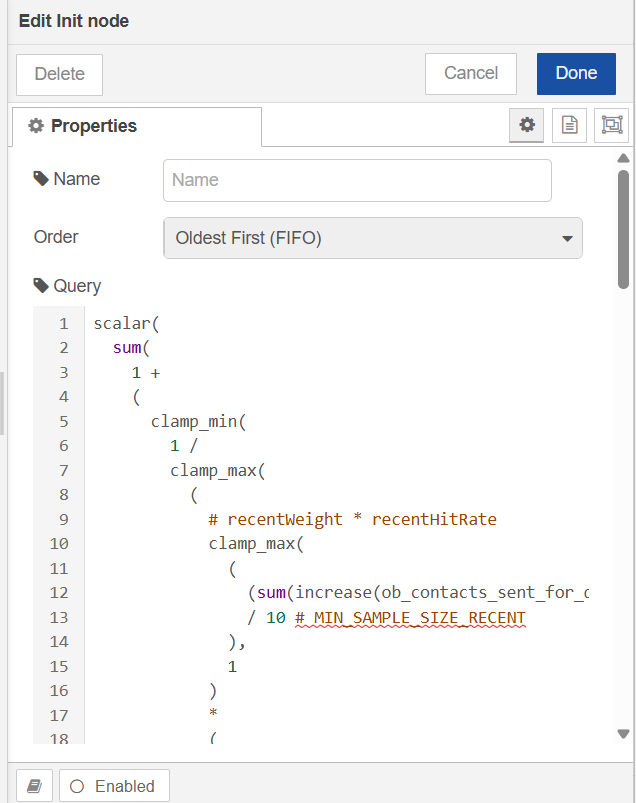
Configurable values in this formula:
|
Value |
Current |
Meaning |
|---|---|---|
|
Recent window |
|
Lookback for recent dial/hit rate |
|
|
|
How many recent dials before recent rate is fully trusted |
|
Lifetime window |
|
Lookback for lifetime dial/hit/abandon rates |
|
|
|
How many lifetime dials before lifetime rate is fully trusted |
|
|
|
Fallback hit rate when there is little/no history |
|
|
|
Abandon-rate cap used by the safety factor ( |
|
|
|
Campaign/flow this query is scoped to |
What This Query Does (High Level)
-
Dynamically controls contact throughput per execution
-
Reduces load when human detection increases
-
Applies penalty when abandonment rate exceeds threshold (3%)
-
Acts as a real-time campaign pacing / throttling mechanism
The PromQL formula sets how many contacts Init wants to pull; the result is rounded up to a whole number. For CX_Voice campaigns, that value is capped by the remaining allocated slot budget from Campaign Init (Governor) — Init only fetches up to what is still available and reduces the budget as contacts are consumed. For Non_CX_Voice campaigns, the formula is used directly with no slot cap.
If the query is invalid, evaluates to 0, or no contacts are fetched, Init does not send any contacts downstream. For CX_Voice, if an agent was already seized for this pulse, Init releases that agent so it can be used elsewhere.
What Happens When This Node Runs
When an input message reaches the Init node:
-
The PromQL query is executed
-
Result is rounded up to a whole number
-
This defines batch size for contact delivery
-
Eligible synchronized contacts are selected
-
Ordering is applied (FIFO / LIFO)
-
Each contact is emitted as a separate message
The node never pulls directly from CX Customers — only from synchronized campaign contacts.
Runtime Eligibility Check
Before sending, the Init node re-checks every contact, whether the campaign's contact source is a file or a filter. A contact that no longer qualifies is not sent into the flow.
For filter-based campaigns, this includes customers who no longer match the active filter due to:
-
filter definition update
-
customer attribute change
Such contacts are not sent into the flow.
Status Indicators
|
Status |
Meaning |
|---|---|
|
🔵 Blue ring |
Waiting for input |
|
🟡 Yellow ring |
Query evaluated to 0 contacts |
|
🟢 Green dot |
Contacts being processed/sent |
|
🔴 Red ring |
Missing configuration or runtime error |