
|
Node |
Check Seize Agent Event |
|---|---|
|
Description |
This node |

Overview
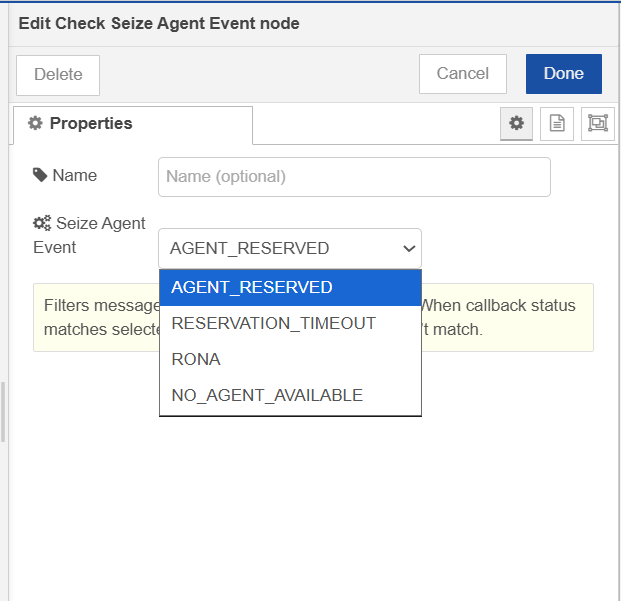
The Seize Agent node sends each reservation result as a separate, asynchronous message. The Check Seize Agent Event node sits downstream and acts as a router — it inspects the outboundMetadata.seizeResult.status field in each incoming message and compares it to the action you've selected.
-
Output 1 (True / Match): The message's status matches the selected action.
-
Output 2 (False / No Match): The message's status does not match.
This allows your flow to branch on specific reservation outcomes, such as handling a successfully reserved agent differently from a timeout or a no-agent-available result.
|
Category |
Inputs |
Outputs |
Default Label |
|---|---|---|---|
|
Contact Operations |
1 |
2 |
Node name, or "Check Seize Agent Event" if left blank |
Configuration Options
|
Setting |
Default |
Description |
|---|---|---|
|
Name |
(blank) |
Optional label shown on the node in the canvas. Falls back to |
|
Seize Agent Event |
|
The reservation status to match against. Select one from the dropdown. |
Available Actions
|
Value |
Meaning |
|---|---|
|
|
An agent was successfully reserved. |
|
|
The routing engine did not fulfill the reservation before the TTL expired. |
|
|
The reserved agent did not answer (Ring on No Answer) or has logged out. |
|
|
No eligible agent was available to fulfill the reservation request. |
How It Works
-
A message arrives from the Seize Agent node (or any node that populates
outboundMetadata.seizeResult.status). -
The node reads the
statusfield frommsg.outboundMetadata.seizeResult.status. -
It compares the status to the Seize Agent Event value configured on the node.
-
If they match → the message is sent to Output 1, and the node status updates to
Matched (n). -
If they don't match → the message is sent to Output 2, and the node status updates to
Not matched: n. -
If an unexpected error occurs, the node logs the error, sets a red error status, and calls
done(error).
Node Status
|
Status |
Meaning |
|---|---|
|
🟢 Green dot — |
The last message matched the selected action. |
|
⚪ Grey ring — |
The last message did not match. |
|
🔴 Red ring — |
An unexpected error occurred while processing a message. Check the Node-RED logs for details. |
Note: Counters (
n) are in-memory and reset when the flow is redeployed or Node-RED restarts.
Outputs
|
Output |
Label |
When it fires |
|---|---|---|
|
1 |
True (Match) |
|
|
2 |
False (No Match) |
|
The original msg object is forwarded unchanged in both cases. No fields are added or removed.
Input Message Structure
This node expects messages in the format produced by the Seize Agent node:
{
  "outboundMetadata": {
    "seizeResult": {
      "status": "AGENT_RESERVED",
      "agent": { "...": "..." },
      "flowId": "..."
    },
    "seizeId": "<node id>"
  }
}
If msg.outboundMetadata.seizeResult.status is missing or undefined, the status comparison will evaluate to false and the message will be routed to Output 2.