|
Node |
End Survey |
|---|---|
|
Description |
This node |
Overview
-
Sits at the end of a survey flow, closing out the conversation once the customer is done answering.
-
Records the survey as completed so it shows up correctly wherever survey submissions are tracked.
-
Cleans up after itself — removes the timeout and scheduling state that were keeping the survey conversation "alive" while waiting for replies, so nothing is left running in the background once the survey is over.
-
Always passes the message on afterward, even if there was nothing to clean up.
|
Category |
Inputs |
Outputs |
Default Label |
|---|---|---|---|
|
Survey |
1 |
1 |
Node name, or "End Survey" if left blank |
Configuration Options
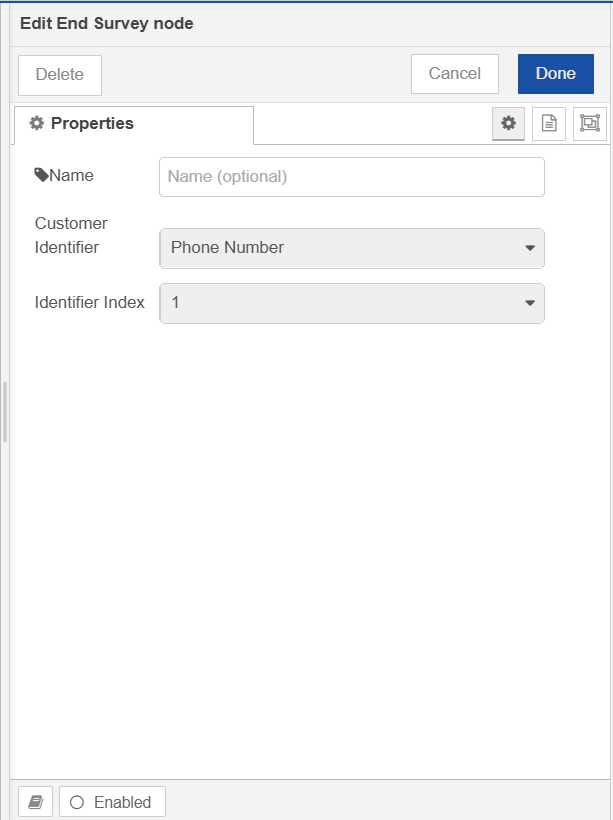
|
Setting |
Default |
What it does |
|---|---|---|
|
Name |
(blank) |
Optional label for the node. |
|
Customer Identifier |
phoneNumber |
Which field on the contact record holds the value used to identify this conversation. |
|
Identifier Index |
1st |
If that field can hold more than one value, which one to use — 1st through 10th. |
Configuration setup
-
The Customer Identifier list is loaded live from your contact schema configuration, the same as on the Dial and Form Message nodes.
-
If that list fails to load, you'll see "Could not load configuration" instead of the usual fields.
-
To end the survey, it need to be as same as used in Form Message node.
What Happens When This Node Runs
-
Checks that a contact is attached to the incoming message, and that it has a usable value in the configured identifier field. If either is missing, the message is quietly dropped — nothing is sent onward, and nothing is treated as an error.
-
Otherwise, looks for a form ID and conversation ID on the message (carried through from earlier in the survey flow).
-
If both are present: records the survey as completed, and clears the timeout and scheduling state tied to that conversation.
-
If either is missing: a warning is logged, and the cleanup step is skipped — but the flow still continues.
-
-
In both cases, the message is passed on to the next node afterward.