|
Node |
Survey Init |
|---|---|
|
Description |
This node |
Overview
-
Sits at the start of a survey flow, similar in spirit to the Start node, but it's triggered by an incoming conversation event at
/red/survey-triggerrather than running on a timer. -
Has no visible input connector in the editor — it's fired from outside the flow (for example, when a call conversation ends) rather than by another node sending it a message.
-
Before starting the survey, it checks several things in order: the campaign is published, the conversation data looks valid, the channel matches one you've configured, and (optionally) the customer isn't on the Do Not Contact list.
-
If any of those checks fail, the survey simply doesn't start for that conversation — nothing is sent onward, and nothing is shown as an error for normal skip cases.
|
Category |
Inputs |
Outputs |
Default Label |
|---|---|---|---|
|
Survey |
0 |
1 |
Node name, or "Survey Init" if left blank |
Configuration Options
|
Setting |
Default |
What it does |
|---|---|---|
|
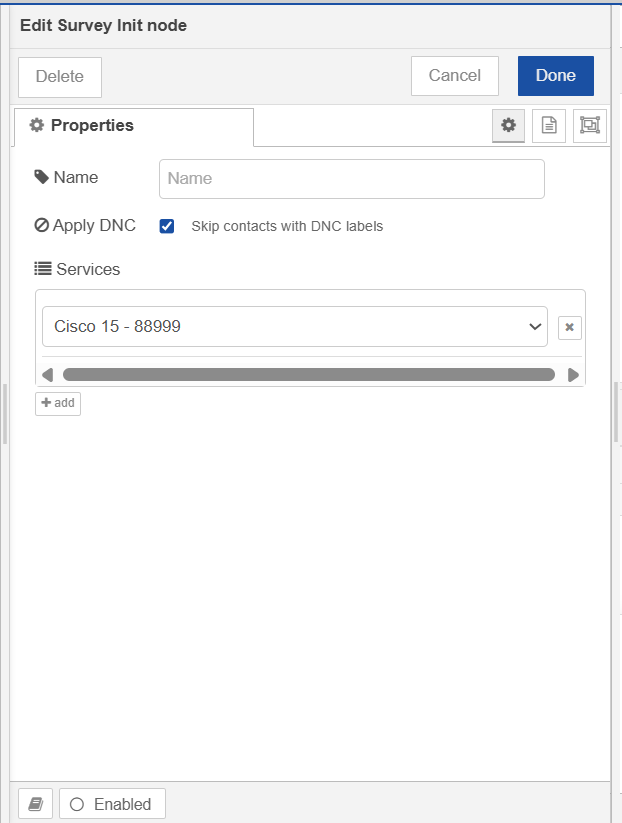
Name |
(blank) |
Optional label for the node. |
|
Apply DNC |
On |
When enabled, skips customers who have a Do Not Contact label for SMS surveys. |
|
Services |
(none selected) |
Which configured channels this survey applies to. Only conversations on one of these channels will trigger a survey. Loaded automatically from your configured channels — pick one or more from the list. |
Configuration setup
-
The Services list is loaded live from your channel configuration; each channel can only be added once, and the "add" button disables itself once every available channel has been added.
-
If the channel list fails to load (for example, none are configured), you'll see "Could not load configuration" instead of the usual fields.
What Happens When This Node Runs
-
Checks that the campaign tied to this flow is published — if not, the survey is skipped quietly.
-
Checks that the incoming conversation data is complete (has a conversation ID, a customer, and a channel). If anything's missing, this is logged as an error, since it suggests something upstream sent malformed data rather than a normal skip.
-
Checks that the conversation's channel is one of the Services you've configured — if not, the survey is skipped.
-
If Apply DNC is on, checks whether the customer has the Do Not Contact label for SMS surveys — if they do, the survey is skipped.
-
If every check passes, attaches the customer's details to the message and sends it onward to start the survey.