
|
Node |
Seize Agent |
|---|---|
|
Description |
This node |

Overview
-
Reserves agents from your routing engine before a flow needs them — typically just ahead of placing an outbound call.
-
The number of agents to reserve isn't fixed; it's calculated fresh each time from a query you configure.
-
This node doesn't send its result right away — each reservation request resolves on its own, later, and is sent out as a separate message.
-
Successfully reserved agents are held in a small per-node waiting pool until something downstream uses them, or until the node is removed and they're released.
|
Category |
Inputs |
Outputs |
Default Label |
|---|---|---|---|
|
Contact Operations |
1 |
1 |
Node name, or "Seize Agent" if left blank |
Configuration Options
|
Setting |
Default |
What it does |
|---|---|---|
|
Name |
(blank) |
Optional label for the node. |
|
Queue |
First available |
Which contact center queue to pull agents from. Loaded automatically from your routing engine — you pick from a list. |
|
MRD |
First available |
Which Media Routing Domain (the media channel agents are reserved on, e.g. voice) to reserve agents within. Also loaded automatically. |
|
Request TTL |
60 seconds |
How long the routing engine will keep each reservation request open before giving up and reporting it as timed out. |
|
Query |
(blank) |
A Prometheus query, run every time the node is triggered. Its result (rounded up to a whole number) is how many agents will be requested. Use the Preview button to check the result before saving. |
Configuration Setup
The Queue and MRD lists are loaded directly from the routing engine whenever the node is opened.
If the routing engine is unreachable, the node displays "Could not load configuration" instead of the configuration fields.
Agent Reservation Count
The number of agents to reserve is determined by the value configured in this field.
You can either:
-
Enter a fixed number (for example,
1,5, or10), or -
Provide a PromQL query that dynamically calculates the number of agents to reserve.
The configured value or query must evaluate to a single numeric value.
Preview
The Preview button evaluates the current value or query and displays the result.
-
If the query returns multiple results, an error is displayed.
-
If the query fails to execute, or evaluates to 0 or a negative value, no agents are requested during that execution.
-
This behavior is not considered an error; the node simply skips agent reservation for that run.
PromQL Query
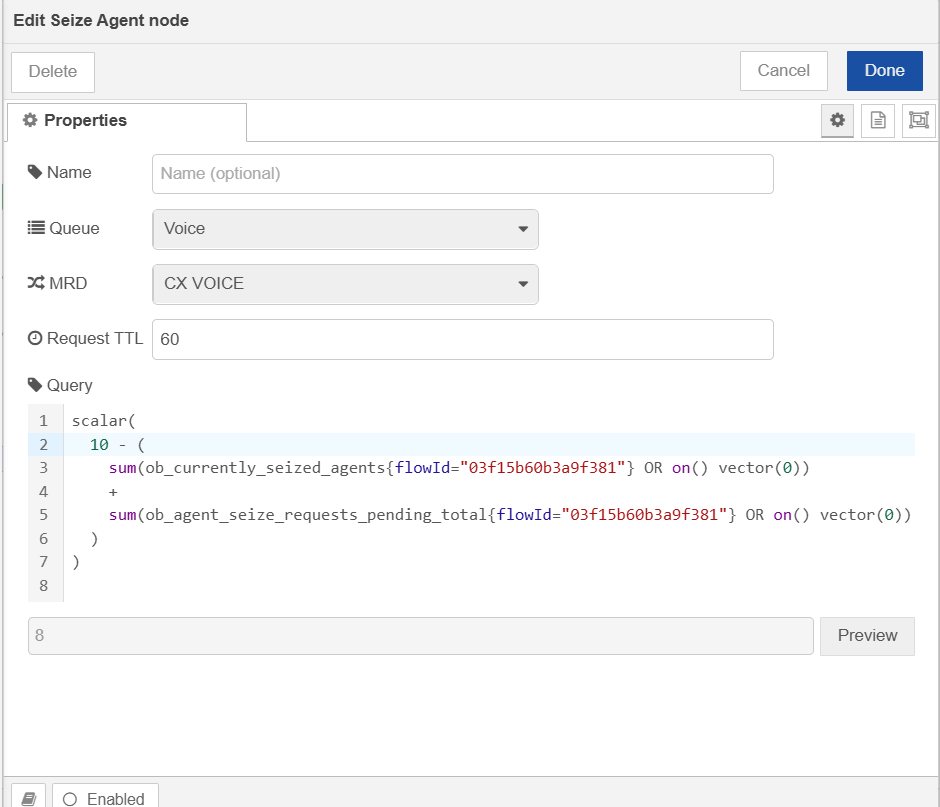
scalar(
  10 - (
    sum(ob_currently_seized_agents{flowId="e5dce880f59d2d24"} OR on() vector(0))
    +
    sum(ob_agent_seize_requests_pending_total{flowId="e5dce880f59d2d24"} OR on() vector(0))
  )
)
This query calculates how many additional agents can be reserved.
In this example:
-
10represents the total number of agents that can be reserved for this flow. -
ob_currently_seized_agentsrepresents agents that are already reserved. -
ob_agent_seize_requests_pending_totalrepresents reservation requests that are currently pending. -
The query subtracts the reserved and pending counts from the total value and returns the remaining number of agents that can still be requested.
For example, if the total is 10 agent and there is already 1 reserved agent or 1 pending reservation request, the query returns 8, so eight reservation request is made.
Using a fixed number is suitable when you always want to request the same number of agents, while a PromQL query allows the reservation count to be calculated dynamically based on current system state.
The PromQL formula suggests how many agents to reserve, but for CX_Voice campaigns the Seize node will not request more agents than the allocated slot budget for this cycle.
Configurable values in this formula:
|
Value |
Current |
Meaning |
|---|---|---|
|
Target agent capacity |
|
Desired total agents to aim for |
|
|
|
Campaign/flow this query is scoped to |
What Happens When This Node Runs
-
Runs your configured query and rounds the result up to a whole number — that's how many agents it will try to reserve.
-
If the query fails, or evaluates to zero or less, nothing happens — no agents are requested, and no error is raised.
-
Otherwise, sends one reservation request per agent to the routing engine, and shows a green status ring ("Reserving Agent(s)..") while doing so.
-
Each request's real outcome — agent reserved, no agent available, timed out, or (for an already-reserved agent) didn't answer / logged out — comes back separately from the routing engine, on its own schedule.
-
Every time a result comes back, the node sends a new message out its output carrying that result. A single trigger can therefore lead to no output messages, one, or several over time.
-
An agent that was successfully reserved is held in a waiting pool for this node until something downstream uses it, or until it later times out / RONAs / logs out — in which case it's removed from the pool and a follow-up message is sent for that too.
-
If the node is removed from a flow, any agents still sitting in its pool are automatically released back to the routing engine.
|
Status |
Meaning |
|---|---|
|
🟢 Green ring |
Sending reservation requests |
|
🔴 Red ring |
Misconfigured — Queue, MRD, Query, or Request TTL missing/invalid |
Output
-
The input handler never calls
send()— it only fires off reservation requests. All output messages come later, from a webhook the routing engine calls at{webhook base}/seize-result/{nodeId}. -
That webhook rebuilds the original
msg(stashed in the reservation request's metadata) and adds:
"outboundMetadata": {
  "seizeResult": { "status": "AGENT_RESERVED", "agent": { "...": "..." }, "flowId": "..." },
  "seizeId": "<node id>"
}
-
statuscan beAGENT_RESERVED,NO_AGENT_AVAILABLE,RESERVATION_TIMEOUT,RONA.