
|
Report Summary |
Is available within the Metabase dashboard. It displays data from submitted forms alongside the details of the conversation and the agents involved. |
|---|
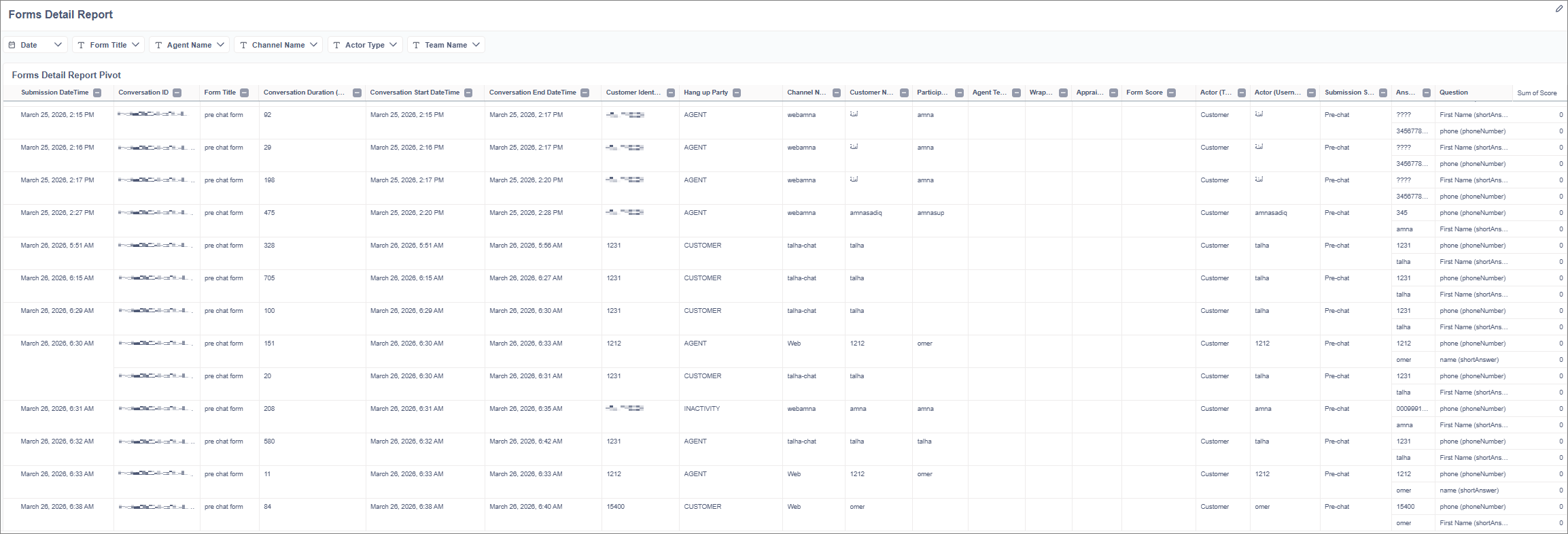
Filter Panel
Users can narrow down the report data using the following filters:
-
Select Form: Search and select specific forms (Multi-select).
-
DateTime Range (Submission): Select a date range for when the form was submitted (Defaults to the Last 7 Days).
-
Team: Search and select specific agent teams (Multi-select).
-
Agent: Search and select specific agents (Multi-select).
-
Channel: Select the communication channel (Multi-select).
-
Actor Type: Select the role of the person who submitted the form. Options include Quality Manager, Evaluator, Customer, Agent, Supervisor, and UCCE IVR Call (Multi-select).
The filter panel includes an "Apply Filters" button to load the data, and a "Clear Filters" button to reset all selections to their default state.
Report Columns
The main table displays the following information for each submitted form,
|
Column Name |
Description / Example Data |
|
Form Title |
The name of the form (e.g., "Survey form 2026"). |
|
Submission DateTime |
When the form was submitted (e.g., 24-04-2026 24:00:00). |
|
Conversation ID |
The unique identifier for the interaction. |
|
Conversation Duration |
Total time of the conversation (e.g., 0:00:20). |
|
Conversation Start DateTime |
When the interaction began. |
|
Conversation End DateTime |
When the interaction ended. |
|
Customer Identifier |
The customer's phone number or email address. |
|
Channel |
The platform used for the interaction (e.g., Web, Cisco CC). |
|
First Name |
The customer's first name. |
|
Last Name |
The customer's last name. |
|
Agent Participant(s) |
The agents involved in the conversation (e.g., Olivia Wilson, Avery Davis). |
|
Agent Team(s) |
The teams the agents belong to (e.g., Team A, Team B). |
|
Score |
The total score is calculated from the form (e.g., 52). |
|
Actor (type) |
The role of the person submitting the form (e.g., Quality Manager, Customer). |
|
Actor (username) |
The username of the person who submitted the form (e.g., shehzad21). |
|
QM Centric (agentReviewed) |
The username of the agent being reviewed (e.g., irfan21). |
|
Submission Source |
Where the form was generated from (see section below). |
Submission Sources
The "Submission Source" column indicates the origin of the submitted form. Possible sources include:
-
Quality Management Review
-
Agent Quiz
-
Agent Guidance
-
Agent Wrapup
-
Web PCS
-
IVR PCS
-
Pre-chat
-
Chatbot prompt
-
When a new campaign or team is added in CX, manually refresh the metadata so the dropdown filters reflect the updated values:
-
Go to Admin Settings → Databases in Metabase.
-
Select the relevant database.
-
Click “Sync database schema” and “Re-scan field values.”
-
-
For newly added agents to appear in filter dropdowns, assign the required attribute in CX and ensure the agent has logged in at least once.
Limitations:
If the same question appears multiple times in a survey, the Form Detail Report does not currently show each occurrence with its own submitted answer; it displays only one instance of the repeated question.