|
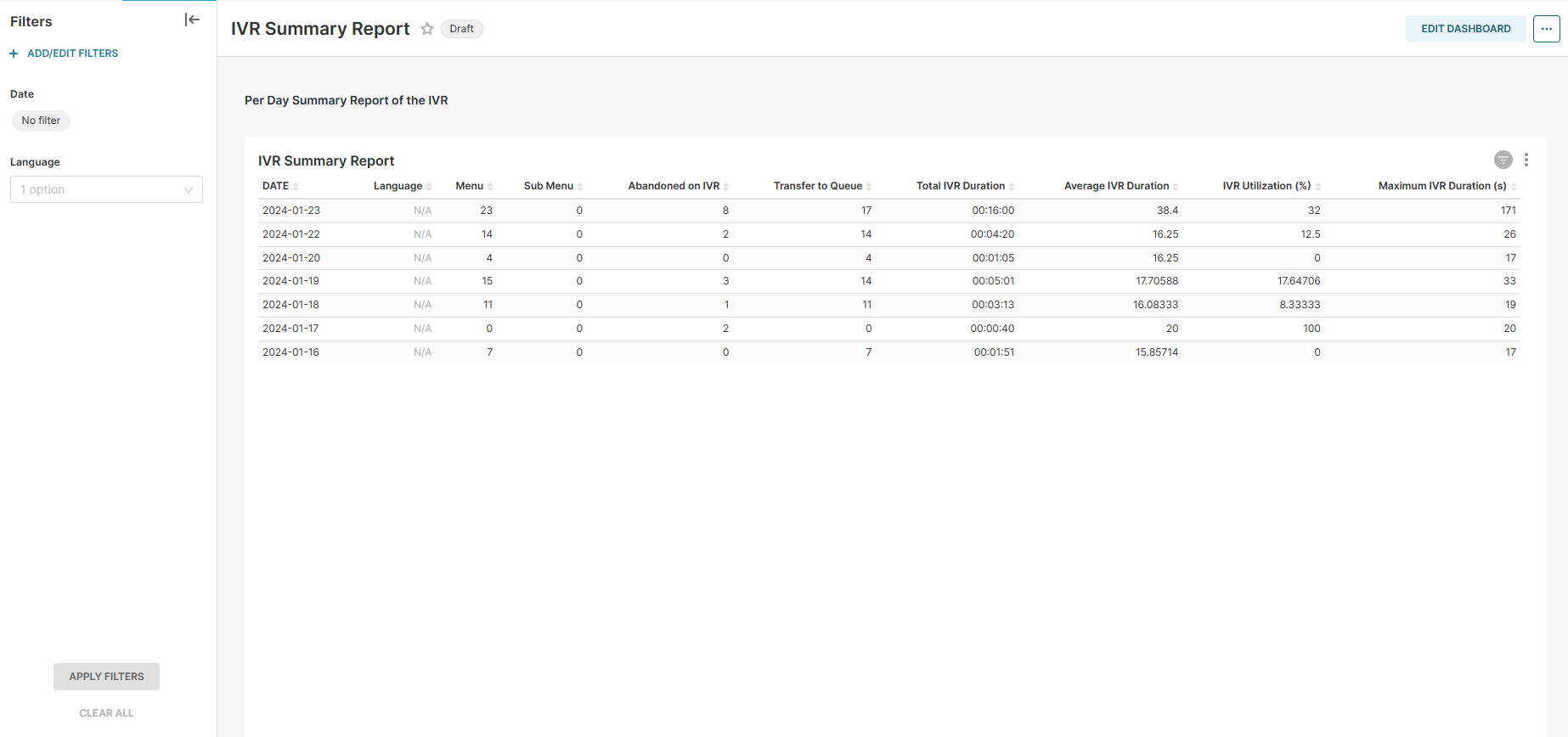
Report Summary |
Summarizes the journey of IVR activities per day |
|---|
Report Columns
Following are the report columns
|
Fields |
Description |
|
|---|---|---|
|
Date |
Shows the date. |
|
|
Language |
Shows the chosen language of sumerized data. |
|
|
Menu |
Total number of times customers selected the Main Menu on the IVR. |
|
|
Sub Menu |
Total number of times customers selected the Sub Menu on the IVR. |
|
|
Abandoned on IVR |
Total number of Abandoned calls on IVR. |
|
|
Transfer to Queue |
Total number of calls transferred to Queue. |
|
|
Total IVR Duration (HH:MM:SS) |
Shows the sum of time the customer spent on IVR in (HH:MM:SS) |
|
|
Average IVR Duration (S) |
Shows the Average of time the customer spent on IVR in secounds. |
|
|
IVR Utilization (%) |
Show the IVR utilization in percentage. |
|
|
Maximum IVR Duration (s) |
Shows the Maximum time the customer spent on IVR in secounds. |
|
Report Filter
The following report filters are available for filtering the reporting data.
-
Date ~ choose the date for which you want to filter out the data.
-
Language ~ choose the language for which you want to filter out the data.