|
Report Summary |
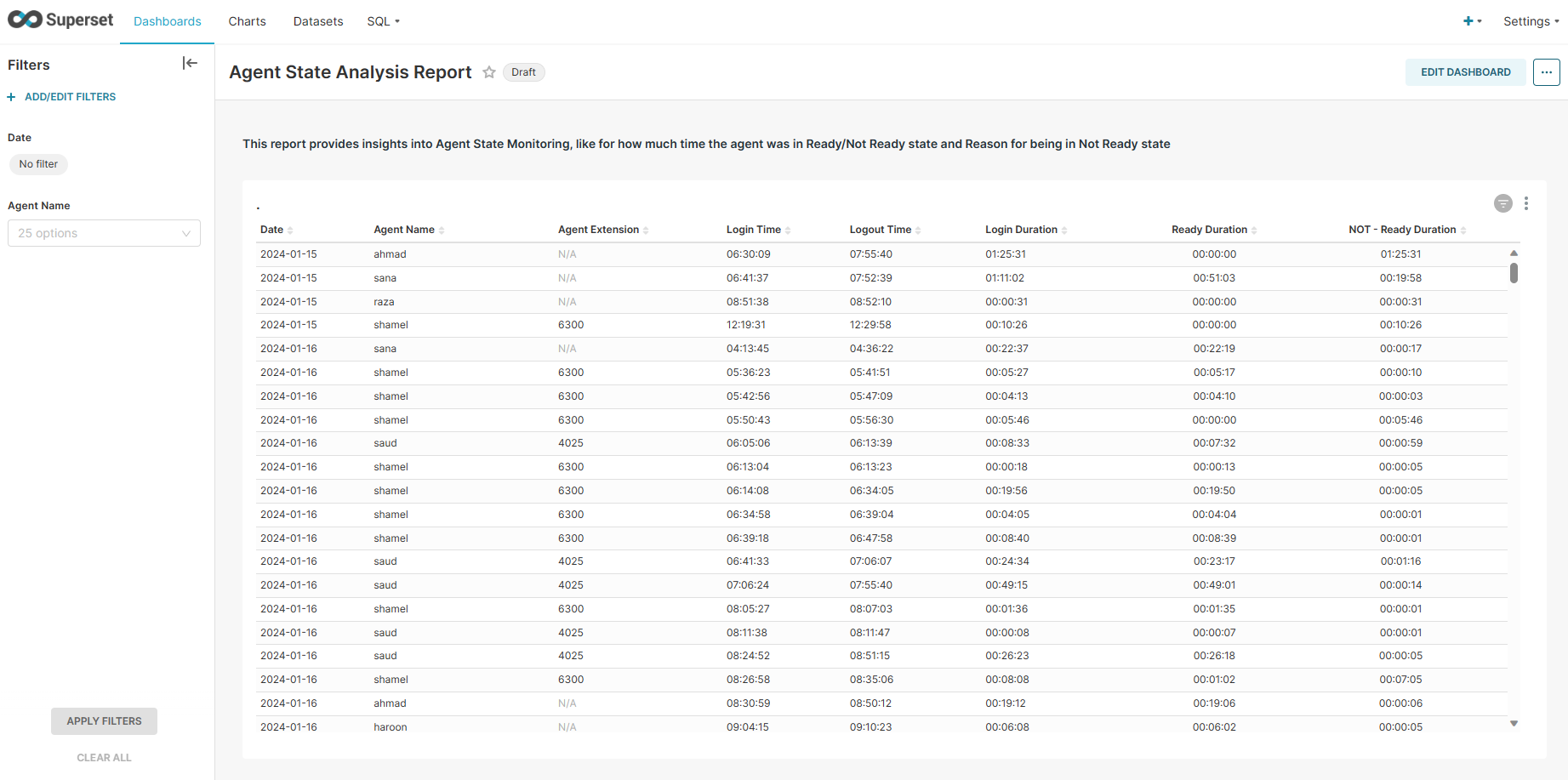
Provides a summary of the time duration of agents' state in ready or not-ready and the reason for being in a not-ready state. This helps the business to monitor the duration of the agent in each particular state for better visualization. |
|---|
Report Columns
Following are the report columns
|
Fields |
Description |
|---|---|
|
Date |
Shows the date. |
|
Agent Name |
Shows the full name of the agent. |
|
Agent Extension |
Shows the extension of the agent. |
|
Login Time |
Shows the login time of the agent. |
|
Logout Time |
Shows the logout time of the agent. |
|
Login Duration |
Shows the total login duration of an agent for this login session. |
|
Ready Duration |
Shows the total ready duration of an agent for this login session. |
|
Not Ready Duration |
Shows the total not-ready duration of an agent for this login session. |
Report Filter
The following report filters are available for filtering the reporting data.
-
Date ~ choose the date for which you want to filter out the data.
-
Agent Name ~ select the agent(s) by name whose performance you want to monitor.