|
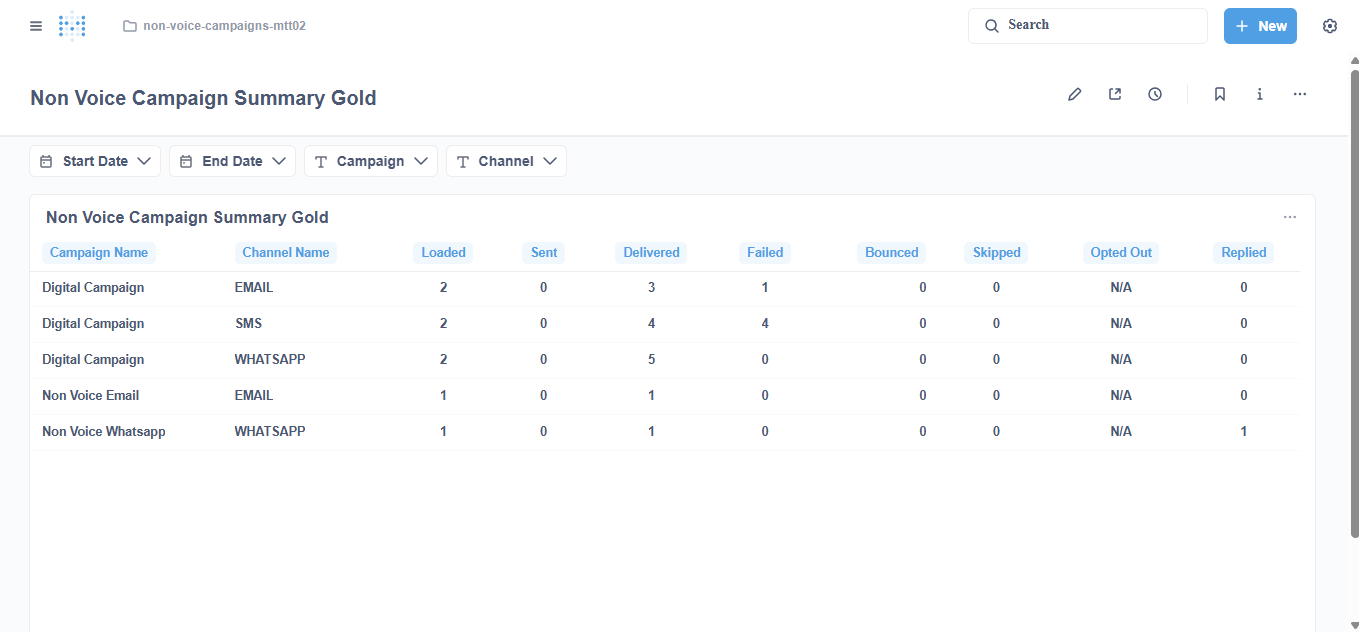
Report Summary |
Summarizes the daily journey of non-voice campaign messages (Email, SMS, WhatsApp, and other non-voice channels) by campaign and channel. It shows the number of contacts loaded and the number of messages sent, delivered, failed, bounced, or replied to. Voice campaigns (CX Voice) are excluded. |
|---|
Report Columns
The following are the report columns
|
Field(s) |
Description |
|---|---|
|
Date |
Shows the date of the terminal delivery outcome. |
|
Campaign Name |
Shows the name of the campaign. |
|
Channel |
Shows the channel of the summarized data (for example EMAIL, SMS, WHATSAPP). |
|
Total Loaded |
Total number of distinct contacts with a terminal delivery outcome on that date. |
|
Sent |
Total number of messages whose terminal outcome is Sent. |
|
Delivered |
Total number of messages whose terminal outcome is Delivered. |
|
Failed |
Total number of messages whose terminal outcome is Failed. |
|
Bounced |
Total number of messages whose terminal outcome is Bounced. |
|
Skipped |
Total number of skipped (suppressed) messages. Placeholder until product emits events. |
|
Opted Out |
Total number of opted-out contacts. Placeholder until product emits events. |
|
Replied |
Total number of distinct contacts who replied or engaged (READ receipt and/or inbound reply). |
Report Filter
The following report filters are available for filtering the reporting data.
|
Field(s) |
Description |
|---|---|
|
Date |
Choose the date for which you want to filter out the data. |
|
Campaign Name |
Choose the campaign for which you want to filter out the data. |
|
Channel |
Choose the channel for which you want to filter out the data. |
Report Output