|
Node |
Reschedule Contact |
|---|---|
|
Description |
This node |

Overview
-
Takes the message coming out of a delivery result (typically the Dial or CCX Cisco Dialer Delivery Notification output) and compares
payload.body.statusandpayload.body.reasonCodewith the rules on the node. -
A match reschedules the campaign contact: status goes back to
UNDELIVERED,scheduleAfteris set to now plus the configured delay, andrescheduleCountis increased by one. A later pass of the campaign can pick that contact up again oncescheduleAfteris due. -
The message is always sent on the single output. A reschedule does not stop the flow. No match, a missing contact, a reached retry limit, and a failed update all forward the message as well.
-
With no complete rules, or with Max retries left at 0, nothing is rescheduled.
|
Category |
Inputs |
Outputs |
Default Label |
|---|---|---|---|
|
Flow Control |
1 |
1 |
Node name, or "Reschedule Contact" if left blank |
Outputs
|
Output |
Label |
Carries |
|---|---|---|
|
1 |
(single output) |
The same message that came in. After a successful reschedule, |
Configuration Options
|
Setting |
Default |
What it does |
|---|---|---|
|
Name |
(blank) |
Optional label for the node. |
|
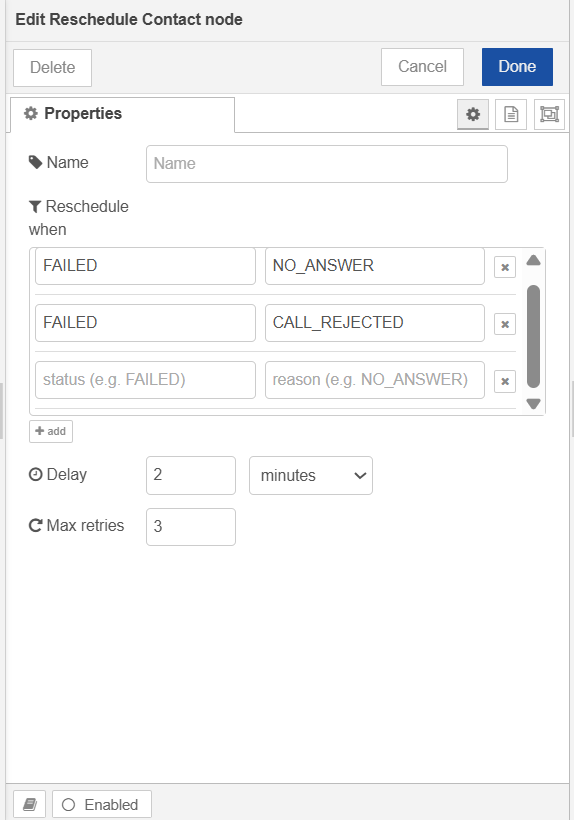
Reschedule when |
One empty rule row |
The status and reason pairs that should be retried. Each row needs both a status (for example |
|
Delay |
0 minutes |
How long to wait before the contact is eligible again. Amount plus a unit: minutes, hours, or days. |
|
Max retries |
0 |
How many times this contact may be rescheduled. The contact’s current |
Match Rules
|
Rule shape |
Result |
|---|---|
|
Both status and reason filled in |
Matches when the incoming status and reason both equal that row. Comparison ignores letter case. |
|
Several rows |
Any one complete row is enough. Rows are combined with OR. |
|
Status or reason left blank on a row |
That row never matches. |
|
No rows, or every row incomplete |
Nothing matches. The message is forwarded and the contact is not updated. |
|
Incoming status or reason missing |
No match, even when a rule exists. |
What Happens When This Node Runs
The node reads:
-
msg.payload.body.status -
msg.payload.body.reasonCode -
msg.outboundMetadata.contact._id -
msg.outboundMetadata.contact.rescheduleCount(treated as 0 when missing)
Then:
-
If status and reason do not match any complete rule, the node shows No match and forwards the message. The contact is not updated.
-
If they match but
contact._idis missing, the node shows Missing contact id, logs a warning, and forwards the message. -
If
rescheduleCountis already greater than or equal to Max retries, the node shows Retry limit reached and forwards the message. The contact is not updated. -
Otherwise it computes
scheduleAfteras now plus the delay, in the campaign timezone, and updates the campaign contact:
|
Field written |
Value |
|---|---|
|
status |
|
|
scheduleAfter |
Campaign-local time |
|
rescheduleCount |
Current count plus 1 |
The update is PATCH /contacts/{contactId} on the campaigns service. The same three fields are written onto msg.outboundMetadata.contact before the message is forwarded. The node status shows the new time, the timezone used, and the attempt count, for example 1/3.
If that update fails, the node shows Update failed, logs the error, and still forwards the original message. The contact fields on the message stay unchanged.
Delay
|
Unit |
How the next time is calculated |
|---|---|
|
minutes |
Now plus that many minutes. Seconds are kept. |
|
hours |
Now plus that many hours. Seconds are kept. |
|
days |
That many calendar days later in the campaign timezone, at the same hour, minute, and second. |
Prerequisites
-
Place this node on the delivery-result path, where
payload.body.statusandpayload.body.reasonCodeare present (the Dial or CCX Cisco Dialer delivery output). -
The message must carry the campaign contact id on
outboundMetadata.contact._id. That is the id in the campaigns contacts collection. -
Add at least one rule with both a status and a reason.
-
Set Max retries to the number of extra attempts you want. Left at 0, a matching result is forwarded and the contact is not rescheduled.
-
A contact becomes eligible again only after
scheduleAfter. The undelivered-contact check uses that time.