|
Report Summary |
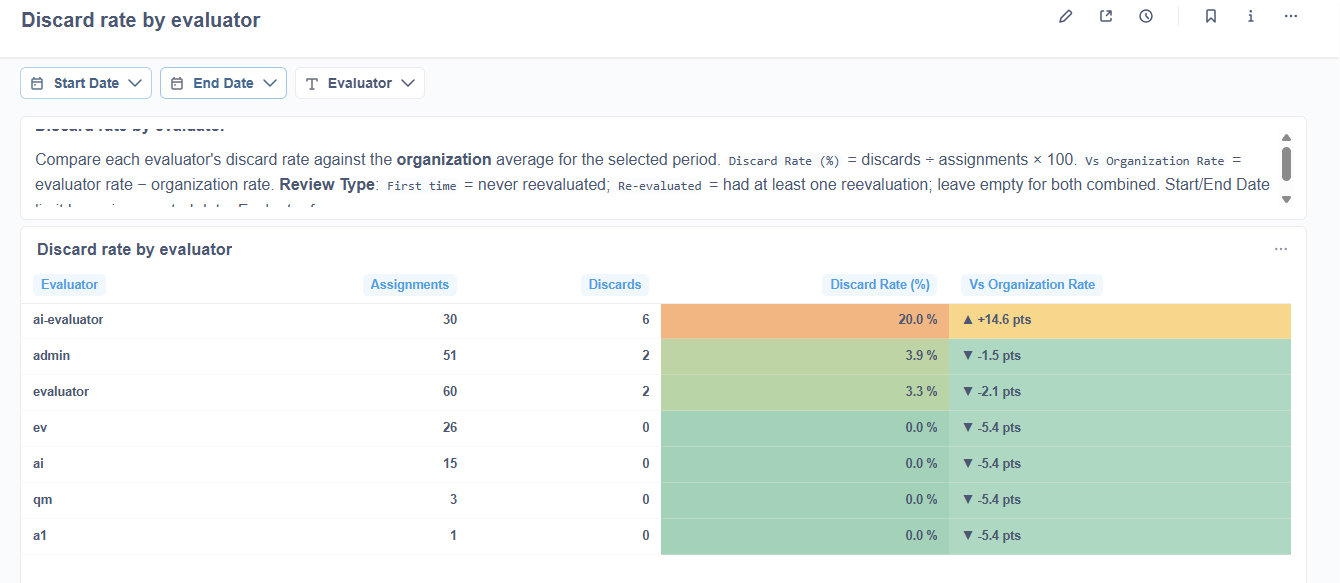
Compares how many reviews each evaluator was assigned and how many they discarded, with their discard rate against the organization average. |
Each row is one evaluator. The organization rate is the discard rate across all evaluators for the selected dates.
Open QM Reports → Discard rate by evaluator.
Set the date range, optionally filter by evaluator, then review or export the table. Rows are ordered by Discard Rate, highest first.
Report Columns
The following are the report columns:
|
Field(s) |
Description |
|
Evaluator |
Username of the evaluator assigned to the reviews. (Source: users.username of review.reviewer) |
|
Assignments |
Number of reviews assigned to the evaluator. (Source: count of review rows) |
|
Discards |
Number of those reviews that were discarded. (Source: review.reason = 'DISCARDED' or review.discarded_by set) |
|
Discard Rate (%) |
Discards divided by Assignments, as a percentage to one decimal. (Calculated) |
|
Vs Organization Rate |
Difference between the evaluator's discard rate and the organization rate, in percentage points. Shown as ▲ +n pts when above the organization rate, ▼ -n pts when below, and ● 0 pts when equal. (Calculated) |
Note: Deleted reviews are excluded. The organization rate is not affected by the Evaluator filter.
Report Filter
The following report filters are available for filtering the reporting data.
|
Field(s) |
Description |
|
Start Date |
Includes reviews created on or after Start Date. (Date filter) |
|
End Date |
Includes reviews created on or before End Date. End date is inclusive. (Date filter) |
|
Evaluator |
Filters by evaluator. Leave empty to include all evaluators. (Dropdown, multi-select) |
Leave a filter empty to ignore it.
Report Output