|
Report Summary |
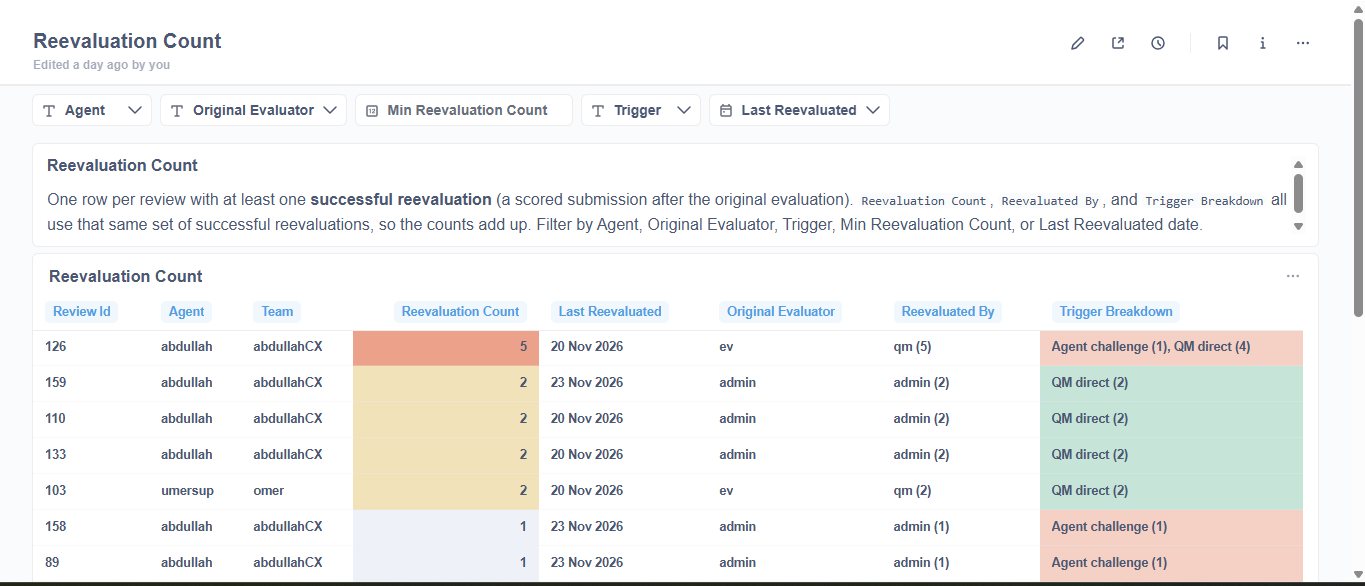
Shows how many times each review was reevaluated, who reevaluated it, and what triggered each reevaluation. |
Each row is one review with at least one successful reevaluation. A successful reevaluation is a scored submission made after the first submission of the review.
Open QM Reports → Reevaluation Count.
Set the Last Reevaluated date range, optionally filter by agent, evaluator, minimum count or trigger, then review or export the table. Rows are ordered by Reevaluation Count, highest first, then by Last Reevaluated, newest first.
Report Columns
The following are the report columns:
|
Field(s) |
Description |
|
Review Id |
Review number shown in the QM application. (Source: review.display_id) |
|
Agent |
Username of the agent who was reviewed. (Source: users.username of review.agent_id_to_review) |
|
Team |
Agent's current team. Blank if the agent is not in a team. (Source: latest team_members row → teams.team_name) |
|
Reevaluation Count |
Number of successful reevaluations of the review. (Source: scored SUBMITTED rows in review_history after the first one) |
|
Last Reevaluated |
Date of the latest successful reevaluation, as DD Mon YYYY. (Source: review_history.created_at) |
|
Original Evaluator |
Evaluator who first created or submitted the review. (Source: first CREATED or SUBMITTED row in review_history) |
|
Reevaluated By |
Evaluators who submitted the reevaluations, with how many each, for example Ali (2), Sara (1). (Source: review_history.reviewer) |
|
Trigger Breakdown |
What triggered the reevaluations, with counts, for example Agent challenge (1), QM direct (2). Each reevaluation takes the trigger of the latest assignment or challenge before it. (Source: REEVALUATION_ASSIGNED / CHALLENGED rows in review_history) |
Note: Deleted reviews are excluded. A reevaluation that was assigned but not yet submitted with a score is not counted.
Report Filter
The following report filters are available for filtering the reporting data.
|
Field(s) |
Description |
|
Last Reevaluated |
Counts only reevaluations submitted in the selected period. Reviews with none in the period are not shown. (Date filter, all options) |
|
Agent |
Filters by the reviewed agent. Leave empty to include all agents. (Dropdown, multi-select) |
|
Original Evaluator |
Filters by the original evaluator. (Dropdown, multi-select) |
|
Min Reevaluation Count |
Shows only reviews reevaluated at least this many times. (Number) |
|
Trigger |
Shows reviews with at least one reevaluation of the selected trigger: Agent challenge, QM direct or Evaluator modification. (Dropdown, multi-select) |
Leave a filter empty to ignore it.
Report Output