
Overview
This guide explains how we can achieve multitenancy on grafana by running only one grafana instance of the dashboards and grafana to dynamically handle multitenancy by utilizing different FQDN for API requests based on dashboard variables. By leveraging Grafana's Infinity plugin, we can ensure that tenants can access their respective data using their unique FQDNs without requiring multiple static datasources or complex API configurations.
Diagram flow overview.
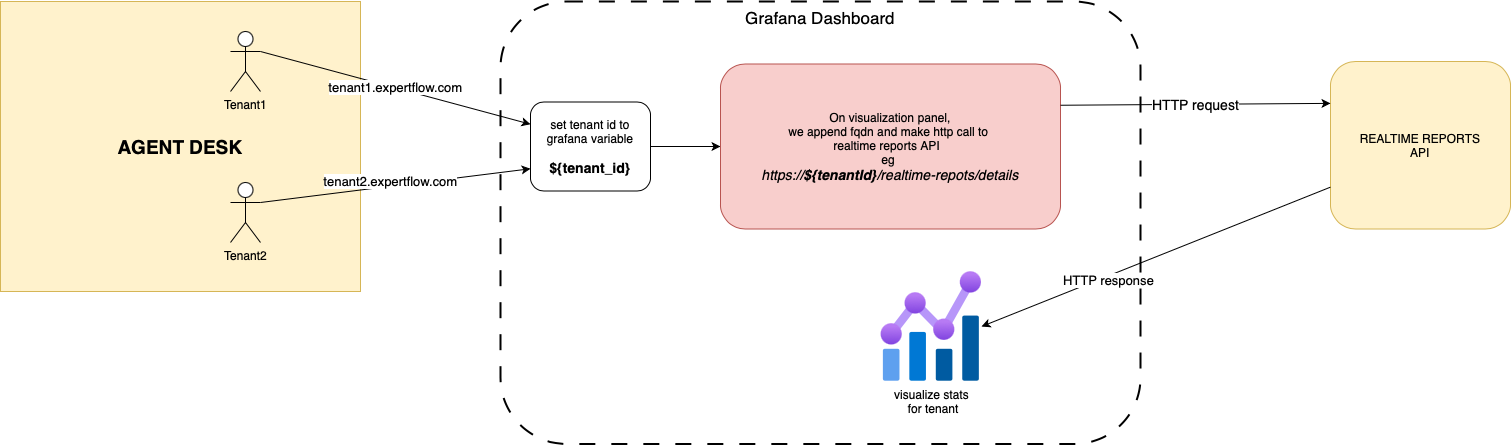
Steps to achieve this
-
On grafana, define a variable to store tenants fqdn. eg ${tenant_id}
-
Use Infinity Plugin for Grafana to make HTTP requests to realtime reports component.
-
On the dashboard visualization panel, embadde the ${tenant_id} variable that was created on step (1). and make REST call to realtime reports.
-
So it will be like ${tenant_id}/realtime-reports/details. → https://tenant1.expertflow.com/realtime-reports/details
-
FQDN will be passed to grafana via the AgentDesk and set on this grafana variable ${tenant_id}.
-
-
User on Agent Desk will be able to see their relevant stats, based on the fqdn passed to the embedded grafanan dashboard.