
Introduction
We've recently introduced a new feature to enhance the personalization of the customer widget. This feature allows for a dynamic display of the agent's name in the active chat view based on the configuration settings of the customer widget.
Configuration Variable
-
USERNAME_ENABLED: A boolean configuration variable was added in thehelm-values/ef-cx-custom-values.yamlfile and is used to control the display of the agent's name in the customer widget.
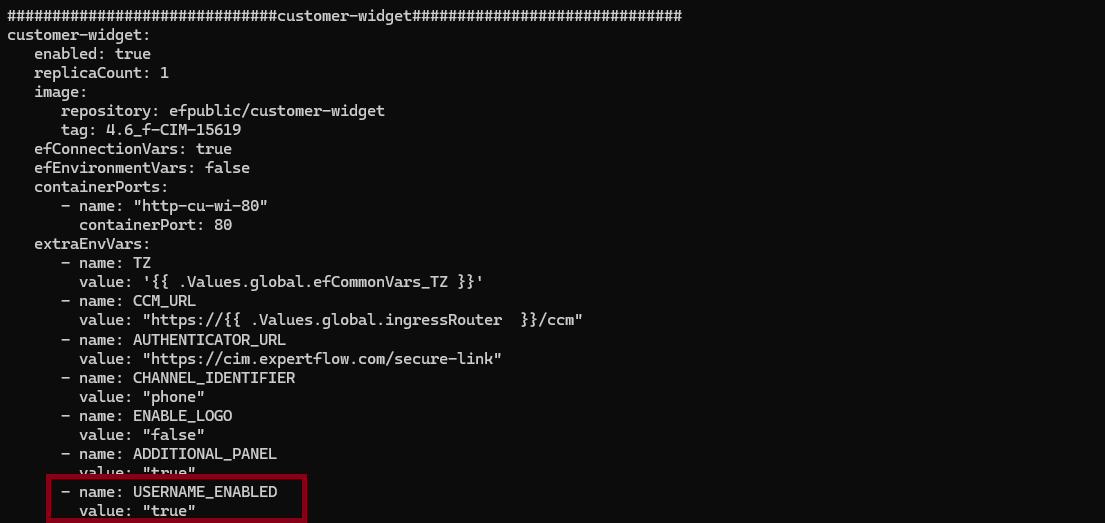
-
Upgrade the
helm-values/ef-cx-custom-values.yamlfile with the following commands to update the pods.-
helm upgrade --install --namespace expertflow --create-namespace ef-cx --debug --values helm-values/ef-cx-custom-values.yaml expertflow/cx --version <release-name>
-
Behavior-Based on Configuration
-
When
USERNAME_ENABLEDistrueonly the agent's username will be shown.-
Notification: The username will appear in the customer widget notifications.
-
Message Header: The username will also be displayed in the message header of the active chat view.
-
-
When
USERNAME_ENABLEDisfalsethe widget will display the agent's full name if available. If both the first and last names are empty, a default string of"AGENT"will be shown.-
Notification: The full name (or "AGENT" if the name parts are missing) will be displayed in the notification section.
-
Message Header: The first name and last name as full name (or
"AGENT") will appear in the message header of the active chat view.
-
Detailed Display Logic
-
Active Chat View - Notifications
-
If
USERNAME_ENABLEDistrue:-
Display:
Username
-
-
If
USERNAME_ENABLEDisfalse:-
If
firstNameandlastNameare available:-
Display:
FirstName LastName
-
-
If
firstNameorlastNameis empty:-
Display: available name like
firstName
-
-
If
firstNameandlastNameboth are empty:-
Display:
"AGENT"
-
-
-
-
Active Chat View - Message Header
-
If
USERNAME_ENABLEDistrue:-
Display:
Username
-
-
If
USERNAME_ENABLEDisfalse:-
If
firstNameandlastNameare available:-
Display:
FirstName LastName
-
-
If
firstNameorlastNameis empty:-
Display: available string like
firstNameorlastName.
-
-
If
firstNameandlastNameare empty:-
Display:
"AGENT"
-
-
-
Example Scenarios
-
Scenario 1:
USERNAME_ENABLEDistrue,usernameis"john_doe",firstNameis"John",lastNameis"Doe"-
Notification:
"john_doe" -
Message Header:
"john_doe"
-
-
Scenario 2:
USERNAME_ENABLEDisfalse,usernameis"john_doe",firstNameis"John",lastNameis"Doe"-
Notification:
"John Doe" -
Message Header:
"John Doe"
-
-
Scenario 3:
USERNAME_ENABLEDisfalse,usernameis"john_doe",firstNameis"John",lastNameis""-
Notification:
"John" -
Message Header:
"John"
-
-
Scenario 3:
USERNAME_ENABLEDisfalse,usernameis"john_doe",firstNameis"",lastNameis"Doe"-
Notification:
"Doe" -
Message Header:
"Doe"
-
-
Scenario 4:
USERNAME_ENABLEDisfalse,usernameis"john_doe",firstNameis"",lastNameis""-
Notification:
"AGENT" -
Message Header:
"AGENT"
-
This feature allows for a customizable and personalized experience for users interacting with the customer widget, based on the configMaps of the Customer Widget.