
The purpose of this document is to provide deployment steps for Eleveo recording components of Expertflow CX solution.
Run All Commands in cim-solution/Kubernetes Directory
Recording Backend Information
This deployment is meant for users who have Eleveo set up as a recording backend. If you wish to use EFSwitch as a recording backend, then consult the docker-based deployment guides of the recording middleware and recording link uploader.
Before you begin, verify
- CX deployment on Kubernetes, see https://expertflow-docs.atlassian.net/l/cp/6ufqN94G
Update the FQDN
Decide the FQDN to be used in your solution and change the <FQDN> in the below-given command to your actual FQDN
sed -i 's/devops[0-9]*.ef.com/<FQDN>/g' cx-voice-recording/Ingresses/nginx/* cx-voice-recording/ConfigMaps/*
Set ConfigMap fields
-
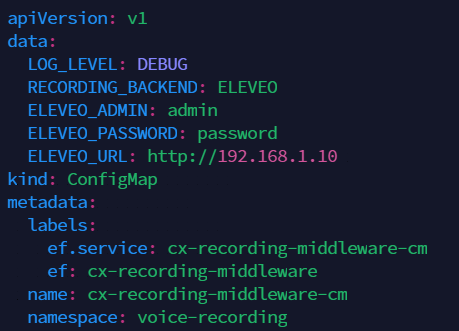
Open the Recording Middleware ConfigMap with
vi cx-voice-recording/ConfigMaps/ef-recording-middleware-cm.yaml
-
Change the values as follows:
-
RECORDING_BACKEND: The mechanism for recording files. Leave at default ELEVEO.
-
LOG_LEVEL: The amount of detail in the logs. Default is INFO, and for more detailed logs the value should be DEBUG.
-
ELEVEO_ADMIN: The administrator username for Eleveo.
-
ELEVEO_PASSWORD: The administrator password for Eleveo.
-
ELEVEO_URL: The IP address of the Eleveo deployment.
-
-
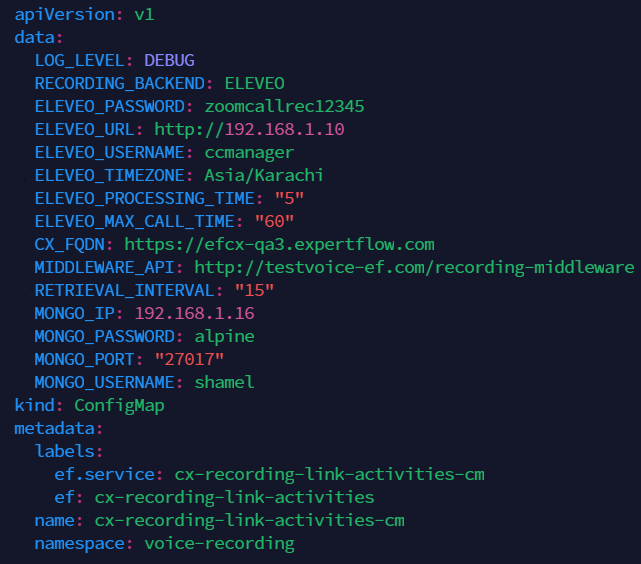
Open the Recording Link Uploader ConfigMap with
vi cx-voice-recording/ConfigMaps/ef-recording-link-activities-cm.yaml
-
Change the values as follows:
-
RECORDING_BACKEND: The mechanism for recording files. Leave at default ELEVEO.
-
LOG_LEVEL: The amount of detail in the logs. Default is INFO, and for more detailed logs the value should be DEBUG.
-
CX_FQDN: The address of EF CX. https://EFCX-FQDN. This is set by Step 3: Update the FQDN above, but can be changed manually if need e.g. if the protocol used is HTTP instead of HTTPS.
-
MIDDLEWARE_API: The API link of the recording middle-ware that will provide recording files. Format: http://EFCX-FQDN/recording-middleware. This is set by Step 3: Update the FQDN above.
-
RETRIEVAL_INTERVAL: The number of past days to push recording links for on startup.
-
ELEVEO_MAX_CALL_TIME: The maximum possible time in minutes a call is assumed to last.
-
ELEVEO_PASSWORD: The administrator password for Eleveo.
-
ELEVEO_PROCESSING_TIME: The time in minutes it takes for a call to appear in Eleveo after ending.
-
ELEVEO_TIMEZONE: The timezone of the Eleveo deployment e.g. Asia/Karachi
-
ELEVEO_URL: The IP address of the Eleveo deployment.
-
ELEVEO_USERNAME: The username of the Eleveo deployment.
-
-
Apply all configurations in the ConfigMaps folder using
kubectl apply -f cx-voice-recording/ConfigMaps/ef-recording-link-activities-cm.yaml
kubectl apply -f cx-voice-recording/ConfigMaps/ef-recording-middleware-cm.yaml
Start the Recording Middleware service
Create a service for the recording middleware.
kubectl apply -f cx-voice-recording/Services/ef-recording-middleware-service.yaml
Services must be created before Deployments
Create the Recording Middleware Deployment
Apply the Deployment manifest for the recording middleware.
kubectl apply -f cx-voice-recording/Deployments/ef-recording-middleware-deployment.yaml
Set the Recording Middleware Ingress
You need to apply the Ingress route for the recording middleware.
kubectl apply -f cx-voice-recording/Ingresses/nginx/ef-recording-middleware-Ingress.yaml
Start the recording link uploader cronjob
kubectl apply -f cx-voice-recording/cronjob/ef-recording-link-activities-cronjob.yaml