
This document aims to describe the process of pushing recording links to EFCX and retrieving files for the respective recording solutions. The implementation within CX Core is described here:
Technical Solution for Handling Call Recording of each Call Leg along with overall Voice Call
Eleveo
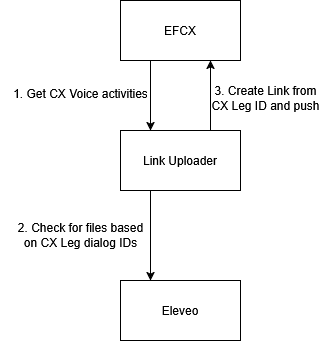
Pushing Links to EFCX
-
Fetch voice activities from CX:
-
Get last pushed time from cache (or use default interval)
-
Call CX voice activities API between start time and end time:
-
end time= current time - eleveo processing time (time it takes for Eleveo to process recordings).
-
start time = endtime - interval (either default or duration between current time and last pushed time).
-
-
Sort each set of CX Call Legs.
-
-
Get recording information from Eleveo:
-
Use dialogId of each leg to get Eleveo recording information from API.
-
Create list of Eleveo call legs per call.
-
Merge the legs that are split due to HOLD.
-
-
Push links to EF CX:
-
Compare sorted lists of CX Call Legs to Eleveo call legs.
-
Create links with CX Legs IDs and push to CX.
-
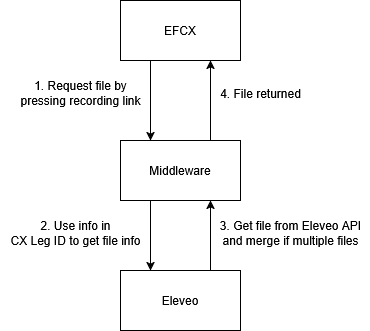
Retrieving Files From Eleveo
-
The recording link pushed to CX is clicked on:
-
CX leg ID in received in the format: dialogId:agentExtension:ani:legStartTime
-
-
Use dialogId from leg ID to fetch Eleveo recording information:
-
Get Eleveo recording information from API.
-
Sort list of legs provided by Eleveo.
-
Merge Hold ended legs.
-
The leg with the closest start time to that in the CX leg ID is chosen.
-
Get Eleveo Leg Id(s) of that leg (multiple IDs if merged legs).
-
-
The file is obtained from Eleveo APIs:
-
If multiple files are present (due to HOLD) then they are all retrieved and merged sequentially.
-
-
Return recording file to CX.
EFSwitch
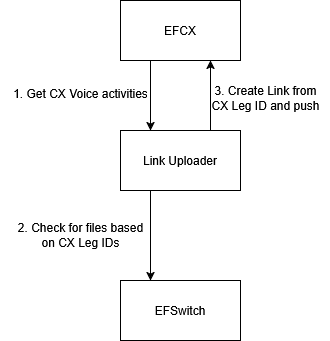
Pushing Links to EFCX
-
Fetch voice activities from CX:
-
Get last pushed time from cache (or use default interval).
-
Call CX voice activities API between current time and time before interval.
-
Sort each set of CX Call Legs.
-
-
Check EFSwitch for recordings per call leg:
-
Use CX Leg Ids as dialogId to fetch file paths from Efswitch database.
-
From filepaths fetch files that match the respective CX Leg IDs.
-
-
Push links to EF CX:
-
Compare sorted lists of CX Call Legs to EFSwitch call legs.
-
Create links with CX Legs IDs and push to CX.
-
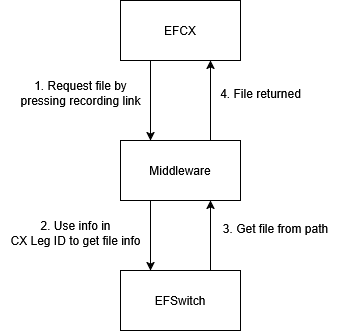
Retrieving Files From EFSwitch
-
The recording link pushed to CX is clicked on:
-
CX leg ID in received in the format: dialogId:agentExtension:ani:legStartTime
-
-
Info the the leg ID is used to get files from EFSwitch:
-
The dialogId is used to get the filepath from EFSwitch database.
-
Within the path, the files matching the first three sections of the leg ID (dialogId:agentExtension:ani) are returned.
-
The leg with the closest start time to that in the CX leg ID is chosen.
-
-
The file is picked from the system.
-
The file is returned to CX.