
This document illustrates the procedure and steps to deploy Expertflow Cisco Voice on Kubernetes.
Before you begin, verify
- cx deployment on Kubernetes, see https://expertflow-docs.atlassian.net/l/cp/6ufqN94G
Prepare for Cisco Voice Deployment
Step 1: Create Namespaces
-
Create a namespace
cisco-voicefor all cisco components.
# Run the following command on the control-plane node.
kubectl create namespace cisco-voice
Step 2: Apply Image Pull secret
-
Run the following commands for applying ImagePullSecrets of Expertflow CX images.
kubectl apply -f voice/pre-deployment/registryCredits/ef-imagePullSecret-cisco-voice.yaml
Step 3: Update FQDN
Expertflow cisco should be accessible by a fully qualified domain name. Assign the FQDN that resolves to the control plane node or KubeVIP.
# Replace <FQDN> with your FQDN for cisco voice and run this command.
sed -i 's/devops[0-9]*.ef.com/<FQDN>/g' voice/cisco/Ingresses/*
Step 4: Set ConfigMap Fields
-
Open the Cisco outbound connector ConfigMap with:
vi voice/cisco/ConfigMaps/ef-cisco-outbound-connector-configmap.yaml
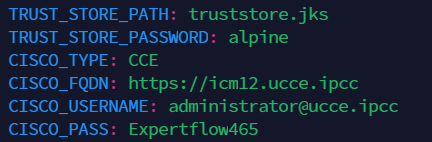
-
Change the values as follows:
-
CISCO_FQDN: The Fully Qualified Domain Name of the EF CX.
-
CISCO_TYPE: Set to CCX or CCE depending on the type of Cisco call center in use (UCCX/UCCE)
-
CISCO_USERNAME: The administrator username of the Cisco call center.
-
CISCO_PASS: The administrator password of the Cisco call center.
-
-
Exit the editor by pressing the Esc key then entering
:wq
Deploy cisco voice Components
-
Apply all configurations in the ConfigMaps folder using
kubectl apply -f voice/cisco/ConfigMaps
-
Create services for all deployment EF components
kubectl apply -f voice/cisco/Services
-
Apply all the Deployment manifests
kubectl apply -f voice/cisco/Deployments
-
Before proceeding to the the next steps, wait for all the solution components to be up and ready.
# Wait for the CX voice to be ready
kubectl -n cisco-voice get pods
Step 4: Setup Ingress Routes
For RKE2-based Ingresses using Ingress-Nginx Controller
kubectl apply -f voice/cisco/Ingresses