
QM Connector is an optional component. It only needs to be deployed if you want to perform quality management on the conversations done through Cisco Contact Center (UCCE). It pushes the call recordings as conversations into the Expertflow CX from VRS. VRS is a Voice Recording Solution, which lets you record and playback recordings for future use. See the following guide to install VRS
1. Configure Channel on Unified Admin
One needs to create a channel of type CISCO_CC for both Inbound and Outbound separately, for communication between Expertflow CX and the QM Connector. For Inbound channel should be created same as the DN used for dialing.
-
For outbound, select a 4-5 Digit Number, and set it as
UCCE_OB_SERVICE_IDENTIFIERinhelm-values/cx-qm-custom-values.yaml
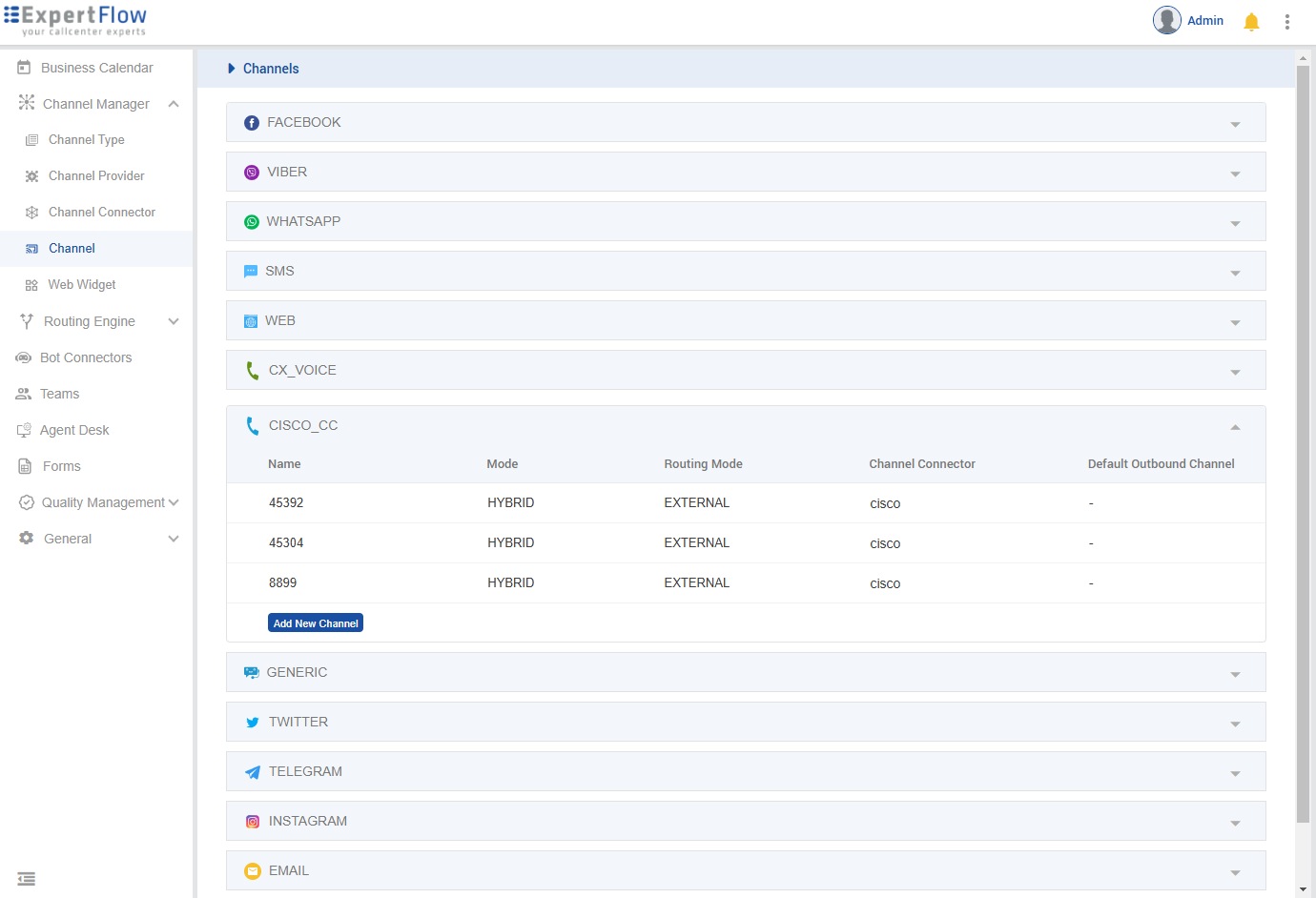
-
Set Routing Mode as External
-
Set the Channel Model as HYBRID
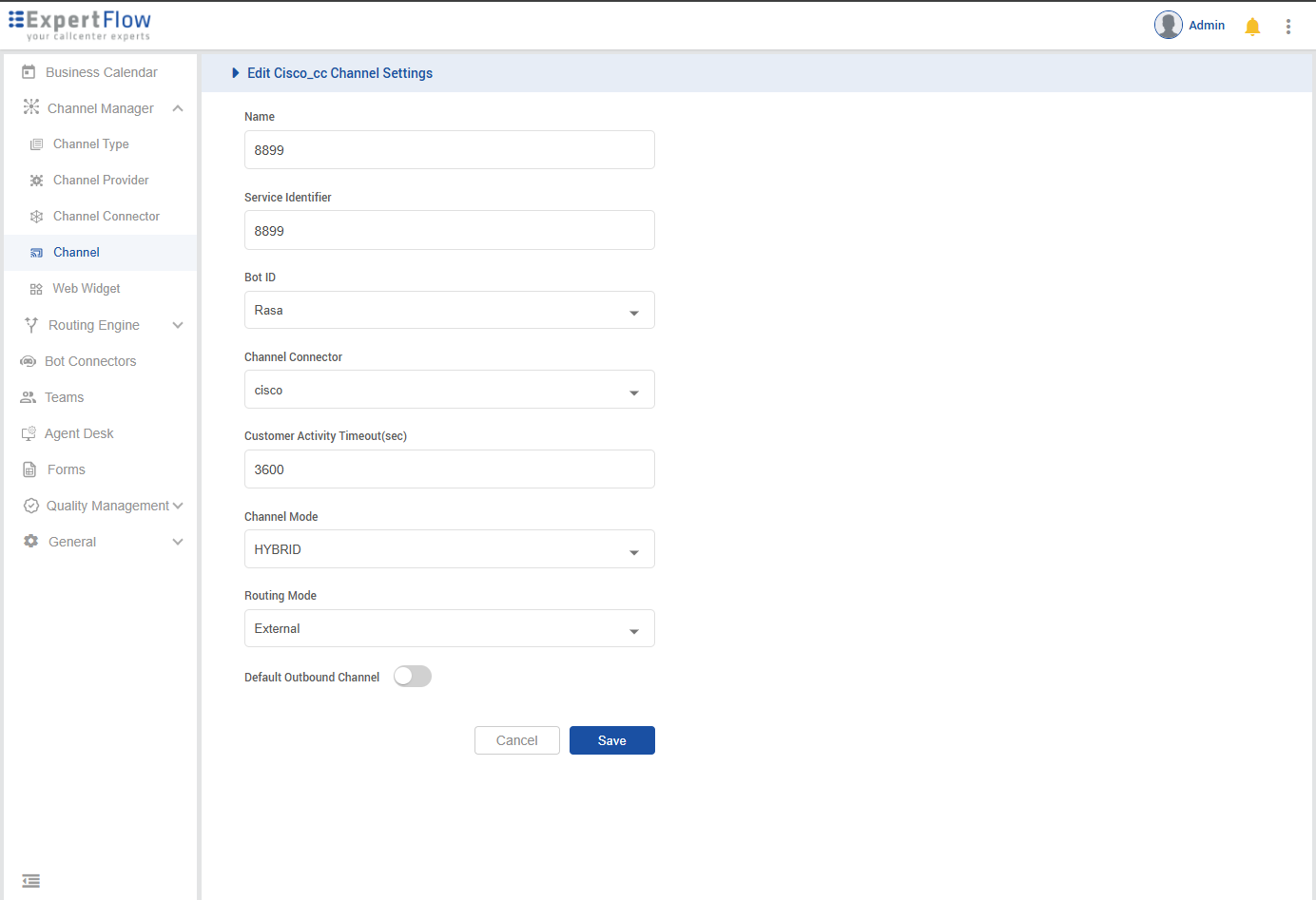
-
Create a new user in Realm, set its name & password as ‘vrs’, and assign all 21 ‘realm-management’ roles to that user. Set
KEYCLOAK_USERNAME & KEYCLOAK_PASSWORDinvalues.yaml
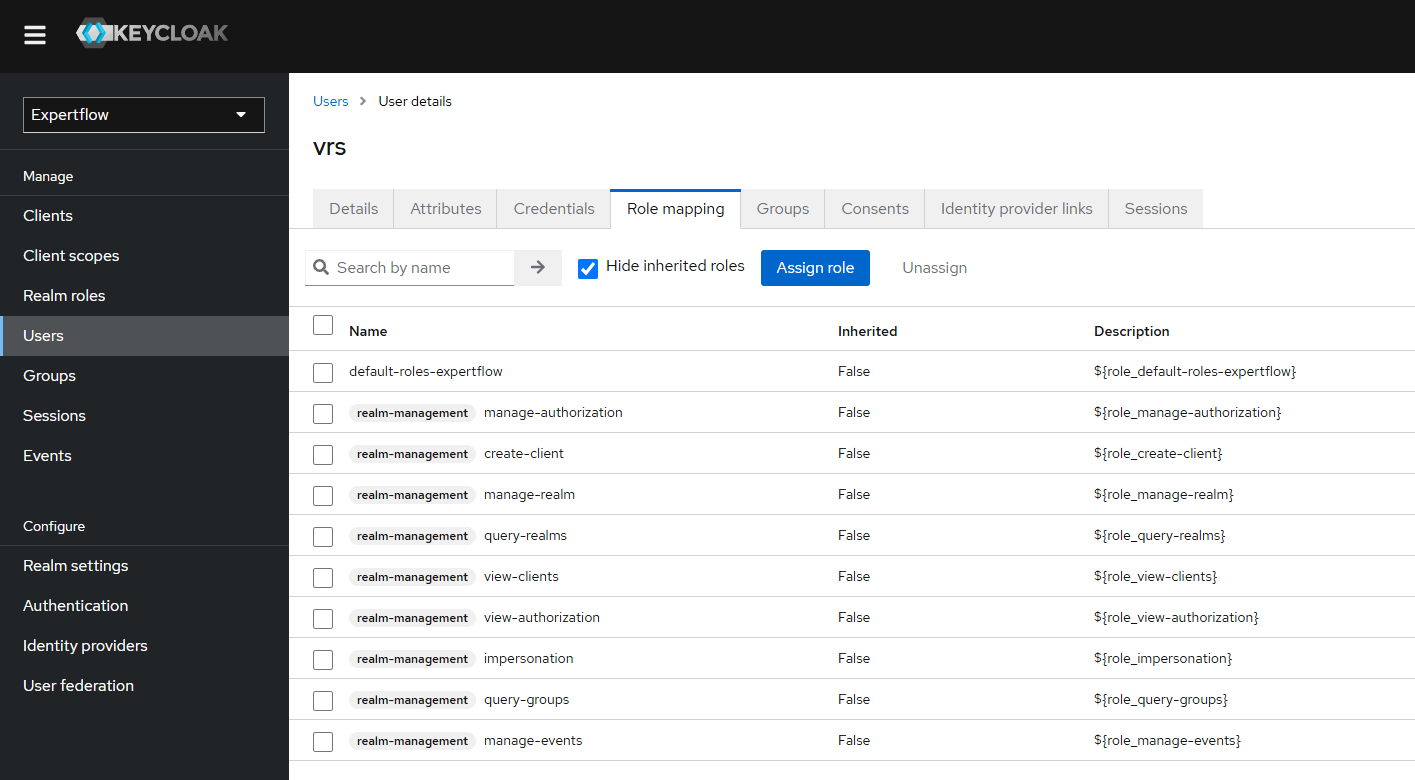
2. Deploy QM Connector
-
By default QM Connector is not enabled for deployment in the
helm-values/cx-qm-custom-values.yamlfile. Edit thehelm-values/cx-qm-custom-values.yamlfile to set theenabledflag totrueforqm-connector. -
Update the environment variables given in the table below, under QM-Connector in the
helm-values/cx-qm-custom-values.yamlfile, according to the channel, VRS, and UCCE configuration. -
Run the deploy command.
helm upgrade --install --namespace=expertflow --set global.efCxReleaseName="ef-cx" --version 4.10.0 qm --debug --values=helm-values/cx-qm-custom-values.yaml expertflow/qm
|
Env var |
Description |
Example values |
|---|---|---|
|
RECORDING_SERVER_FQDN |
Recording Server IP |
* |
|
EFCX_FQDN |
CX FQDN |
|
|
CALL_BACK_URL |
Webhook for conversation creation |
|
|
UCCE_ENGINE |
UCCE DB Engine |
sqlserver |
|
UCCE_IP |
UCCE IP |
* |
|
UCCE_PORT |
UCCE DB port |
* |
|
UCCE_DATABASE |
UCCE |
* |
|
UCCE_USERNAME |
UCCE |
* |
|
UCCE_PASSWORD |
UCCE |
* |
|
UCCE_OB_SERVICE_IDENTIFIER |
Service Identifier for outbound calls |
8899 |
|
KEYCLOAK_REALM_NAME |
Realm name from EFCX IAM (keycloak) |
expertflow |
|
KEYCLOAK_CLIENT_ID |
KeyCloak client ID from IAM (keycloak) |
cim |
|
KEYCLOAK_CLIENT_SECRET |
Add the client secret from the IAM (keycloak) |
ef61df80-061c-4c29-b9ac-387e6bf67052 |
|
KEYCLOAK_USERNAME |
IAM (Keycloak) User with all the realm-management Roles |
vrs |
|
KEYCLOAK_PASSWORD |
The password of the IAM (keycloak) User with all the realm-management Roles |
vrs |
|
KEYCLOAK_AGENT_ROLE_NAME |
The role that needs to be assigned to the new Agent created with QM-connector |
agent |
|
KEYCLOAK_AGENT_ROLE_ID |
Role-Id that needs to be assigned to new Agent created with QM-connector |
1903735d-5bcc-4253-a05e-ea1487195c9c |
|
DB_NAME |
Name of the VRS database |
* |
|
DB_USER |
Username for VRS database |
* |
|
DB_PASSWORD |
Password for the VRS database |
* |
|
DB_ENGINE |
The engine on which the VRS database is running i.e MySQL |
sqlserver |
|
DB_HOST |
Name or IP of the host on which the VRS database is active |
* |
|
DB_PORT |
Port of the VRS Database |
* |
|
DB_DRIVER |
Driver on which VRS database is running i.e mysql drive |
com.microsoft.sqlserver.jdbc.SQLServerDriver |
|
CALL_START_DATE |
The cutoff date; only TCD records with a start time after this date are fetched |
2025-01-01 |
|
MAX_BATCH_SIZE |
The maximum number of users to fetch from Keycloak in a single batch. |
30000 |