
Enables businesses to engage with customers through public posts by managing comments on Instagram directly from within the CX interface. This allows agents to manage both public and private interactions, delivering real-time customer support, enhancing engagement, and shaping brand perception.
Channel Capabilities
Public Reply to a Comment
Allows the business to publicly reply to any comment on a business's Instagram post. The reply appears as a nested comment directly below the original comment on Instagram, maintaining a clear and organized conversation flow.
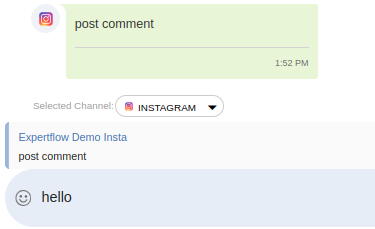
Private Reply to a Comment
Enables businesses to initiate a private reply (via Instagram Direct Message) to any comment on a post. The original comment stays visible while the private thread progresses independently.
Hide or Unhide a Comment
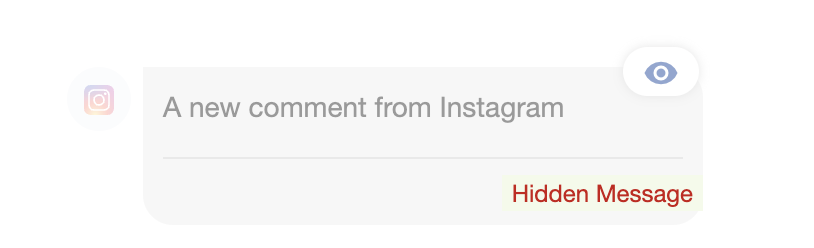
Allows businesses to hide/conceal or unhide a specific comment from public view on their posts. These hidden comments are not visible to the public but remain accessible to the commenter and page administrators, ensuring privacy while maintaining oversight. To hide a specific comment, expand the arrow on the top right of the comment, as shown below. Click on the 'Hide' button on a comment. The specific comment will be hidden from the Instagram Post. It will be shown as blurred, with the indication of 'Hidden Message' in the Conversation View. Once hidden, you can see an Unhide icon at the top of the hidden message, which can be used to unhide the comment message.
Delete a Comment
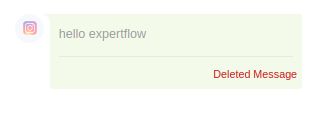
Enables businesses to permanently delete comments from a post. Once deleted, the comment is completely hidden from everyone, including the original commenter. This is particularly useful for addressing harmful or policy-violating content.
View Full Post
Enables the business to access the entire Instagram post with all associated comments. To view the full post, click on the 'View Full Post' button
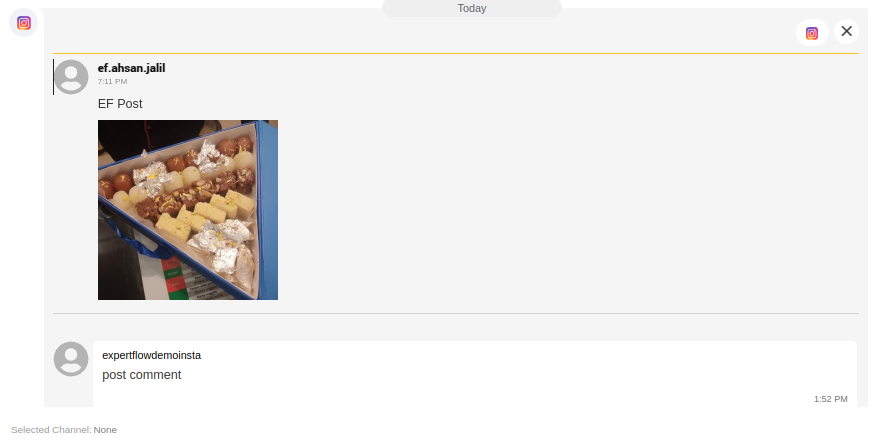
Once the screen pops up, this provides full context, including timestamps and usernames. This facilitates better agent understanding and fosters improved personalized engagement.