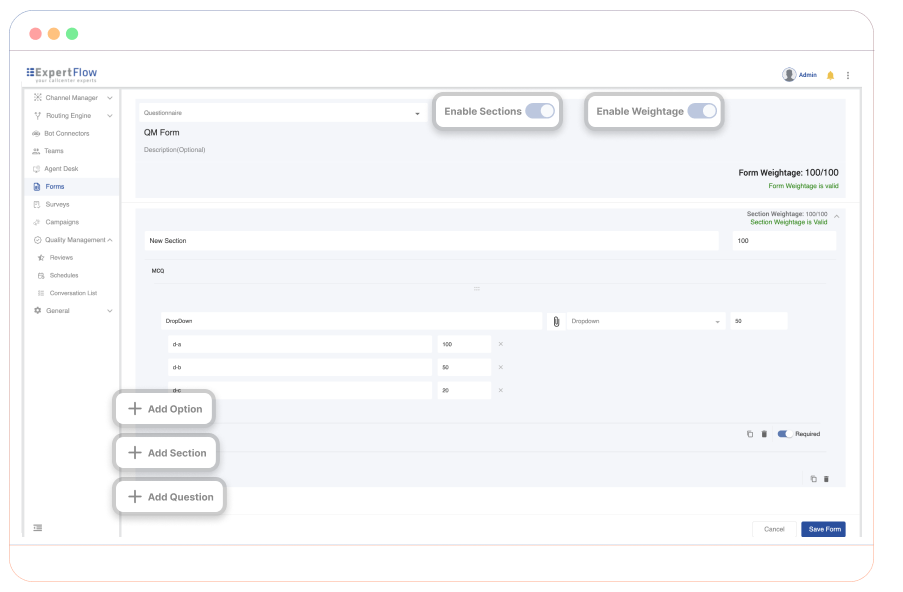
Create structured, multi-section evaluation forms tailored to your quality assurance needs. The Form Builder supports a wide range of question types—including dropdowns, multiple choice, rating scales, and text inputs—along with configurable weight assignments at form, section, and question level. Built-in checks ensure that total weights are correctly distributed and sum to 100% where required.
Steps to Create an Evaluation Form
1. Define Evaluation Goals
Start by setting clear objectives for the evaluation form. Identify key performance indicators (KPIs) such as communication clarity, compliance adherence, and problem resolution. These goals determine the structure and scoring logic of the form.
2. Structure Sections and Questions
Organize the form into sections aligned with core performance areas. Common sections include:
-
Communication: Clarity, tone, and customer handling
-
Compliance: Adherence to internal policies and regulatory standards
-
Problem Solving: Ability to understand and resolve customer concerns
Each section can include multiple question types depending on what best captures agent behavior.
3. Apply Weighting Logic
Assign weightage to each section and individual question based on its importance. For instance, if compliance is a high-priority area, it may carry a greater percentage of the overall score. The Form Builder automatically enforces that the total weights add up to 100%.
3.1 Evaluation Questionnaire
Here is a list of properties that define a weighted evaluation form:
-
The form usually has different questions grouped in a section.
-
There may be multiple sections.
-
A weighted question is always of the type options (single select), however, QM allows you to add other non-weighted questions as well.
-
Each section has a weightage in percentage that can be defined by the user, and all sections' combined weightage should sum up to 100 (which makes up the total weightage of the form, which is always 100). If there is only one section in the form, then the weightage of that section is 100. However, if there are multiple sections, then the sum of the weightages of all sections must be 100. For example, if there are two sections, one could have a weightage of 40 and the other 60, or they could be 30, 30, and 40.
-
Each section can have one or more questions with a defined weightage for each question. The sum of all questions’ weightages in a section must be 100.
-
Similarly, each weighted question can have multiple options, but only one option can be selected. The total weightage of all options for a question does not need to sum up to 100; rather, it should be a fraction of 100. For example, there could be three answers/options: one with a weightage of 100, the second with a weightage of 50, and the third with a weightage of 0.
4. Validate for Completion
Before saving, the system verifies that the total form and section weightages equal 100%. If they don’t, it highlights the issue, prompting users to adjust values for completeness. This ensures that evaluation forms are mathematically accurate and ready for use.