
|
Node |
Deploy Node |
|---|---|
|
Description |
The Deploy node is responsible for finalizing and publishing the entire IVR flow. It takes the complete call flow that has been designed in Node-RED, compiles it into a fully-structured Lua script, and securely deploys it to the target server over SSH. This node must be placed at the end of the flow, and all flow paths should ultimately terminate at this node to ensure proper Lua generation and deployment. |
Functionality
When the Deploy node is triggered:
-
It compiles the entire active flow into a single Lua file.
-
Establishes an SSH connection to the specified server.
-
Writes the generated Lua code into the specified target file path on the server, replacing any existing contents.
This enables real-time deployment of updated IVR logic directly into your telephony infrastructure.
Configuration
|
Field |
Description |
|---|---|
|
Name |
(Optional) Friendly name for the node instance, used for readability and visual clarity in the flow editor. |
|
Server IP |
The IP address of the target server |
|
Port |
SSH port to connect (default is usually |
|
Username |
SSH username with appropriate permissions to modify Lua file |
|
Password |
SSH password for authentication |
|
Target File Path |
Absolute path on the server where the Lua file should be written (e.g., |
Usage
-
The Deploy node must be placed at the final stage of your flow.
-
Every possible branch of the IVR logic must lead to this node, ensuring complete Lua generation.
-
Ensure that SSH credentials are secure and have write access to the specified target path.
-
Overwriting system Lua scripts may impact running services, always validate flow logic before deployment.
Security Note
-
Credentials are transmitted over SSH; however, it is recommended to use a secured environment and rotate passwords regularly.
-
Avoid deploying directly to production without proper testing in a staging environment.
Example
Scenario: You’ve completed designing a multilingual IVR flow with conditions, API calls and prompts. Now, you want to publish this logic as a Lua script to /usr/local/ivr/scripts/ivr.lua on your server (192.168.1.118).
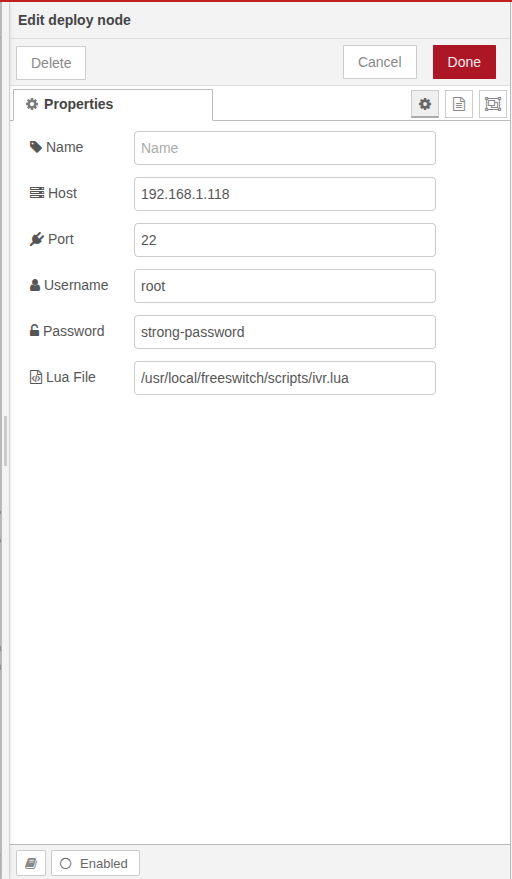
Configuration:
-
Host:
192.168.1.100 -
Port:
22 -
Username:
your-username -
Password:
securePass123 -
Lua File:
/usr/local/ivr/scripts/ivr.lua
The Deploy node will automatically compile and push the final Lua code to the server upon execution.