
Please note that this pipeline/DAG is also used for 15 minutes Agent States consolidated data using gold queries. The configurations and process of running the pipeline is the same.
Please note that this is an off-set interval data pipeline, means this pipeline will bring in data according to the offset defined for each query in the configuration file. For example, if the time_offset is set for '-15' for a query then the pipeline is run on the date 17-06-2025 at time 12:30:00 the data that will be processed and inserted in the tables would be from the interval 12:00:00 to 12:15:00 of the same date.
Purpose:
-
For the gold queries that are dependent on multiple tables to execute and get gold level data in our target database, we needed to load all the silver layer data in our target database first and then execute the gold queries.
-
Previously for campaigns we used the main campaigns and activities pipeline with a single task for executing gold queries but this led to missing data because of dependencies between the pipeline data.
-
So, for this purpose we have completely removed that task from the main pipeline and made a separate consolidated DAG with a 15 minutes offset interval, to ensure no data is missed and valid data is inserted.
-
To run the pipeline and load please refer directly here: Campaigns/Agent States 15 Minutes Gold Queries Pipeline | How to Run the pipeline:
Gold Queries:
The following gold queries would be executed by this pipeline:
-
Agent State Summary Gold (15 minutes consolidated Agent States Data)
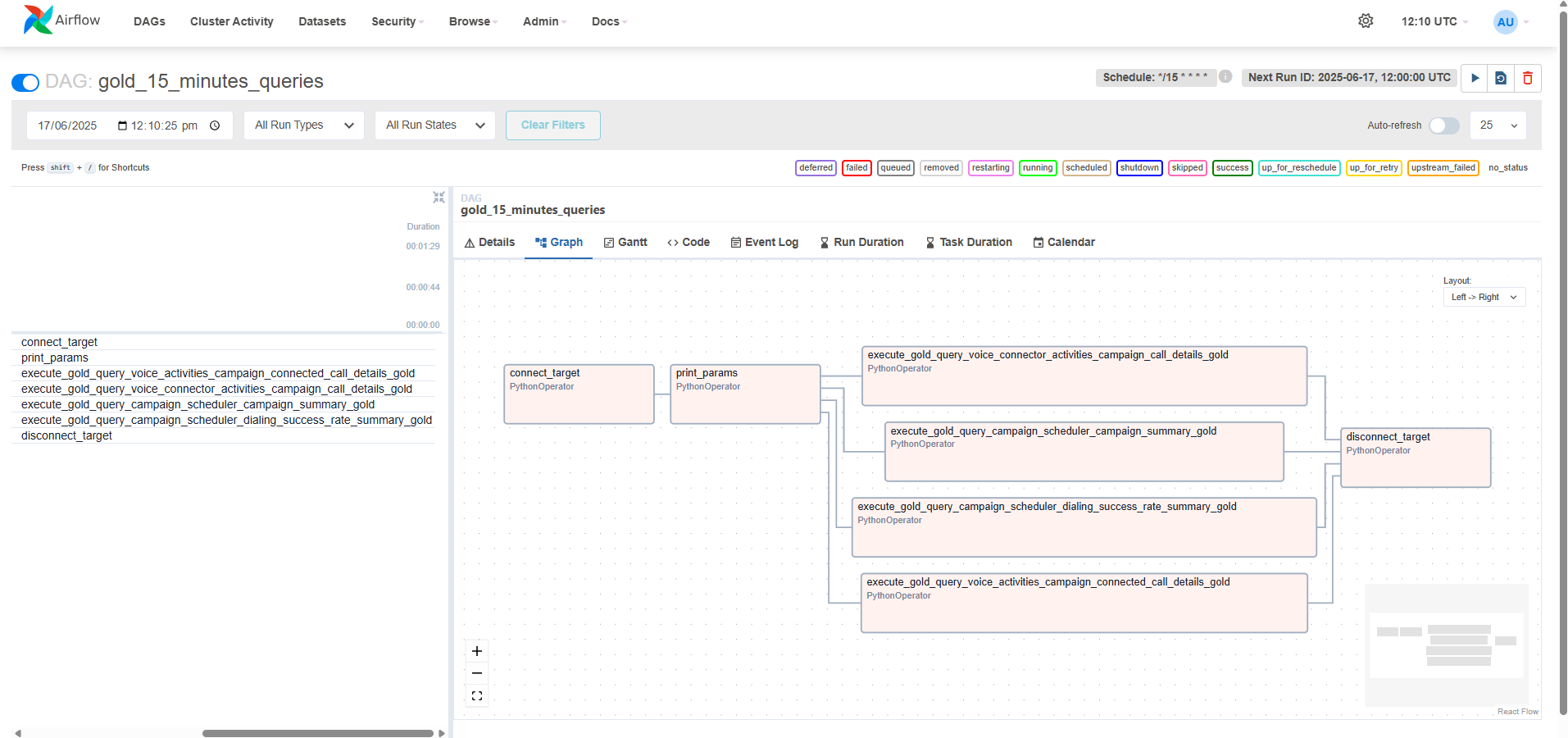
Configurations:
Configurations for Gold Queries Data Pipeline are provided in a yaml format in transflux/config directory in your solution deployment to ensure flexibility and adaptability. These configurations are designed for normal and ideal use cases and are advised to be used as-is to achieve optimal results.
dbt_models:
  - name: dialing_success_rate_summary_gold
    time_offset: -15 # All time_offset are configurable. Can be changed according to requirements for example 0 for no time offset.
  - name: campaign_connected_call_details_gold
    time_offset: -15
  - name: campaign_call_details_gold
    time_offset: -15
  - name: campaign_summary_gold
    time_offset: -15
  - name: agent_state_summary_gold
    time_offset: 0

target:
  type: "{TARGET_TYPE}"
  db_url: "mysql+pymysql://{TARGET_USERNAME}:{TARGET_PASSWORD}@{TARGET_HOST}:{TARGET_PORT}/{TARGET_DATABASE}"
  enable_ssl: {TARGET_SSL_ENABLED}
  ssl_ca: "/transflux/certificates/mysql_certs/ca.pem"
  ssl_cert: "/transflux/certificates/mysql_certs/client-cert.pem"
  ssl_key: "/transflux/certificates/mysql_certs/client-key.pem"

schedule_interval: "*/15 * * * *"
time_offset: "0" # Not to be changed, please keep it as "0"
interval_minutes: 15
start_date: "2025-11-27T06:00:00+00:00"
catchup: false
tenant_id: {TENANT_ID}
How to Run the pipeline:
In order to run the gold queries and get data in the gold tables, there can be two cases.
1. If there is no Historical Data to be loaded:
For this case if you don't have any historical data, you can simply set the datetime within your accordance in start_date field in the configuration file and simply just un-pause the pipeline from the Data Platform UI to start executing the gold queries on your data.
2. If there is Historical Data to be loaded:
In case you have Historical Data then you would have to trigger the pipeline manually from the Data Platform UI. Please follow the following steps for this purpose:
-
Go to your configuration file and set the datetime in
start_timeto the current datetime or the datetime from which you want to run your latest gold query data. After this un-pause the gold queries pipeline in Data Platform UI and the schedule will start executing the gold query on the data according to your setstart_timein the configuration file. -
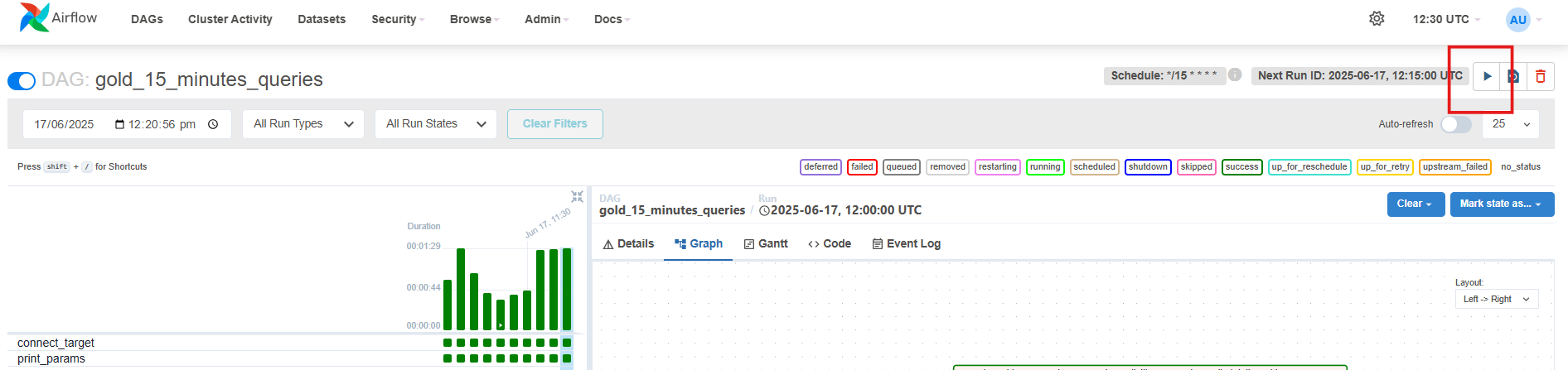
Now for running the gold query on the historical data, go to your pipeline and select the trigger option in the top right corner of the Data Platform UI as shown below.
-
Once you click the trigger option you would be presented with the following screen. In the
custom_model_namesfield enter the exact gold query name/names in a JSON format that you want to run manually on custom time. In the case of campaigns the query names that run are:
-
campaign_connected_call_details_gold -
campaign_call_details_gold -
campaign_summary_gold -
dialing_success_rate_summary_gold
However in the case of 15-minute consolidated Agent States Data the query name that run is: agent_state_summary_gold.
If you have to run multiple queries then your format should be for example; [“campaign_connected_call_details_gold”, “campaign_call_details_gold”, …….., so on]. If you want to run only a single query then your format should be; [“campaign_connected_call_details_gold”]. Also note that if you give all the 4 queries then all of them will run on custom time but if you only give some queries to be run on custom time then the other queries that are not mentioned will run on normal schedules.
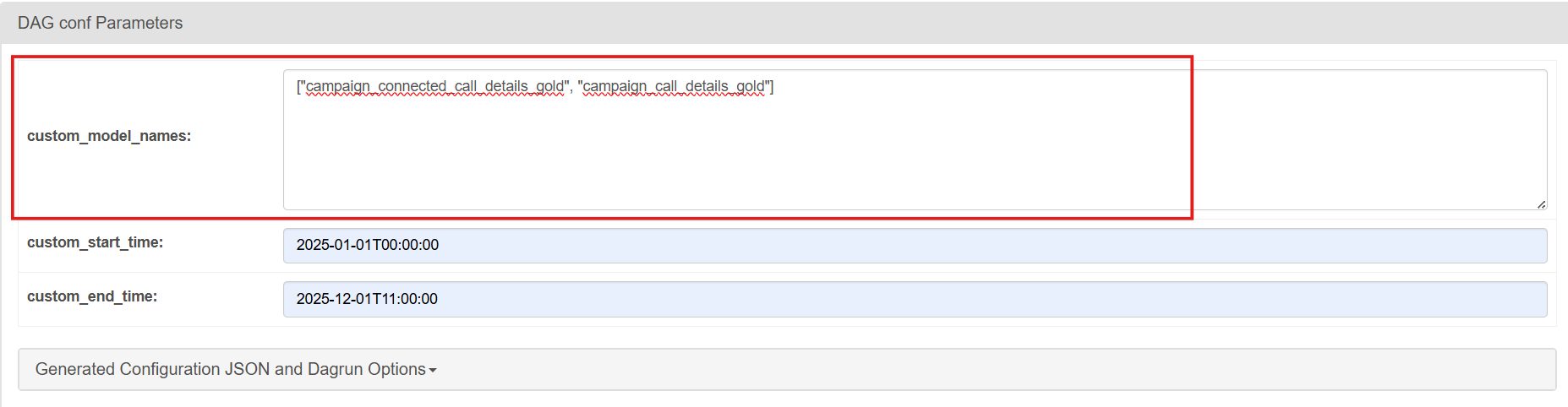
(Please note that the query name should be exact as mentioned above else the query would not run with custom time and would run with the normal scheduled time. Also the custom_model_names should be given as a list separated by commas and in double quotes.)
-
Now enter the
custom_start_timeandcustom_end_timewith the same format as being shown in the screenshot according to which your data is present (custom_start_timebeing the oldest data andcustom_end_timebeing the latest data). In the case attached in the screenshot, the oldest data for campaigns was generated on date 01-10-2025 and the latest data present was for date 11-01-2025, so please check your database and check the datetime for latest and oldest data and add the datetime here accordingly.
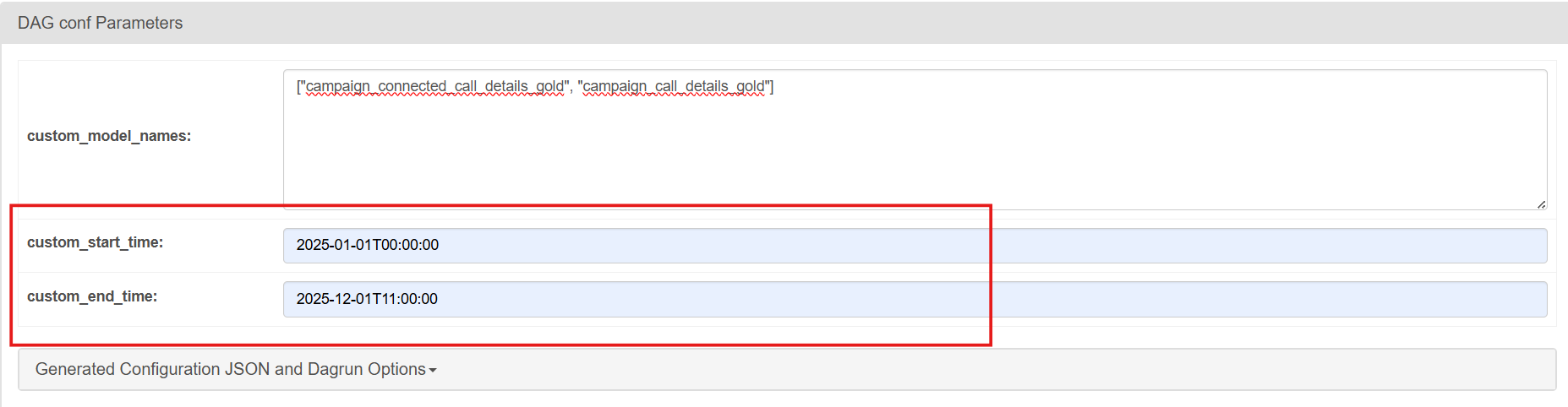
Please add the date and time carefully, ensuring no time interval is missed to get the complete data in your database. The time should be added here according to UTC timezone.
-
Once you set your dates here, click ‘Trigger’. This will start the pipeline run and will execute the gold queries on the historical data present according to the custom start and end datetime you gave and load all the historical gold level data for campaigns and agent states in a single run.