
|
Node |
Digit Node |
|---|---|
|
Description |
The Digit node is used to collect numeric input from the caller via DTMF tones. It plays a user-defined prompt and waits for a number to be entered by the caller. Input is validated against configurable rules like length and regular expressions, and is then stored into an SDO (Session Data Object) variable for later use in the IVR flow. This node is ideal for collecting values like complaint numbers, customer IDs, extension digits, or any form of numeric input. |
Configuration Options
|
Field |
Description |
|---|---|
|
Name |
A label for readability within the Node-RED flow |
|
Prompt |
The audio prompt (file path) played to the user requesting input (e.g., “Please enter your complaint number”) |
|
Invalid |
Prompt to play if user input does not match the validation pattern |
|
No Input |
Prompt to play if the user provides no input within the allowed time |
|
Regex |
A regular expression to validate the input.
|
|
Minimum Length |
The minimum number of digits required |
|
Maximum Length |
The maximum number of digits allowed |
|
Iterations |
Number of retries if input is invalid or missing |
|
Timeout |
How long to wait for input before treating it as “no input” |
|
Digit (SDO Key) |
The input collected from the user is stored in this key within the SDO scope (e.g., |
Behavior Flow
-
The prompt is played to the caller.
-
The system waits for DTMF input.
-
Input is evaluated against:
-
The defined regex
-
Minimum and maximum length constraints
-
-
If valid: value is saved in SDO and flow continues.
-
If invalid or no input:
-
Corresponding prompt is played
-
System retries up to the configured number of iterations
-
After all retries are exhausted, flow continues without input.
-
Example Use Case
Scenario: You want to collect a 6-digit complaint id from the user.
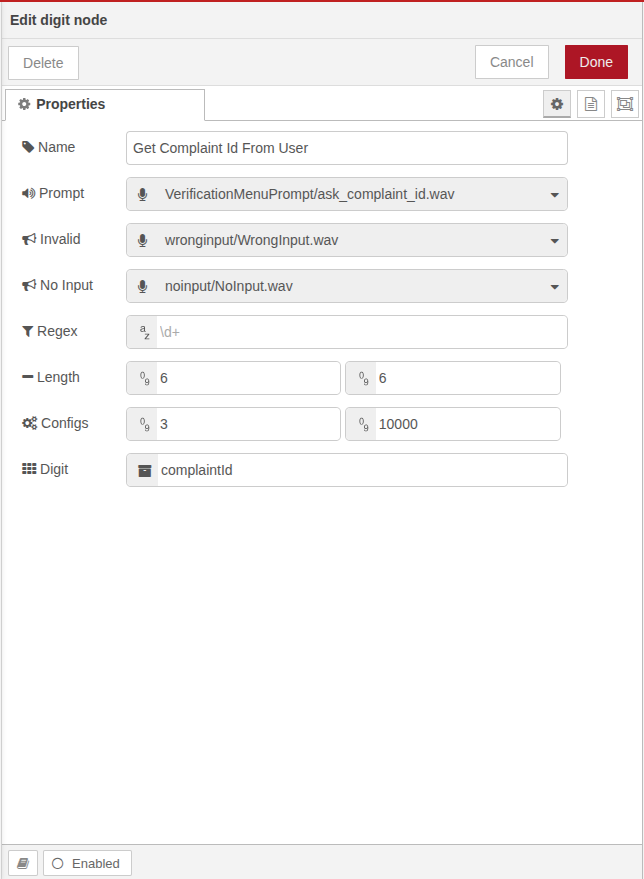
Configuration:
-
Prompt:
prompts/enter_complaint_number.wav -
Invalid Prompt:
prompts/invalid_input.wav -
No Input Prompt:
prompts/no_input.wav -
Regex:
^[0-9]{6}$ -
Min Length:
6 -
Max Length:
6 -
Iterations:
3 -
Timeout:
6000 -
SDO Key:
SDO.complaint_number
Best Practices
-
Ensure all audio prompts are present and fetch the prompts via prompt node.
-
Keep the prompt clear and user-friendly.
-
Use regex for fine-grained input control (e.g., specific starting digits or patterns).
-
Set realistic timeout and retries to balance user experience and call duration.