
|
Node |
HTTP Node |
|---|---|
|
Description |
The HTTP Node allows you to make RESTful API requests within the IVR flow. It can send data to or fetch data from external services, and automatically captures the response for use in later parts of the flow. This node is essential for integrating dynamic content, performing lookups, validating user input, or executing business logic via APIs. |
Purpose
-
To perform external API calls (e.g. customer lookup, ticket status, payment verification)
-
To store API responses into SDO variables for further decision-making
-
To allow real-time interaction with backend systems
Supported API Type
-
Currently supports only REST APIs
Configuration Options
|
Field |
Description |
|---|
|
Field |
Description |
|---|---|
|
Name |
Label for the node (for readability) |
|
Type |
Currently fixed to |
|
Method |
HTTP method — |
|
URL |
Full endpoint URL of the API |
|
Body |
Request body (JSON format) You can dynamically insert values from CDO, SDO, and ENV into JSON structures using placeholder syntax. For example: During Lua generation, these placeholders will be resolved at runtime using their respective sources:
This allows you to build flexible, dynamic payloads for APIs and other nodes where values may change depending on the session context. |
|
Headers |
List of headers in
|
|
Response |
Name of the SDO key where response will be stored |
Response Storage Format
Upon successful API execution, the node stores the result in an SDO variable using the key provided in the Response field:
|
SDO Path |
Description |
|---|---|
|
|
HTTP status code (e.g., 200, 404) |
|
|
Response headers in Lua table format |
|
|
Parsed response body (Lua table) |
These response values can be used in any subsequent node — like in a Decision Node, Prompt, or Digit input logic.
Example
On Hangup node you want to submit a call report based on user selections and inputs.
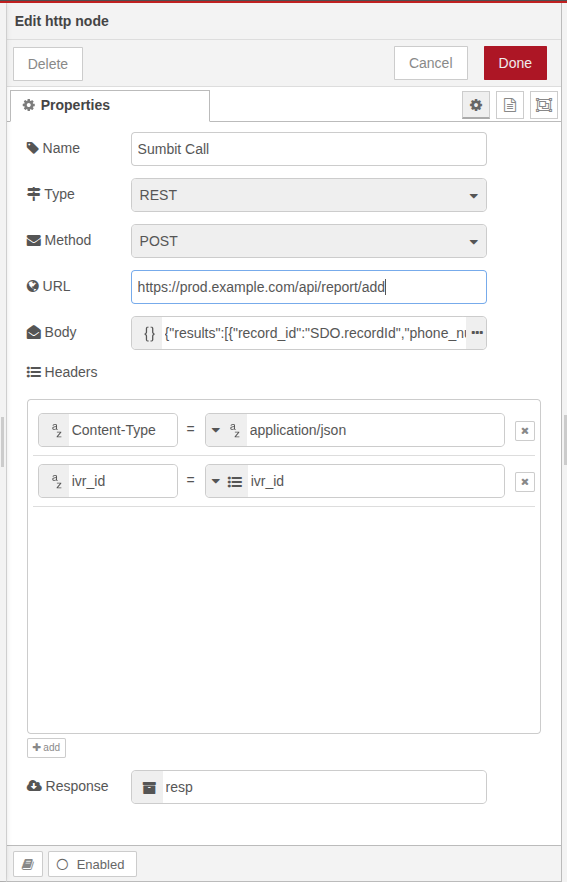
Best Practices
-
Validate responses using a Decision Node after API call
-
Use environment variables for dynamic headers like tokens or base URLs
-
Always define unique and descriptive SDO keys for response storage
-
Use error handling logic (like Exception Node) for failed API calls