
|
Node |
Lua Code Node |
|---|---|
|
Description |
The Lua Code Node allows you to insert and execute custom Lua code at any point within your IVR flow. It provides flexibility to perform advanced logic, call internal modules, or manipulate session data beyond the standard nodes. This node can be used in any part of the IVR, including the main call flow, hangup flow, or exception flow. |
Purpose
-
To execute custom Lua scripts
-
To enhance flows with additional logic that is not covered by predefined nodes
Configuration
|
Field |
Description |
|---|---|
|
Name |
A user-defined label for better readability and maintenance |
|
Lua Code |
A multiline text area where raw Lua code can be written |
Usage
-
Each line of Lua code must be placed on a new line.
-
Code should follow standard Lua syntax.
-
Fetching and formatting the current date and time
-
Performing mathematical operations or string manipulation
-
Preparing or transforming data before it is passed to other nodes
Example
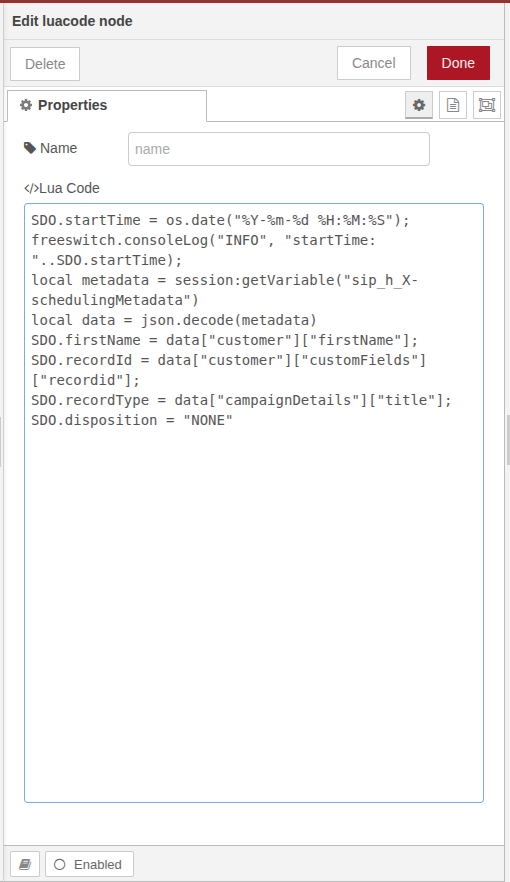
On the start of IVR you want to store the date/time and parse some custom data
Best Practices
-
Use this node when you need logic that is not possible with visual nodes
-
Always test custom Lua logic in a safe environment before deploying to production