
|
Node |
Menu Node |
|---|---|
|
Description |
The Menu Node is one of the core interactive components in an IVR (Interactive Voice Response) system. It plays a voice prompt to the caller, listens for DTMF (digit) input, and then routes the call based on the user’s selection. |
Purpose
This node allows you to:
-
Prompt the caller with a menu (e.g., "Press 1 for Sales, 2 for Support")
-
Accept user input through keypad (DTMF)
-
Route the flow dynamically based on the input received
-
Store the input for further logic or processing
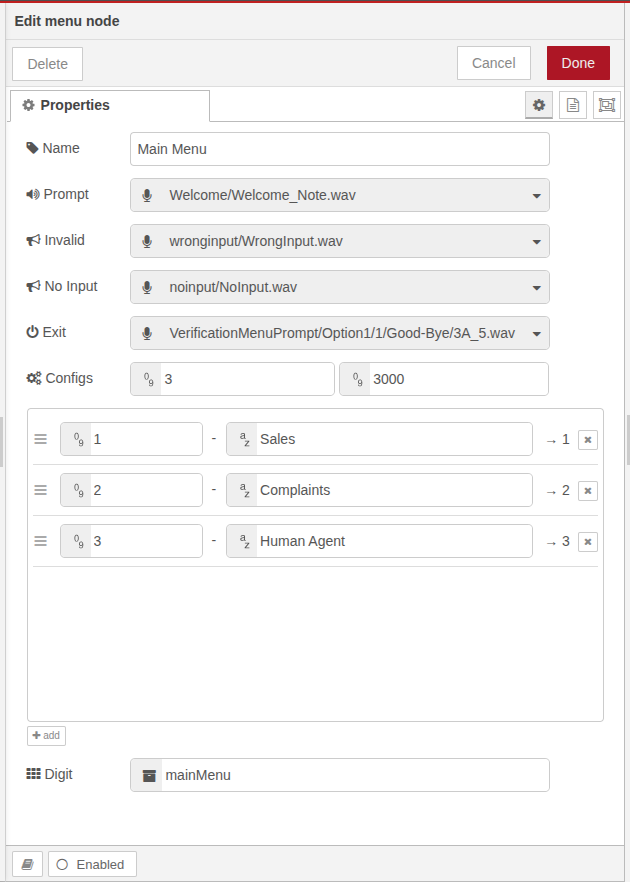
Configuration Options
|
Field |
Description |
|---|---|
|
Name |
Friendly identifier for readability within the flow |
|
Prompt |
The main audio/message played to the caller (e.g., "Press 1 for sales, 2 for support") |
|
Invalid |
Audio/message played when an invalid digit is entered |
|
No Input |
Audio/message played when no input is received within the timeout window |
|
Exit |
Final prompt that plays after max retries are exhausted, after which the call will hang up |
|
Iterations |
Number of retries allowed in case of no input or invalid input |
|
Timeout |
Duration to wait for the caller to enter a digit |
|
Options |
A key-value mapping of digit presses to option labels Key = expected digit (e.g. 1)
Each option will result in a separate output in the visual flow editor |
|
Digit |
The name of the Session Data Object (SDO) key where the digit and value will be saved for later use |
Stored Output in SDO
When a user selects an option, the following values are stored in the SDO for future use:
-
SDO.{key}.digit→ The actual digit the user pressed -
SDO.{key}.value→ The label of the selected option as defined in configuration
Example:
You want to play a menu prompt and user will select the options
If user presses 1 and that corresponds to sales:
SDO.{key}.digit = "1"
SDO.{key}.value = "Sales"
Flow Behavior
-
If valid input is received: The corresponding output port (based on selected digit) is triggered
-
If invalid input: The Invalid prompt is played, and the user is prompted again (if retries remain)
-
If no input: The No Input prompt is played, and user gets another chance (if retries remain)
-
If all retries are exhausted: The Exit prompt is played and the call is terminated
Sample Configuration
|
Parameter |
Example Value |
|---|
|
Parameter |
Example Value |
|---|---|
|
Name |
Main Menu |
|
Prompt |
"/prompts/main_menu.wav" |
|
Invalid |
"/prompts/invalid_option.wav" |
|
No Input |
"/prompts/no_input.wav" |
|
Exit |
"/prompts/exit_prompt.wav" |
|
Iterations |
3 |
|
Timeout |
5000 |
|
Options |
|
|
Digit (SDO Key) |
|
Best Practices
-
Keep prompts short, clear, and informative
-
Always define an Exit scenario to avoid deadlocks
-
Use descriptive option labels for better downstream flow design
-
Ensure your Timeout is long enough for human interaction but short enough for good UX