
|
Node |
Prompts Node |
|---|---|
|
Description |
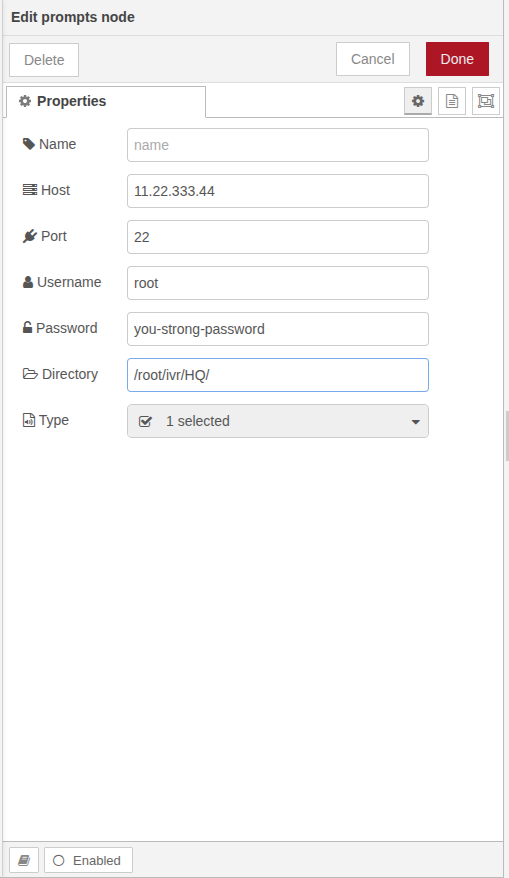
The Prompts Node is a standalone utility node used to retrieve audio prompts from a remote server via SSH. This node does not participate in the main IVR call flow, hangup flow, or exception flow. It is designed to operate independently on the same page where your main flow is created. To use it, place a separate Start node and directly connect it to a Prompts node. No other nodes are required or supported after it in this mini-flow. It simply fetches and lists available prompts from a specified directory and all of its sub-directories on the server. |
Purpose
The Prompts Node is intended for:
-
Centralized fetching of available audio prompts (e.g.,
.wav,.mp3). -
Helping designers choose from existing prompts without manually browsing the server.
-
Improving configuration speed and accuracy.
Configuration Parameters
|
Field |
Description |
|---|---|
|
Name |
A label to identify this prompt-fetch flow. |
|
Host |
IP address or hostname of the remote server. |
|
Port |
SSH port number (default is usually 22). |
|
Username |
SSH login username. |
|
Password |
Password for SSH authentication. |
|
Directory |
The root directory path from where prompts should be fetched. This can be any valid server path and includes sub-directories. |
|
Type |
Audio file type to fetch, e.g., |
Usage Notes
-
Prompts Node should always be linked only to a Start node and must not be part of the main or secondary IVR flow.
-
This node helps dynamically fetch all available prompts, which can then be reused in other IVR nodes like
Play,Digit, orMenu. -
No further connections are allowed from the Prompts node, its sole function is to retrieve and list files.