
|
Node |
Session Data Object (SDO) |
|---|---|
|
Description |
The SDO(Session Data Object) Node is used to create or modify session-scoped variables during the IVR call flow. These variables are not tied to the CDO (Call Data Object), but are maintained separately within the the duration of the call. This node enables storing, modifying, and referencing dynamic data, making it extremely useful for managing user inputs, API responses, prompts, or any temporary values throughout the call journey. You can use this node anywhere in the flow, and its values can be accessed later in other nodes using the |
Use Cases
-
Saving menu selections or digit entries
-
Holding API response data or computed values
-
Storing flags or session-specific preferences
-
Passing dynamic content to prompt, HTTP, Queue, or Lua Code nodes etc
⚙️ Configuration
|
Field |
Description |
Example |
|---|---|---|
|
Name |
A user-friendly label for this node in the designer. |
|
|
SDO |
One or more key-value pairs to be stored. Keys must be strings. Values can be of multiple types, described below. |
See examples below |
🔡 Supported Value Types for SDO
|
Type |
Description |
Example |
|---|---|---|
|
String |
Simple text or string literals |
|
|
Number |
Integer or floating-point numbers |
|
|
Boolean |
Logical values |
|
|
JSON |
Structured JSON objects for complex values |
|
|
Null |
Special value that translates to |
|
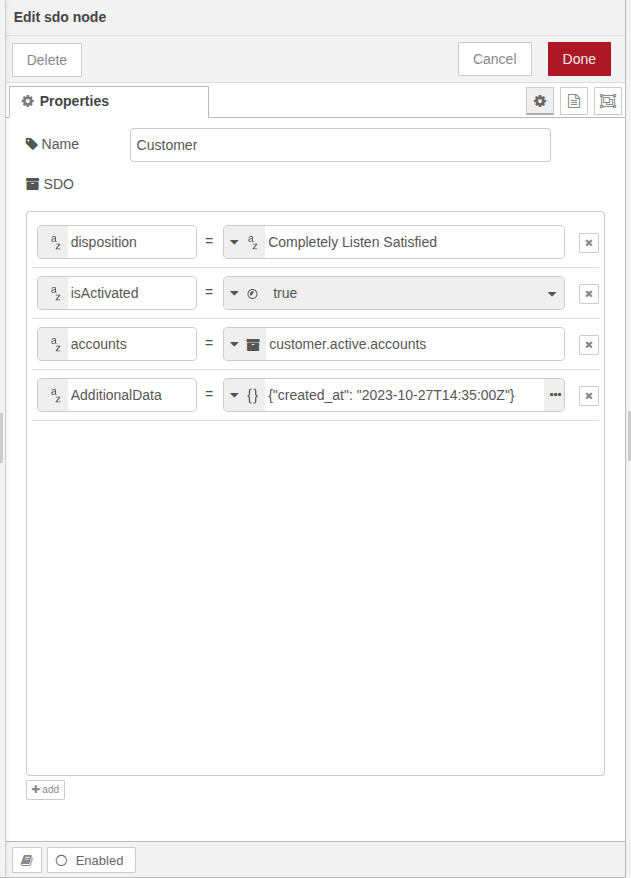
🧠 Behavior
-
Once set, these
SDOvalues can be reused in HTTP, Menu, Digit, Lua Code, or any other nodes supporting dynamic values. -
For example:
-
To set
SDO.lang = "en"early in the flow -
And then use it later in HTTP header:
Accept-Language: SDO.lang
-
📌 Comparison with CDO Node
|
|
SDO Node |
CDO Node |
|---|---|---|
|
Contains |
Call Data Information like |
Custom session data maintained by IVR designer |
|
Purpose |
Get the call information |
Maintain the custom data to manage the IVR flow |
Best Practices
-
Use clear & consistent key names (e.g.
userLang,retryCount) -
Set important SDOs early in the flow
-
Store API responses or user inputs for reuse
-
Use
nullonly if you handle it properly, in Lua (nil) -
Inject SDOs into API headers/body or dynamic prompts
-
Prefer JSON type for structured data
-
Don't duplicate data already in CDO