
This is enhancement of Bulk Customer Upload feature (available from CX4.10 onwards) and the enhancement is part of CX5.1 and onwards.
1. Overview
The CX Bulk Customer Upload feature allows administrators to upload customer data into the CX Customer using CSV files. The current implementation lacks duplicate validation, resulting in multiple records for the same customer and fragmented customer data.
This enhancement introduces a deduplication and merge mechanism during bulk uploads to ensure that:
-
Duplicate customer records are prevented
-
Existing customer records are intelligently updated
-
Customer attributes remain consistent and accurate
-
Users have control over how duplicate records are handled
The system will detect duplicates based on user-selected deduplication keys and apply a configurable conflict resolution strategy.
2. Problem Statement
The current bulk upload mechanism has the following issues:
2.1 Duplicate Customer Creation
-
The system does not check for existing customer records during bulk upload.
-
Uploading the same customer multiple times results in duplicate records.
2.2 Fragmented Customer Profiles
-
Customer information becomes scattered across multiple records.
-
Different uploads may contain partial information for the same customer.
Example:
|
Upload |
Data |
|---|---|
|
Upload 1 |
Name + Phone |
|
Upload 2 |
Name + Email |
Result:
Two different customer records instead of one unified profile.
2.3 Data Integrity Issues
Duplicate records cause issues in:
-
Customer analytics
-
Reporting
-
Contact routing
-
CRM integrations
-
Campaigns
3. Objectives
This enhancement aims to:
-
Prevent duplicate customer creation.
-
Allow flexible deduplication based on user-defined keys.
-
Provide configurable actions for duplicate handling.
-
Enable attribute merging for improved customer profiles.
-
Maintain upload transparency through detailed results.
4. High-Level Solution
The solution introduces a deduplication framework integrated into the bulk upload pipeline.
Key capabilities:
-
User selects Deduplication Key(s) during upload.
-
User selects Duplicate Handling Behavior or Action.
-
The cx-data-platform processes the CSV in batches.
-
Each batch is sent to the CIM Customer.
-
The microservice:
-
Detects duplicates
-
Categorizes customers
-
Executes the selected action
-
-
The system returns a summary of operations performed.
5. Feature Workflow
Step 1 — Upload CSV
The user uploads a CSV file containing customer records via the Bulk Import UI on Unified Admin.
Example fields:
firstName,lastName,email,phone,city
John,Doe,john@example.com,123456,New York
Jane,Doe,jane@example.com,654321,Boston
Step 2 — Select Deduplication Key(s) — UI Enhancement
The user must select at least one deduplication key.
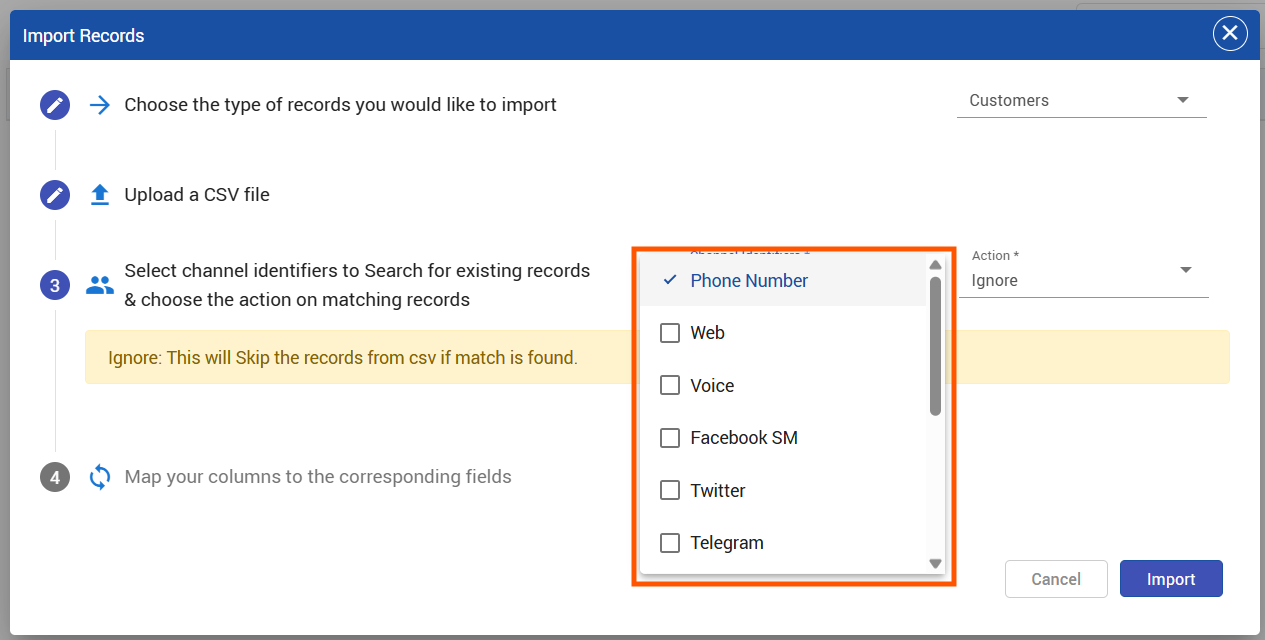
Possible keys:
-
Email
-
Phone Number
-
Facebook
-
All supported EFCX Channel Identifiers
-
First Name (default fallback)
These keys are used to detect duplicate records.
Example selection:
Deduplication Keys:
☑ Email
☑ Phone
Step 3 — Select Duplicate Handling Behavior
If duplicates are found, the user selects how the system should handle them.
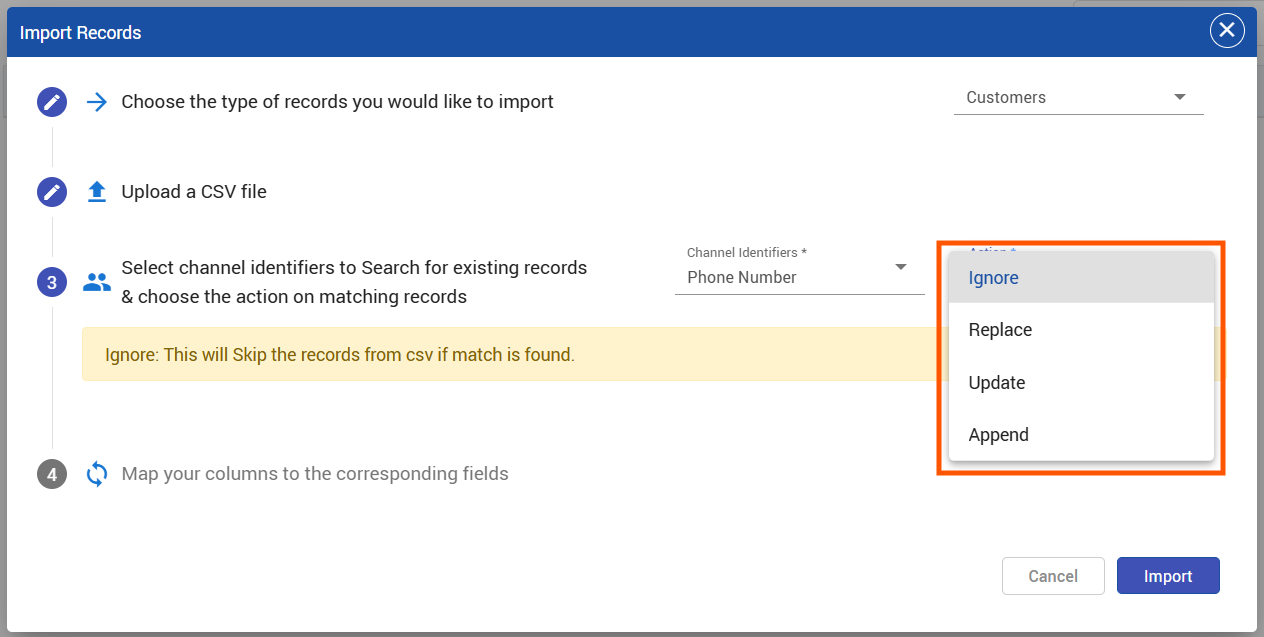
Available options:
1. Ignore
Duplicate records are skipped.
-
Existing record remains unchanged.
-
Ignored contacts are returned in output CSV with reason.
Example:
Reason: Ignored
2. Merge
Only attributes with empty values in the existing record will be updated.
Example:
Existing Customer
|
Name |
|
Phone |
|---|---|---|
|
John |
(empty) |
123 |
CSV Record
|
Name |
|
Phone |
|---|---|---|
|
John |
123 |
Result
|
Name |
|
Phone |
|---|---|---|
|
John |
123 |
3. Replace
The entire existing record is replaced with the CSV record.
Example:
Existing Record
|
Name |
|
Phone |
|---|---|---|
|
John |
123 |
CSV Record
|
Name |
|
Phone |
|---|---|---|
|
John |
999 |
Result
|
Name |
|
Phone |
|---|---|---|
|
John |
999 |
4. Append
New values from the CSV are appended to the existing record.
Rules:
-
Multi-valued fields → append
-
Single-valued fields → replace
Example:
Existing
phone = [111]
CSV
phone = [222]
Result
phone = [111,222]
6. System Architecture Flow
Frontend
-
User uploads CSV
-
User selects:
-
Deduplication Key(s)
-
Duplicate handling action
-
-
Frontend uploads the file and deduplication details with status Unprocessed are saved in db
Data Platform
Responsibilities:
-
Parse unprocessed CSV
-
Convert records into JSON
-
Split records into batches
Example batch payload:
{
  "deduplicationKeys": ["email","phone"],
  "action": "append",
  "customers": [
    { "firstName":"John","email":"john@example.com"},
    { "firstName":"Jane","email":"jane@example.com"}
  ]
}
The Data Platform sends batches sequentially to the CIM Customer Microservice.
CIM Customer Microservice
For each batch:
-
Iterate over customers
-
Check duplicates using dedupe keys
-
Categorize customers into:
duplicateCustomers[]
uniqueCustomers[]
Processing Logic
Unique Customers
Bulk inserted into database.
bulkInsert(uniqueCustomers)
Duplicate Customers
Based on selected action:
|
Action |
Operation |
|---|---|
|
Ignore |
Skip record |
|
Merge |
Update only empty fields |
|
Replace |
Replace full record |
|
Append |
Append or replace depending on field type |
Operations executed using bulk database operations.
7. API Enhancement
Bulk Upload API
Request
POST /customers/bulkCustomers
Payload:
{
  "action": "append",
  "deduplicationKeys": [
            "firstName",
            "web",
            "instagram"
        ],
  "customers": [
    {
      "firstName": "Aliceee",
      "phoneNumber": ["+000000"],
      "isAnonymous": false,
      "email": ["alice@example.com"],
      "labels": "premium",
      "web": ["abc.com", "nice.com"]
    },
    {
      "firstName": "Bob",
      "web": "bobsite.com",
      "isAnonymous": false,
      "facebook": ["bob.njice"],
      "telegram": ["bob_telegram"]
    },
    {
      "isAnonymous": false,
      "voice": ["+1987654321"],
      "linkedin": ["charlie_in"]
    },
    {
      "firstName": "Diana",
      "isAnonymous": false,
      "viber": ["diana_viber"],
      "youtube": ["dianaYT"]
    },
    {
      "firstName": "Ethan",
      "isAnonymous": false,
      "instagram": ["ethan.ig"],
      "twitter": ["@ethan_tw"],
      "email": ["ethan@mail.com"]
    },
    {
      "firstName": "Fiona",
      "isAnonymous": false,
      "labels": "newsletter",
      "phoneNumber": ["+1122334455"],
      "telegram": ["fiona_tg"]
    }
  ]
}
Response
{
    "insertedCount": 5,
    "rejectedCustomers": [],
    "appendedCount": 0,
    "rejectedCount": 0
}
8. Output CSV for Failed / Ignored Records
The system provides a downloadable CSV containing:
-
Ignored contacts
-
Rejected records
-
Error reason
Example csv:
|
Customer |
Reason |
|---|---|
|
Ignored |
|
|
Invalid email format |
9. Benefits of the Enhancement
Improved Data Quality
Ensures single source of truth for customers.
Duplicate Prevention
Stops multiple records of the same customer.
Flexible Merge Options
Allows users to choose how data should be merged.
Better Customer Profiles
Enables gradual enrichment of customer attributes.
Performance Optimized
Batch processing with bulk database operations